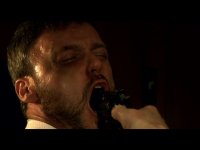
From the film "Bullet"

Lake Films

Veteran
A few scenes from a film I shot last weekend. The scene is a very intense russian roulette game to pay back a 40k debt. With every pull of the trigger, 10k comes off of the debt...
 

Attachments

  • Untitled5-1 00114915.jpg
    Untitled5-1 00114915.jpg
    22.7 KB · Views: 0
  • Untitled1 00523426.jpg
    Untitled1 00523426.jpg
    17.7 KB · Views: 0
  • Untitled2 00034516.jpg
    Untitled2 00034516.jpg
    16.9 KB · Views: 0
  • Untitled 00460113.jpg
    Untitled 00460113.jpg
    20.3 KB · Views: 0
:kali:
A few scenes from a film I shot last weekend. The scene is a very intense russian roulette game to pay back a 40k debt. With every pull of the trigger, 10k comes off of the debt...


Wow! Great footage and it looks like it will be something to look forward too. I love this site because so far I've been helped out well
 
They're not that dark on my editing monitor. For some reason when I save them out of FCP as a JPEG & upload them they get a lot darker. I LOVE close-ups and especially an intense story with this subject matter, we need to see & feel the emotion so it called for it.
 
Of course; a philisophical difference Lake. I too used to employ mad close ups and then discovered the wider shots; really opens up the frame and lets the viewer into the world.

.02

Make sure your monitor is calibrated ! They should not be this dark!

I did a 2 second Auto Level and Conrast on it

mankyyv4.jpg
 
I personally will stick with the CU's, need to create a feeling of tension. By the way, there are WS, OVR Shoulder, Med shots.

Your 2 second Level looks ok, a little hot on the actor on the right, no?

I'm still not color corrected yet, these were just a test so I will watch the darkness, thanks.

PS: Which monitor are you speaking about? Computer or Editing?
 
I realize the guy on right is hot; this was a literal auto adjustment for example

What I am saying is, my monitor is calibrated. And they are so dark they're almost unreadable.

(Just trying to help) :p

If they look fine on your Editing Monitor but come out dark everywhere else, then your editing monitor appears to be to bright.
 
Thanks. I'm already experimenting with bringing up the white's without blowing out the highlights. I'm not the best at calibrating a monitor, I have t brush up my skills. Thanks for the help.

Any suggestions on a step by step process for calibrating a monitor? Or a site?
 
Back
Top