Help, my chroma key has jagged edges!!!!

Phil Maker

Well-known member
I shot the background in 720p 24pn, the talent in front of the green screen in 1080i 24pA, brought it into FCP through log and transfer, stacked the clips, sent green screen clip to motion, pulled the key, saved, went back to FCP, rendered, played back and the edges are jagged. What could be the cause of this??

I'm using a MacBook Pro with Final Cut Studio 2.

Also, when I'm in Motion pulling the key a strange thing is happening. My noise removal, matte density and spill suppression slide controls will each only move a little to the right or left. I'm not getting the full range of motion these controls offer. I don't know if this is normal or not?

I've tried everything to get rid of the jagged edges, researched and tried again. I'm out of ideas.
 
A couple issues. Almost all flavors of digital video compress the color channels, typically by half, so you have half as much resolution to pull your key with, which causes the jaggies. Also, the keyer in Motion isn't all that great unless you have an uncompressed 4:4:4 source. The Chroma Keyer filter in Final Cut Pro does a much better job with DV but you have to play with it. After selecting the green in your clip with the eyedropper, go into the filter tab and you'll see three strips. The top one is the color selector. Widen the selection here to cover most of the green area. The next strip is saturation and the bottom strip is luma. Widen both these selections just until your green disappears and no more. Adjust thin edges to get rid of any lingering green around the subject, and adjust soften edges to get rid of the jaggies. If there still is some green fringe around the talent, you can adjust the enhance slider, but too much and the edges go purple. It should end up looking something like this, although depending on your footage the slider positions will vary--

key.jpg
 
Last edited:
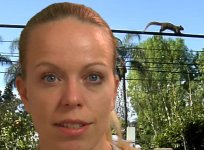
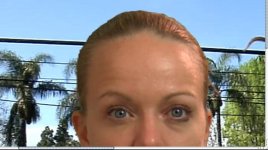
Here's a couple frame grabs. I was told going through Motion 3 was much better than just FCP.
 

Attachments

  • Green Screen Jagged.jpg
    Green Screen Jagged.jpg
    340.4 KB · Views: 0
  • Green Screen Test .jpg
    Green Screen Test .jpg
    217.8 KB · Views: 0
Here's a couple frame grabs. I was told going through Motion 3 was much better than just FCP.

It's not, unless you have an uncompressed source like the RED, or telecined film. Just try the Chroma Keyer plug in in FCP (not Blue and Greenscreen). It looks like you have a pretty good key, you just need something that can fine tune those edges.
 
Thanks Batutta I will try it tonight. Once I do that in FCP will I be able to blow it up to the big screen without the jaggies showing? Also, will DVmatte pro do a better job for me than FCP? By the way Batutta I saw your little future battle movie and it was pretty sweet.
 
Thanks Batutta I will try it tonight. Once I do that in FCP will I be able to blow it up to the big screen without the jaggies showing? Also, will DVmatte pro do a better job for me than FCP? By the way Batutta I saw your little future battle movie and it was pretty sweet.

DVMatte Pro is better, I've tried the demo, but if you've shot correctly you shouldn't really need it. People always expect with green screen that you should just hit a button and make it disappear but it never really works that way. Personally, I think green screen is a cumbersome, limiting technique and I wish their was an easier more accurate way. There are people working on cameras that record depth channel info simultaneously with the imag.e. Once they get that working I'll be thrilled.
 
Also, if you're still using FCP (didnt read the whole thread) Try using Garbage Matte and matte out as much as you can, it makes it a WHOLE lot easier.
 
Ok, I tried what Battuta recommended and got good results with no jaggies. Still a little green spill, but better than what I got in Motion. Hmmm...
 
dvmatte pro is the jam. they make a cheap version called dvmatte blast that works really well too. you just lose some of the cool features like advanced spill suppression and light wrap. pretty much all of the standard keyers included with any software are kinda crappy unless you are dealing with 4:4:4. the exception to this rule is keylight which now comes free with after effects. it is really nice. primatte is another cool one.
 
Ok, I downloaded the trial version of dvMatte Blast and I am blown away! In 2 clicks I had a better key than I did after 2 days of trying to pull a good key in both FCP and Motion 3. I can not believe how amazing this plug in works! And it's only $99. I recommend dvMatte Blast to anyone who wants to pull a perfect key in 2 clicks or less. WOW! WOW! WOW!
 
oh man, I'm clamoring for a copy of this now. I'm gonna have to invest in this next paycheck. Thanks for the unintended tip!
 
Back
Top