Purple fringes in tele/zooming in! What is this??

daktulus

Well-known member
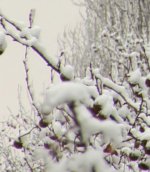
On wide angle shots I see nothing unusual, but in tele (zooming in) I see in pictures with a lot of contrast instead of black, purple edges. Purple fringes!
But only in the lower left corner.


What is wrong with the lens?

Can this be fixed?

I bought the camera 2 weeks ago from an authorized dealer, what should I do??
 
Sounds like normal chromatic aberration to me. Who did you buy the camera from? Post some stills highlighting your issue and we can tell you if they look like they should.

Best,

Dan
 
Authorized dealer in Germany.

Yes it is probably chromatic aberration, but I cant believe it is that bad.
There seem to be no aberrations in wide shots.

Look at the twig in the lower left corner. It is almost completely purple!

This looks so videoish/really crappy on screen.

Please tell me not every HVX looks like this in tele.

What can I do??
 

Attachments

  • chromatic.jpg
    chromatic.jpg
    193.6 KB · Views: 0
  • chromatic2.jpg
    chromatic2.jpg
    185 KB · Views: 0
that is what you get with a 5000 dollar camera.
Generally, once you zoom in a little, most of this disappears. However at full wide you are bound to get chromatic aberration, especially fine lines, diagonals, and hi contrast areas.
 
No it´s the other way: zooming in (tele) I get chromatic aberrations, in wide shots (zooming out) there is no problem.
Do you have the same aberrations on your HVX?

BTW: I cant understand how people can say this is normal for a 5000$ camera (except if you are the dealer who took the money and ran)
I have many other cameras, one of them the Canon XM1 which was much cheaper and has no chromatic aberrations at all.
What is this "for 5000$ you only get crap" dealer talk anyway? It is not constructive at all.

Do you really have aberrations this bad? Have you ever tested it?

Can this theoretically be fixed, or is the only possibility to exchange the camera?
 
Watch your zebras and make sure you're not overexposing. Purple fringing on high contrast areas, especially with the cine-gammas, is a known issue. If you don't overexpose it should disappear.
 
Why does this purple effect only appear in the lower left corner?
If it was an exposure problem, why is it not all over the picture?

What do you think, Barry: is the aberration on my camera worse than on other HVX?
Do I have a bad lense?
 
I didn't realize that was a full-frame extraction. If it only happened on the lower left I'd suspect a lens aberration, but it also happens in the right side of the frame. It might be C.A., it might be flare, but if it's C.A. it's not any worse than I've seen from all the HD cameras, and quite a bit milder than what I've seen from JVC HD100s and Canon XHA1s. I'm not telling you to be happy about it, but I'm saying you're in the same boat as everyone else in this price bracket. I've seen comparable or worse aberration from the $9,000 XLH1 and the $6700 EX1 as well.

Have you looked at my "Chromatic Aberration" article? There's a few examples in there from lower-cost HD camcorders that'll give you some perspective on what's going on out there. Look at the goose from the HD100, or the church building from the XHA1, and you'll see that comparatively your lens is showing *minimal* aberrations.
 
Great article, thanks.

I know the C.A. of the JVC HD100 is worse, this is the reason why I decided to buy the HVX.
But I never saw any C.A. on a HVX that bad. Your answer is very diplomatic, it mentions the Canons and JVCs, but nothing about the average HVX and C.A.


Is my HVX´ C.A. worse than your HVX´ C.A.?

(If you like I can post some more pictures of the C.A.s of my HVX)


I´m asking, because my dealer might just be able to exchange this brandnew HVX for another one (I guess the only way to fix C.A. is to exchange the lense)
 
It's normal CA. Look at the top right corner, same effect (slightly less noticable, but it's still there). CA should be worst on the outside edges of the frame, in the middle things should pretty much line up. For this reason, it appears to be worse with vertical lines than horizontal ones (since the cameras sensor isn't square).
It looks like any of my shots where I'm 4mm-6mm or really long tele and shooting dark subjects against the sky. Gamma tweaks help, but I usually don't see it in the viewfinder, just the monitor if I'm looking for it.
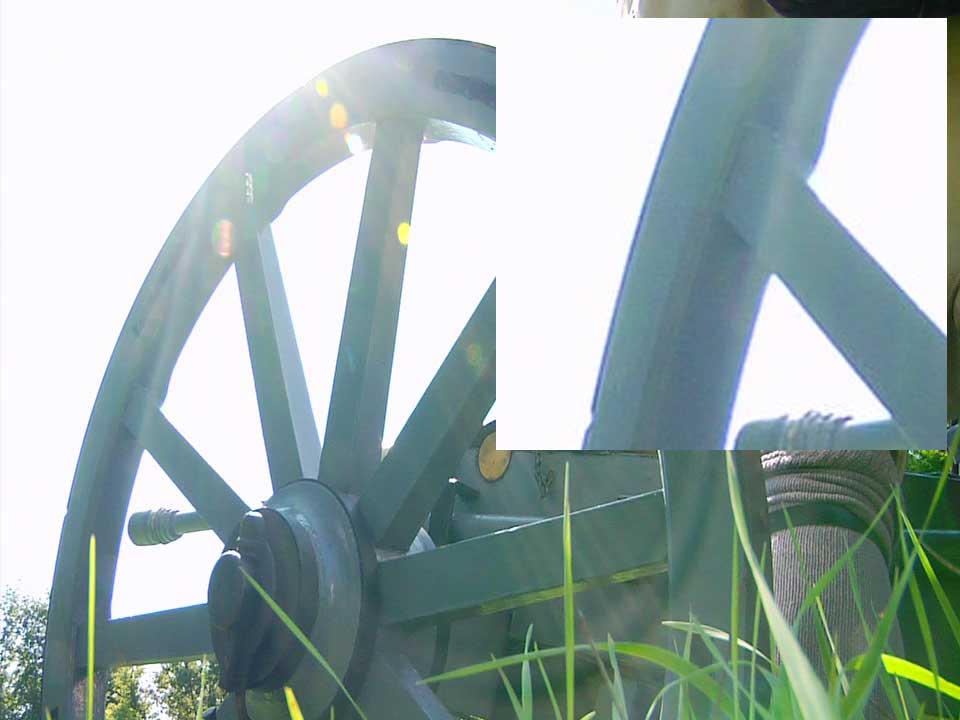
ca1.jpg


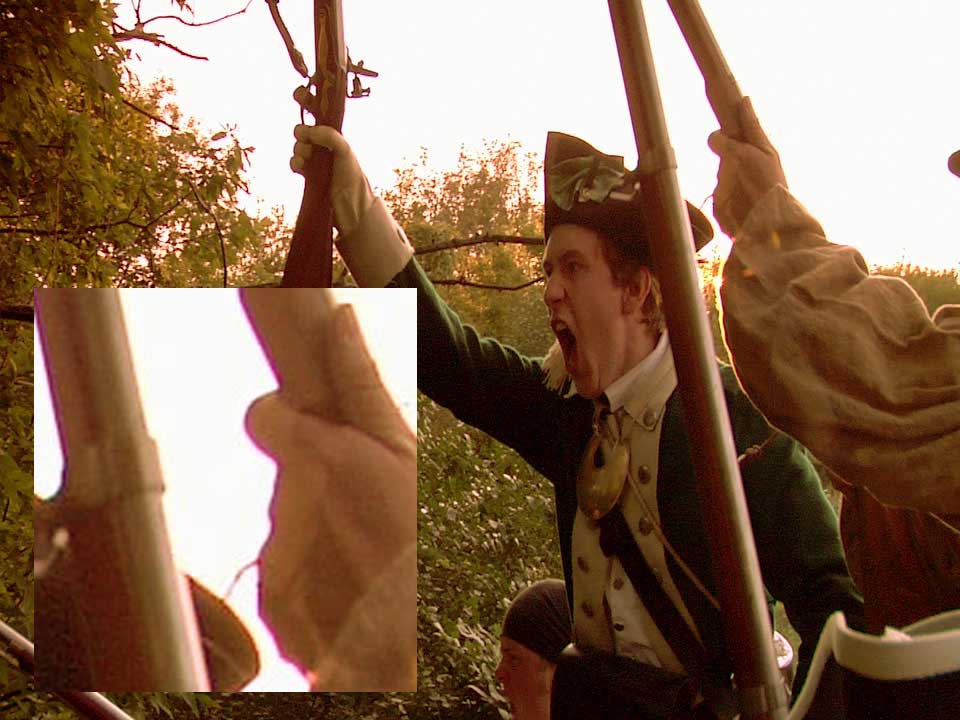
ca2.jpg


These were shot 720p, bottom one was cc'ed, but I left them at DVCProHD resolution (except for the inset, obviously).
 
Those aren't C.A. though, professor. That's the overexposure purple fringe.

daktalus, I think your footage looks about average for an HVX or Z1, and way way better than an average HD100 or XHA1.
 
That's what I was thinking, along the Lines of CardMavericks findings with the green channel clipping first, and his heavy magenta filters to compensate.
 
So why is it worse at the edges of the frame than in the middle?

Can shooting with a megenta filter reduce the issue?
 
No filter can do anything about chromatic aberration. (?)

Is this only in a certain zoom position?


In my case it is really bad zooming in (full tele). And it is only in the lower left corner.

It is much worse than your fringes. In the lower left corner all black is purple and greenish on the other side.
It is in every full zoom picture, no matter what the contrast is.


I bought the camera only 2 weeks ago in Germany.
What can I do legally?
 
scroll to the bottom of the page link. There you'll see cardmaverick discussing magenta/purple highlights when overexposure happens. v.interesting stuff.

yes, it's in relationship to the andromeda, but the theory is sound.
 
Holy, Schmoley...

OK, going back one page (the thread has been added to, so everything got shuttled down a page), after scrolling to the bottom, you get this from cardmaverick:

--------------------------------------------------------------

HAHAHAHAHA!

Good catch, thanks.

On the topic of using the high end, the reason why you never get to use it with the stock DVX and HVX cameras isn't because of highlight handling. It's because of magenta highlights. There is a difference, I'll explain...

This is another thing thats sort of hard to visualize, but imagine three gray scales, one for each color. A perfect balance would have each gray scale on top of the other, but that typically creates a green looking image in our everyday world (apparently there is more "green content" in your typical scene than any other color... kinda fascinating, also adds one more reason to the big list of why crappy green fluorescent lights are bad for video and film use). Because there is so much green, you have to jerk the red and blue channels around to create some kind of color balance, how much you move them around is also determined by the color temperature of your lighting. By the time you have created a "proper" balance, you will quickly see that all three gray scales no longer line up completely. The areas where all three channels are on top of each other look fine, but the extreme edges, particularly the highlights, end up having a color cast. Since green is the channel that always stays constant, you end up moving the red and blue channels around, and the upper highlights only contain red and blue, and in the world of additive color, that equals magenta....

Most people don't want magenta highlights, so the manufacturers make sure you never see it, and its certainly at the expense of potentially greater performance in the hands of a pro who really understands whats going on. Just check out the Reel Stream dynamic range chart, you can clearly see that most the additional top end is various shades of magenta.

This probably begs the question of why its useful to capture that stuff anyways, well... You still have two full channels worth of detail, so you can actually use secondary correction on those highlights to make them usable again, Red One does this actually, and its been mentioned several times. I think the code is called DRX or something to that effect. The downside to correcting it in post is you loose out on potentially greater dynamic range and low noise performance. I increase both by using my partial magenta filtering technique. I basically force the blue and red channels backwards, making them "line up" more evenly on top of the green channel. This lowers noise in the blue and red channels (because I'm lowering their individual gain settings), and it also minimizes my magenta colored highlights even more, almost to the point of non existence. I also gain more usable "textured" highlight range.

OH... and one more thing....

Highlight clipping creates fixed pattern noise, which is most noticeable in the green channel, as it tends to fully expose before the red and blue channels (remember, more green content, thus it blows out faster, even if the red and blue channels are more sensitive gain wise, there is less blue and red content, complex I know...). Is this an issue?? Well, sorta, but not really. Its easily processed out of the image if it ever occurs, and I have my record LUT setup to cut off just prior to green clipping anyways, and again, its one more thing the manufacturer doesn't want the consumer to see.

This little video illustrates what I'm talking about, watch as this blown out shot of some cloth suddenly fills with textural detail, and turns green. All I'm doing is going from a manual white balance, to a custom "unity balance" (all three channels balanced evenly). I shot this under 3200K light, no optical correction filters were used. Also note that this was shot on DV tape not the Andromeda....

http://www.chrisnuzzaco.com/special_uploads/dvrange.mov

I won't dive too deep into this next point but, in case some are wondering, some cameras are natively balanced for lower or higher color temperatures, this also affects overall performance with regards to signal noise and dynamic range. Its a bit deep, but this should put it in perspective...

The DVX is balanced for about 12,000 K (YIKES!), the Red One (according to the Red operation manual), is balanced for 5000 K. The difference certainly shows.

SHEW!

Thanks for sticking in there! I know that was really super long winded, but I feel this is probably the least understood camera out there, so I sorta feel a need to step in and explain whats really going on with it. It really is a mini Viper Filmstream camera. This is also why I DON'T recommend the Andromeda to less experienced DPs. I was fairly well versed technically (with regards to how cameras work) when I got the system, and it took me a good 3 months to win the above knowledge and really make the Andromeda system scream. You simply don't find that stuff in film textbooks, at least I didn't...

NOTE:

I'm just starting to test the magenta filter "trick" while shooting to DV... Not ready to post too much on it yet, but it might take a while, as I now have to deal with that pesky DSP....

--------------------------------------------------------------
 
Back
Top