Dialog awash in the sound of crickets

exacerbatus

New member
Hey Gang,

Long time lurker, first time poster.

Unfortunately, I wasn't on the set for production sound duties through most of this indie feature I am now working on. I just received this beast for post work and am already running into problems with one scene I can't seem to figure out. I am to do dialog cleanup, sweetening, fx/foley, original score, a stereo and a 5.1 mix. I am using DP5 and Peak 5 (so far).

Here's where I need some guidance; The scene in question is a car interior with open windows at night. The crickets are incredibly loud. At times louder than some dialog. I've tried a downward expander and gates to no avail. I have also tried some fader automation and planned on looping cricket tone underneath.

Am I going about this the right way? Can someone suggest eq possibilities for the very nasal sound of the male actor. This is my second job and first feature so I'm still learning on the job. As I always tell my filmmaking friends, "You get what you pay for" (which in my case is nothing). :D

I have a part of the scene for your consideration.

http://www.bodman.com/audio/scene71.aif

IIRC, it was an AT omni lav into a Mixpre.

Thanks in advance for any suggestions.

Ken
 
Honestly, the tone of the male's voice was much more distracting to me than the crickets. You might be able to make the crickets a little less distracting if you can make the loud chirps stay rhythmically consistent. As for EQing his voice, on a parametric EQ set your bandwidth to the narrowest setting, boost the gain and sweep the frequency until you find the harshest part of his voice. Then bring down the gain at that frequency. That might help somewhat. Use your ears as to what sounds best.
 
Thanks, Brad. Will do.

Yes, his voice almost sounds out of phase to me. I joked and referred to his voice as kazoo-like before... he didn't take it too well. :laugh:
 
His voice's peak is somewhere around 2K. Like Brad said, sweep a narrow band parametric boosted 10-15 db or so until you make the peakiness as bad as possible, then cut that frequency and increase the bandwidth until you get the best compromise between tone improvement and undesired effected-sounding-ness. Cutting that frequency will likely reduce the crickets sounds as well, since they occupy some of the same frequency real estate.

The next problem is the girl's voice, although maybe you have her on another lav. If not you'll probably want to dig her out, which will make the crickets worse of course.

Regarding the crickets themselves, try the "Raid" plug-in from the Camping Suite collection by bugzapperplugins.com.

Just kiddin : )

Seriously, you *might* be able to reduce them somewhat by using a noise reduction plug-in like Waves X-Noise (should run in DP and Peak IIRC) or BIAS Soundsoap Pro (which will definitely run in Peak). If you've never used one of these, you run a little portion of the noise into the plugin, which analyzes it, then you adjust the settings to digitally cancel just the noise's "fingerprint" while the rest of the sound is (relatively) untouched.

These kinds of plugins (I've got Soundsoap Pro and Digidesign's DINR, and have used X-Noise) are most effective with steady-state noises like fans, hiss, hum and so on, and are least effective with tone-shifting and "event-based" noises like airplane flybys and such, but the cricket noise may be close enough to steady for them to be at least worthwhile.

Best of luck to you.
 
Another program that you might want to try is Izotope RX from Izotope software. It's actually not a plug-in yet, but it does a fairly good job at noise reduction. The best part is that it also has a spectral repair option so that you might be able to go in and take out the crickets and only the crickets. It's also only $350.

http://izotope.com/products/audio/rx/
 
I would use auditions multi resolution tool for this..

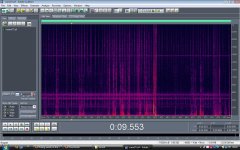
i'll show you an example.. i've loaded your sound into it, looks like this.

mr1.jpg

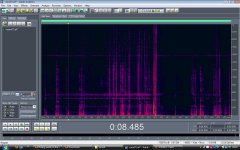
then i just took a 1.5 second sample of the cricket atmos and run a medium noise reduction. now it looks like this.

mr2.jpg

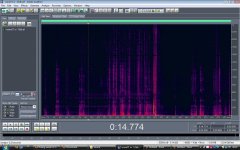
then attentuate the strips of constant noise, I did this by 12dB, but be careful cos two of the three noise bands are share vocal frequencies. Then it looks like this.

mr3.jpg

I don't know how to upload sound clips, but he still sound like he has a peg on his nose, but not much worse than before.. and the crickets have gone.

its a pretty rough way to do it, but its quick and cheap. (1.quick, 2.cheap & 3.good.. you can only have two of these) ;)
 

Attachments

  • mr1.jpg
    mr1.jpg
    188.9 KB · Views: 0
  • mr2.jpg
    mr2.jpg
    162.2 KB · Views: 0
  • mr3.jpg
    mr3.jpg
    160.8 KB · Views: 0
If you want to upload a before and after clip because you're saying that you eliminated the crickets then this is a big deal and we need to hear it... PM me and I'll host this file for you.
 
Wow, thanks for all the great suggestions guys.

I will try soundsoap now. I'd like to check out audition if it was that effective, Scooby. I have about six or so more night ext. scenes that are in need of the same attention. And I am a definitely a big fan of quick and cheap.
 
I used this program all the time for things like this, although this is really loud atmos here.

a confession -
I did this real quick on my laptop speakers last night, and wrote that post without listening on a proper monitor. Now I am listening on am proper monitor and its not the great claim you can be forgiven for thinking I made. ;0)

The louder the noise, the more digital "reverb" creeps in with auditions noise reduction tool, although there are plenty of parameters to play with to tweek results. The best I think you coulds hope for here is getting it to where the lines only, are usable.


This time I attenuated the bands first, so the NR tool has less to think about, and reduced the FFT size to 1024, and the result is a slightly reverby voice (hers is too quiet to be usable but i'm assuming this is his single) that could POSSIBLY be used depending on your chosen atmos for the scene.. choose one that might disguise it best, and place lines only with fades at end.

Doing this heavily just gives you another problem in a way, becuase there is no cure for reverb. Its about finding a balance to get someing salvagable.

i'll email matt the file. don't hold your breath though :0) its not a perfect solution or anything.
 
On the basis of my rock solid experiences with Izotope Ozone, I got RX and its already saved my butt with the clipping repair module. This is 10-15 minutes of work with just the denoiser module to remove the crickets. The cricket spectral profile changes throughout the clip, so normally I would have cut it into sections and optimized processing individually, but this is quick and dirty, so I processed the entire clip the same way. Consequently, the dialogue gets more processing artifacts, but I just wanted to give you an idea of what RX is capable of. Taking more time and only attenuating the crickets would leave the dialogue in a much more natural state.

http://www.mediafire.com/?2ybx5molf99
 
Last edited:
On the basis of my rock solid experiences with Izotope Ozone, I got RX and it's already saved my butt with the clipping repair module. This is 10-15 minutes of work with just the denoiser module to remove the crickets. The cricket spectral profile changes throughout the clip, so normally I would have cut it into sections and optimized processing individually, but this is quick and dirty, so I processed the entire clip the same way. Consequently, the dialogue gets more processing artifacts, but I just wanted to give you an idea of what RX is capable of. Taking more time and only attenuating the crickets would leave the dialogue in a much more natural state.

http://www.mediafire.com/?2ybx5molf99

ooo - nice.

i'll look into that program!
 
Hey Gang,

Long time lurker, first time poster.

Unfortunately, I wasn't on the set for production sound duties through most of this indie feature I am now working on. I just received this beast for post work and am already running into problems with one scene I can't seem to figure out. I am to do dialog cleanup, sweetening, fx/foley, original score, a stereo and a 5.1 mix. I am using DP5 and Peak 5 (so far).
Ken

There's noticeable phasing on his voice; like it's his voice in both mics. Sounds like you're working with a mixed track. Do you have their voices split? You probably find the crickets aren't so bad. I have no problem with his voice as an instrument.

Regards,

Ty Ford
 
It's pretty small--less than 10 MB. I don't remember the install as being long or otherwise unusual. If you buy the standalone program now, the plugin versions are free when they come out next year. They had an introductory price of $199 which was a killer deal, but even at $349, I think it's worth it.
 
I bought soundsoap and I'm not impressed with it.

I have RX, BNR (digi) and Sound Soap2.
Sound Soap 2 (the Le version) is close to BNR with fewer controls. Both BNR and SS can get very artifacty quick if used heavily. Both can do a pretty good job on the right material. SS big plus is that it's simple. If you have some light tape hiss or something you want to get rid of it's pretty effective. One other thing it works OK for is distortion cleanup. The pop/crackle slider if pushed way up can make some totally useless digitally distorted tracks usable. It was the only tool that worked at all until RX came along. RX can make the same tracks very usable. There is only so much that can be done but RX did manage to put a high sheen on some turds.
RX is the best of the bunch in under multi $K restoration apps. There used to be some nice ones that were PC only (Diamond Cut comes to mind) but being on the Mac now I have lost track of what's available on the PC.

THe down side to RX is that it's stand alone and while they plan on adding plug in versions it's unclear how much will be available as a plugin. For your situation that might not be a big deal?

None of the broad band noise reduction apps can remove more than 5-6 dB in a single pass with out creating artifacts (reverb/ roboty/ bubbly under water kinds of sounds). THe trick is to do a number of lighter passes when you need to remove a lot. But unlike SiFi movies you can't take garbage and get pristine tracks. So it's always the "is it better or is it just different" question.
 
You guys rock! I did try SS last night and wasn't very thrilled. I may have to take Noiz's suggestion of a few lighter passes and hopefully get something more useful.

Ty, AFAIK, they used only one poorly placed omni lav on the dash. I've inverted phase and still hear that phasing issue. What they did was go into #1 on the DVX. I received a stereo file with only info on the L track. I used Peak's stereo to mono conversion panning it hard left.

Unfortunately I couldn't be there to help out during filming. The DP was listening to the DVX and a PA was listening to the mixpre. I'm surprised they weren't bowled over by the crix at the time.

This was only my first encounter with an ext night scene so far. I have since seen about a half dozen or more scenes like this to come. You've got to love rural summer nights in PA. Fortunately, this is a horror film (sort of) that will have lots of underscore to mask whatever 'sound nightmares' are in the waiting for me.

This turned out to be a good referendum on NR plugs though. :)
 
I find I can get very good results on many things with Digidesign DINR but the smoothing control generally has to be way up to eliminate artifacts. Like about 97% or so. SoundsoapPro works well too, and the ability to fine tune the amount band by band frequency-wise is a big plus. It runs very very poorly in Pro Tools under RTAS for some reason though. Works fine in Peak.
 
Back
Top