DC
Cinematographiliac
SATA-I = 150MBps
SATA-II = 300MBps
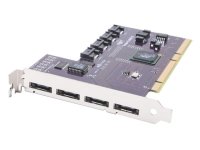
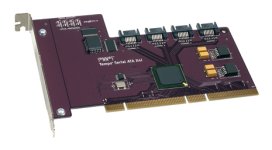
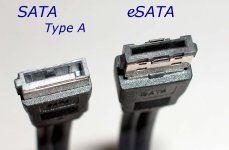
eSATA, a fairly new external connection method for the SATA specification, is more robust and better grounded than regular (internal) SATA Type A. These connectors are the choice for external SATA connected storage. Be aware though, confusion is also going to be common as the eSATA connectors are VERY similar in appearance to the current SATA Type A connectors more commonly being used.
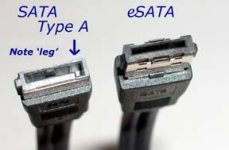
For a closer look, click here:
Recently, I decided to buy a large external hard drive to do some DVCProHD editing on my PC laptop with Avid. My laptop is a single core Pentium 4 running at 3.6Ghz, ATI Radeon x600 graphics, and 2GB RAM.
Although I was torn between which type of external hard drive to get, I knew I wanted something faster and more robust than Firewire400 (IEEE-1394a) so I had my sights set on Firewire800 (IEEE-1394b). Then I began to think about Firewire800 vs. eSATA-150 vs. eSATA-300. And then I began to think about the throughput limitations of my PCMCIA Cardbus in my laptop. My transfer speeds could get bottlenecked right there.
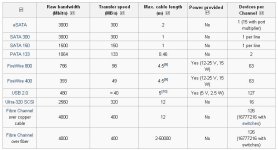
I posted this chart above because I thought some people might find it useful. According to the chart, it seems that even SATA-150 is actually faster than Firewire800. But I wonder what the real-world experience is?
In the end, I purchased a 750GB eSATA hard drive and an eSATA-150 card for my laptop. I'm hoping this will allow me to edit my HD footage without any hiccups, though I can imagine multiple streams may cause it to choke a bit. I'll post my personal experience with this later.
If anyone has any feedback on any of this, please feel free to post.
SATA-II = 300MBps
eSATA, a fairly new external connection method for the SATA specification, is more robust and better grounded than regular (internal) SATA Type A. These connectors are the choice for external SATA connected storage. Be aware though, confusion is also going to be common as the eSATA connectors are VERY similar in appearance to the current SATA Type A connectors more commonly being used.
For a closer look, click here:
Recently, I decided to buy a large external hard drive to do some DVCProHD editing on my PC laptop with Avid. My laptop is a single core Pentium 4 running at 3.6Ghz, ATI Radeon x600 graphics, and 2GB RAM.
Although I was torn between which type of external hard drive to get, I knew I wanted something faster and more robust than Firewire400 (IEEE-1394a) so I had my sights set on Firewire800 (IEEE-1394b). Then I began to think about Firewire800 vs. eSATA-150 vs. eSATA-300. And then I began to think about the throughput limitations of my PCMCIA Cardbus in my laptop. My transfer speeds could get bottlenecked right there.
I posted this chart above because I thought some people might find it useful. According to the chart, it seems that even SATA-150 is actually faster than Firewire800. But I wonder what the real-world experience is?
In the end, I purchased a 750GB eSATA hard drive and an eSATA-150 card for my laptop. I'm hoping this will allow me to edit my HD footage without any hiccups, though I can imagine multiple streams may cause it to choke a bit. I'll post my personal experience with this later.
If anyone has any feedback on any of this, please feel free to post.
Last edited: