2nd Night out in Denver with the 2 mini-Vari's

SurJones

Veteran
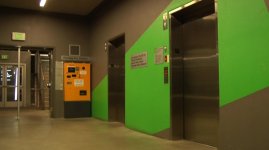
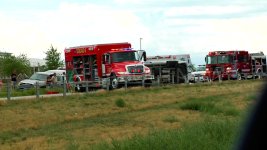
The first night we wanted to bust out our camera mounts. My buddy just bought a sticky-pod and wanted to see how it does. We shot some cool locations, of course using the FRHack, and the time was like 11pm-12am.

The camera mounts held up well, StickyPod was decent. I know the guy and he lives a few miles from me, but I still trust a bulkier unit. Which also allows for more felxability. Agian not knocking the StickyPod. It's great for tight spaces.

But anyways, I threw down a well known colorado track and drop my clips on, nothing creative, except the doing a FRHack with 2 camera angles, and 2 strangers standing still in the frame. I think it came out interesting.

So here is the Footage. I would love to get some feedback.
 
Last edited:
Wicked stuff, time lapse for the win. I'm gonna give the FR Hack a whirl today. I've herd 0 bad news about it. What shutter should I use for a really stretched out light streaking effect?
 
I use 350d, I have shot 180d up to 350 by like every 20 or so, and I like to over expose mine a little, it is my style and I guess my signature, along w/ my 1 reverse shot. Keep your zebras at 80%. And set your exposure.

The song is called Colorado by (oh crap I forgot) I have house in Denver, I am from Cali. :) I'll get back to you with the artist later.
 
Last edited:
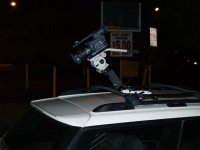
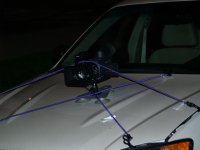
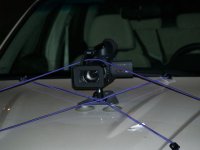
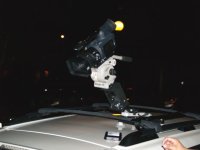
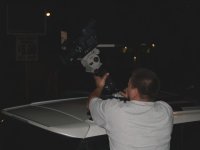
I got some PM's about the carmount, Also if anyone else has any feedback I would love to hear. Thanks for the people who have commented this far.

Here are some still my friend and I's carmount set up.

thanks for the comments.
 

Attachments

  • P8311358.jpg
    P8311358.jpg
    28 KB · Views: 0
  • P8311357.jpg
    P8311357.jpg
    22.2 KB · Views: 0
  • P8311360.jpg
    P8311360.jpg
    33.2 KB · Views: 0
  • P8311363.jpg
    P8311363.jpg
    33.3 KB · Views: 0
  • P8311366.jpg
    P8311366.jpg
    33.4 KB · Views: 0
Nice P. I like the motion one a lot... pretty darn clean key with cam for sure. I like the top piece too... you are becoming a pro with the city timelapses. I can't wait to do some in Scotland.. going over in about 8 weeks.. YIPPEE


looks cool bro
 
So Monday when I was in Wyoming, I caught this on I25 driving down to Colorado. Pretty intresting.
 

Attachments

  • Picture 1.jpg
    Picture 1.jpg
    139.1 KB · Views: 0
Thanks Justyn for commenting, and checking it out. Yea I have fun in life. I just like hanging out and shooting with friends for fun.


Andrew: iTunes folder says, "The Three Taverns Project - A Colorado Compilation"
 
I finally got my stickipod director back. Gonna try some timelapse stuff with it from the boat.. should be pretty cool. Got any tips and where can I download the hack info again.. still haven't done it...
 
well I say as for tips, go out and go crazy. I mean this is the stuff we do for fun. It is like we are profesional by day and kids at night with out old 8mm cameras goofing at in the forest with flashlights. Whatever you do you'll lke it. Watch your focus, and remember it has been done before, so get something or an angle we hvae not seen, and you'll be ahead of the game. LOL

I know someone did a boat one, but I think he was on a HUGE (like Carnival size) boat and it looked cool.

Also make sure you post some footy when you are done. If I download I will comment. I dont troll :)
 
Originally Posted by Barry_Green
Here's the procedure:

1) Get a scene file text file on an SD card, usually by going into menu 8, CARD FUNCTIONS, and saving scene files to your SD card.

2) Open the scene file text file in the PRIVATE\MEIGROUP\PAVCN\SBG\P2SD directory, called SCENE1.TXT (or scene2.txt, scene3.txt, or scene4.txt) using a text editor like Windows Notepad

3) Look for the next-to-last item in the scene file. Here's what a sample scene file text file looks like:
00005000: 8 ; DETAIL LEVEL: 0
00005001: 8 ; V DETAIL LEVEL: 0
00005002: 8 ; DETAIL CORING : 0
00005003: 8 ; CHROMA LEVEL: 0
00005004: 8 ; CHROMA PHASE: 0
00005005: 8 ; COLOR TEMP: 0
00005006: 16 ; MASTER PED: 0
00005007: 8 ; A.IRIS LEVEL: 0
00005008: 1 ; NEWS GAMMA: OFF
00005009: 0 ; GAMMA : HD NORM
0000500A: 0 ; KNEE: AUTO
0000500B: 0 ; MATRIX: NORM
0000500C: 1 ; SKIN TONE DTL : OFF
0000500D: 0 ; V DETAIL FREQ : THIN
0000500E: 0 ; OPERATION TYPE: VIDEO CAM
0000500F: 0 ; FRAME RATE: DEFAULT
00005010: BE026801 ; SYNCRO SCAN :

That next-to-last item is:
0000500F: 0 ; FRAME RATE: DEFAULT

You can ignore everything after the semicolon; the semicolon indicates that it's a "comment" and will have no bearing on anything else (so, in this example, the part that says "; FRAME RATE: DEFAULT " is useless, it affects nothing, it's just there for human-readable description).

So the relevant part is:
0000500F: 0

The only thing you would want to change is that last number (in this case, "0"). To get different frame rates, use one of the following numbers:

0 = DEFAULT
1 = 2fps
2 = 3fps
3 =4fps
4 = 6fps
5 = 8fps
6 = 10fps
7 = 12fps
8 = 14fps
9 = 16fps
10 = 18fps
11 = 20fps
12 = 22fps
13 = 23fps
14 = 24fps
16 = 26fps
17 = 27fps
18 = 28fps
19 = 30fps
20 = 32fps
21 = 34fps
22 = 36fps
23 = 38fps
24 = 40fps
25 = 42fps
26 = 44fps
27 = 46fps
28 = 48fps
29 = 50fps
30 = 52fps
32 = 54fps
33 = 56fps
34 = 58fps
35 = 60fps
36+ = repeat of sequence from 50fps to 60fps

So, for example, if you wanted to get a frame rate of 2 FPS, your modified line would look like this:
0000500F: 1 ; FRAME RATE: DEFAULT

And if you wanted 44 fps, it would look like this:
0000500F: 26 ; FRAME RATE: DEFAULT

(don't try higher than 35; I tried 36 and it set it to 50fps, 37 set it to 52, so I think it just repeats 50-60 for all fields set higher than 36)

4) Save your modified text file back onto your SD card

5) Put the SD card back in the camera, go to CARD FUNCTIONS, and read the scene files into the camera.

Now, when you go to the appropriate scene file, you'll see the new frame rate there. But be aware, the only way to assign these "nonstandard" frame rates is through the SD card. If you use the menu to try to change the frame rate, you'll lose it -- it'll immediately jump to 60, and then only allow the normal rates to be selected. You'd have to re-load the scene file from the SD card in order to re-establish your "nonstandard" frame rate.
.....
 
Back
Top