Im NEW :) And you will help me!!!

One thing i still dont understand is how can i make the background appear further away? Like i tried to make a shot similar to this one :
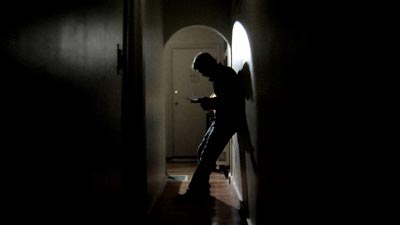
IllHall1.jpg


And couldn't get the right depth of the picture..

Also i really like this shot
Ill_CU1.jpg


But i could only get something simular after about 1 hour of trying and another hour of applying effects and filters.. as i understand what you shoot and what comes out after you edit and apply filters ect ect is very friggin different.

The shots taken from microfilmmaker.com/tipstrick/Issue19/m2_art2.html found it pretty useful! Lighting-wise..

To make a hallway look long you set the zoom function on the lens to go wide. To get the background blur with the stock lens requires a lot of staging, something you will not be able to do in the shooting situation you described.

Flood every location with light.

Like any camera, the HVX is a tool, but it can only capture the image presented to it. What you are describing and the advise given here will look more like TV than a movie. If you manage to do it really well it will look like decent TV.

I can give a state of the art Canon 1D Mark 3 to a newbie and he may manage a few good pictures. Ansel Adams could have created -Art- from a disposable box camera. It's not so much the tool, its how it is used.

I think the HVX-200 is overkill for what you want. I think you would be better off buying a couple of Canon HV20s to cover what you are trying to cover. I used one briefly and the picture was simply amazing.

Good luck...
 
Last edited:
Just a note about Edius: it does not officially support Vista, which is what the original poster is using.

There are folks using it on Vista, but I'm not sure what they had to do (if anything) to make it work -- maybe check the Compatibility tab in the Properties for Edius and make Vista pretend it's XP, who knows.

As far as Vegas is concerned, it's actually quite a nice package, and in combination with Raylight or Cineform will handle the HVX footage.
 
If I were in your shoes I would forget about the p2 workflow for the moment. I would aim to just get the project done. This means shooting "60i" on some dv tapes. When you are done hook a firewire cable to your HVX and "import" the footage into movie maker with the standard "NTSC" presets (only this one time). It won't be HD, and it wouldn't be all that cinematic, but at least it is the easiest route.
 
don't wait till the day of the party to learn how to upload the p2 cards,
it took me 3 days to figure out how to upload mine!

+
are you filming everything at YOUR
bday?

find a dp is my advice to you.
(think someone else advised this too)


plus the shoot will seem more like a birthday,
rather than you trying to figure out how to shoot your bday.

someone else is shooting, right???
 
someone else is shooting, right???

Yea, my dad... He works at panasonic, thats why i got suck a quick access to the cards ect ect..

Thanks for the great advice guys, im gonna go start practicing. And please stick around because i have a feeling i'll have much more questions in the process.
 
if you want film like depth of field, youre going to have to buy a 35mm adapter ($1000ish) and a collection of good lenses - a good comprehensive set of 4 will run you between $100 and $2000 each. then of course you'll have to learn to use that as well...

welcome to a whole new world ; )
 
Yea, my dad... He works at panasonic, thats why i got suck a quick access to the cards ect ect..

Thanks for the great advice guys, im gonna go start practicing. And please stick around because i have a feeling i'll have much more questions in the process.

Ah HA!!! The truth comes out!! Pana insiders are hoarding the cards and
Birthday Boy gets his! I demand to know who your father is,
what department he works for and
tell him it is my birthday and I want 4- 16 gig cards immediately!!!
 
If dad REALLY cared, he would have brought you home a Varicam for your b-day. Stomp your feet, slam the door to your room, pout, stick out your lower lip and scream I want a Varicam.
 
Heh yea we got a hdc27h in the garage but im kinda afraid of using it. I think i'll stick to HVX200 for now.

If you want i can ask if he can get some 16G cards for you guys... I heard that 32Gigs are gonna be out pretty soon as well.
 
Thank you very much for the post.
I found it bloody useful!
Just ordered 2 P2 16GB cards.. should be here tomorrow.
I actually already tried couple of things and found the F5 setting very to my liking...
For editing i tried Vegas 7. Dont really understand how it works so i guess im gonna pick up Avid Xpress tomorrow ( this worked out well when i tried editing something from my HXV100)

One thing i still dont understand is how can i make the background appear further away? Like i tried to make a shot similar to this one :
IllHall1.jpg


And couldn't get the right depth of the picture..

Also i really like this shot
Ill_CU1.jpg


But i could only get something simular after about 1 hour of trying and another hour of applying effects and filters.. as i understand what you shoot and what comes out after you edit and apply filters ect ect is very friggin different.

The shots taken from microfilmmaker.com/tipstrick/Issue19/m2_art2.html found it pretty useful! Lighting-wise..

FOr the first shot, like Bob Gruen suggested, shoot with a wide lens setting. Notice that Lighting is very important to achieve the look of that shot. Lighting helps to separate background and foreground, or subject/background

If you want shallow Depth of Field, you have to shoot with the camera zoomed in (telephoto), and shoot with the aperture as open as possible ( I believe its 1.8 or 2.0 on the HVX). If you are shooting outdoors, using the in Camera ND Filters might help you, and also increasing the shutter speed, but this brings down picture quality (not much). If you want an optimal look with Depht of Field in an outdoors, bright setting with the stock lens, you need to get some step down filters (attachable) . However, since you are shooting run and gun, or "event coverage", having the lens zoomed in will produce very shaky footage- that's a gamble you have to make.

Don't bother with a 35mm adapter yet. it needs lots of practice and it will not suit your particular shooting event. Buy it, but for future narrative projects.

If you manage to cope well with focus assist after days of practice, in a constantly focus changing situation, than you can shoot 720pn 24. But believe me when I say you'll be 80 percent of the time hunting for focus manualy, and all your framing goes out of the window. Nowadays I can manage, but in order to get to this phase I had to go trough at least a month of struggling...And I make a living with this ! :)

You can achieve a 24p look in post with 60p footage.

Do tell us how everything turned out!
 
Back
Top