Im NEW :) And you will help me!!!

Skr4tCH

Member
Heh... Hey guys, and gals.
I should right away excuse myself for such a thread name, just wanted to grab your attention.

Well I'm new here and new to the whole film-making deal.
I do however want to learn how to film. And would like you to help me achieve proper skills.
Here's the deal: I just got HVX200 and i have NO idea how to use it or how to do what with settings, if you would point me to some manuals that i need to read, i would be thankful.

What i want to create is a movie-like feeling...
I have my birthday in about 10 days and I'm making a quest (treasure hunt) for my guests.
What i want to do first, is film the preparation for the quest (movie like scenes) and then film how the guests will be solving the quest and make a dvd at the end and just give it out to guests..
ect. ect..

Question - What software should i buy for editing?
Question 2 - What settings do i use for the best movie-like feeling?
Question 3 - Are there any specific angles i should use while filming or settings?
 
1. Vista... im not a mac user...
2. Reading it.. but im abit short on time got 10 days to shoot/prepare
3. Well i would like to make it look as movie-like as possible. Thats why im asking about the angles. Maybe on location just preparing from which angels its better to shoot the reaction ect ect.
 
Angles are easy!

Shoot from the angle that shows what you want to see. eg if you want to see the face...shoot from the front.
 
other thing im really interested in is how to achieve the depth of the background.. as in make the hallway look longer..
 
If you think you are going to learn how to use the camera and become a film maker / editor in the next ten days, I'm afraid you are going to be in for a rough ride.
 
If you think you are going to learn how to use the camera and become a film maker / editor in the next ten days, I'm afraid you are going to be in for a rough ride.

Of course. I know .. kinda... what im getting myself into. Im not planning to become a film maker (although it would be nice) But i DO want to make a "WOW" "movie"
 
IT takes a lifetime and an incredible amount of work to make a wow movie. in 10 days of "im busy, lemme just get the basics", dont expect Kubrick like quality..

If its for your friends, i would suggest making the video full of inside jokes, and things that only they would get. this way it will be personal and funny, and they will most likely over look the first film mistakes....
 
ALSO start using your camera now and use the SEARCH feature in this wonderful forum - every question has been asked and answered (usually many times ) in this forum...
 
ALSO start using your camera now and use the SEARCH feature in this wonderful forum - every question has been asked and answered (usually many times ) in this forum...


Well.. thanks.
I'll be reading the forum now.. but still accepting any help :love4:
 
Since you're obviously doing okay financially maybe hire somone who knows the first thing about shooting and editing? Don't shoot the messenger, but the learning curve on the camera alone is a good 5 such projects to become "semi" proficient. And editing to someone who hasn't done it? If you decide to dump the gear in a month please post here. If you decide to go all out with the new hobby, don't let me discourage you I would understand all too well.
 
SInce you already bought the camera, you might as well get started. Here are some tips. Good for you to go for your dream!

Quick tips for your first shoot (General):

1- Buy a practical book on filmmaking- One that explains how to do things, Like the Guerrila Filmmakers Guide. Learn about some basic rules of shooting, like crossing the line, basic lighting, etc. This will take you a day.

2- After reading, Immediately start practicing. Try to come up with a quick narrative of 1 minute. Try to put everything together. Don't bother with good quality audio just yet. Use the internal mic.

2- Edit it in a PC or Mac. I would suggest FCP (that's what I use :), but Edius Broadcast is, from what I heard, excelent on the PC front.
Editing is just like connecting a puzzle. After this edit you'll probably know a bit more of what to shoot on your big day.


Things to Buy

On Camera Mic- This is fundamental. Use one input for the mic, and other for the internal one. Use the Internal mic audio only for reference. Good audio is half of a good product. Don't neglect the audio!

Editing Software compatible with P2- Edius, FCP, or Avid. Other softwares need third party components like cineform. I don't know how this works, but since I went for a natively supported software, I would suggest going the same route.

P2- Cards- If you only have 1 8gb, buy 2 more. You'll want to shoot in HD (That's what you bought your HD camera for!) But maybe, just maybe, SD for this first project might be safer for you... I would of course take the risk and go HD...But for someone unexperienced, its certainly a big risk.

PCMIA Capable Laptop for card dumping. You don't want to stop shooting your treasure hunt to dump the files to your PC.

HVX200 Tips

1- Shoot 720 60p. Why? Autofocus. You'll need some time to get used to how the HVX focuses, and you do not have enough to train yourself with the focus assist. HD is very focus sensitive, so go for autofocus in 60p. Its fast and reliable.

1b- Or shoot Mini-dv Ntsc (non Progressive). De-interlace in Post. In SD you'll have a lot less problems (p2 workflow, computer performance, recording times), and it will be a lot easier. Bad point will be... SD, mini-dv resolution. You can, of course, shoot dvcpro 50, but it will bring the P2 workflow barrier back.

2- Use cine V, or D (f5 or F6 on the scene dial). This is the trademark Panasonic Film look that everyone loves (ok, not everyone, but the majority).

3- Always check if the mic (audio) is turned on.

4- If you do decide to shoot progressive, be aware of quick pans and tilts.

5- If you use a tripod, turn OIS (optical image stabilizer) off.

6- Use OIS whenever Handheld.

7- Do not mess much with the scene files at this time. Do it after the birthday.


I guess there's a lot more to be said, but I believe this will get you started.

Also, do buy Barry's book ASAP. It is indeed detailed and practical. Its the HVX bible.

Cheers and good luck!

SPZ
 
Thank you very much for the post.
I found it bloody useful!
Just ordered 2 P2 16GB cards.. should be here tomorrow.
I actually already tried couple of things and found the F5 setting very to my liking...
For editing i tried Vegas 7. Dont really understand how it works so i guess im gonna pick up Avid Xpress tomorrow ( this worked out well when i tried editing something from my HXV100)

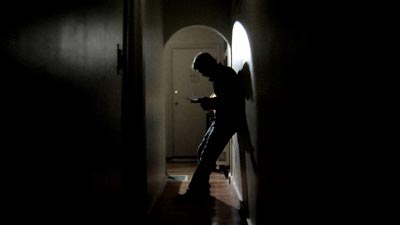
One thing i still dont understand is how can i make the background appear further away? Like i tried to make a shot similar to this one :
IllHall1.jpg


And couldn't get the right depth of the picture..

Also i really like this shot
Ill_CU1.jpg


But i could only get something simular after about 1 hour of trying and another hour of applying effects and filters.. as i understand what you shoot and what comes out after you edit and apply filters ect ect is very friggin different.

The shots taken from microfilmmaker.com/tipstrick/Issue19/m2_art2.html found it pretty useful! Lighting-wise..
 
Shoot 720 60p.

If you want it to look movie-like, do not shoot 60p.

720pn at 24fps on the p2 cards is true 24 frame progressive. just like film. 60p looks like video. autofocus works pretty well even at 24fps.

whoever said to hire someone was giving you great advice. you will learn so much this way and your first film will be much better than anything you can pull off in your first week at it. having a great camera is only a small part of the equation. it's like thinking that buying an expensive microphone makes you a great singer. i would try to find someone from dvxuser in your area that is willing to help you as they shoot and edit and pay them for their time.
 
It looks to me that you are trying to break it down into three categories:

Camera and Hardware
Editing
Film Making

My opinions on a crash courses are as follows:

Barry's boot camp DVD's will help you cover the camera quickly. : http://www.dvxuser.com/articles/hvxdvd/
I recently purchased them and don't regret one cent. I learned more in a half hour than I did with six months of trial and error. Could have saved myself some headaches.

I've used Vegas for editing for about four years now. It doesn't take long to understand and is very user friendly. Once I got the hang of it, I could pop out videos rather quickly. I am in the process of switching to Final Cut Pro. What ever you decide to go with in the end, there are many tutorials at www.lynda.com to help get you started. I can't say how good they all are, but the ones I've seen so far on FCP were very good.

For film making, others may have other opinions about this, but I found the Robert Rodriguez 10 minute film school to be extremely helpful in simplifying things. It is a DVD extra on the movie El Mariachi. I reccomend this dvd wherever you can find it cheap: http://www.amazon.com/El-Mariachi-D...1-3239126?ie=UTF8&s=dvd&qid=1185279164&sr=8-7

When you have more time, the Hollywood Camera DVD set is outstanding in my opinion: http://www.hollywoodcamerawork.us/mc_sampleclips.html

I am one of those people who struggle with reading. I learn much quicker by demonstration rather than reading.

Finally, keep reading DVX User.

Best of luck!!
 
Barry's boot camp DVD's will help you cover the camera quickly.


ABSOLUTELY!

The HVX Bootcamp DVDs are required viewing for anyone trying to get up and running with the HVX.
Seriously.

It's like hiring Barry to come into your home to give you a one on one HVX lesson.
Get them - watch them - and then.....watch them again.
:thumbsup:
 
Not to hijack the thread, but...
you ordered 2 16 gig cards and will get them tomorrow???
where did you find 2 16 gig cards in stock?
 
Back
Top