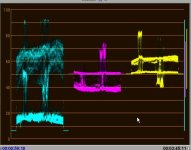
what does this image tells you....

Can someone explain to me , what exactly does this image reperesents in terms of colors, brightness and whatever else this pic might tell a professional color expert

I am trying to correct a mistake i did on a shoot ,,, but would like some feedback on how to fix this image just by looking at this graph.

Thanks
Paul
 

Attachments

  • interpret_videosignal.jpg
    interpret_videosignal.jpg
    33.9 KB · Views: 0
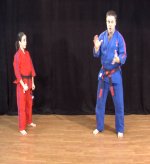
Attach a grab of the associated frame also because the scope does not actually show us the problem.

There is nothing apparently wrong as shown and it could be perfectly normal .
 
Yeah, without a referance image, it's hard to tell how it should look.

I can however give it an educated guess:

Your greenscreen is unevenly lit, and the bright blue object on the right is overexposed compared to the person on the left.
You are trying to compensate by brightening the blacks and dimming the brights - so by reducing contrast while increasing brightness.

If this is the case, I'd recomend you first pull the key, then split screen the forground (as I can't see any common elements) and then(on the forgound only - after the key) decrease contrast on the right and increase it on the left to correct your levels without messing up the blacks.

- Mikko
 
hahaha mikko,, thanks for the laugh,,, trying to understand these darn little screen with these kind of information, it is almost like what you describe

got my new broadcast monitor today, so no more guessing in shoots with an lcd display anymore but i would still like to salvage this clip if i could.

thanks for your help,, and yep i wash out the hosts with the lights ,, i can reduce the brightness with an overlay and 3 way corrector but never satisfied with the red uniform , that thing is like las vegas strip sign,, always on and wanting attention


Paul
 

Attachments

  • rearbearhug_scenario1.jpg
    rearbearhug_scenario1.jpg
    136.9 KB · Views: 0
Look at an image in the same kind of environment that you do like and adjust the image accordingly.

Graphs like that usually don't get used in today's digital world. It's just Adobe being quirky. The best (and easiest) way to do it is use the eyes God gave you.
 
my eyes

my eyes

my eyes are only knowledgeable in things that God made, i see beauty in my children, my car, my dog, my wife but heck i still don't understand how he manage to throw those colors together and make something real nice with them.

i was just hoping someone knew how to remove the contrast from someone in a bad lighted shot.

Paul
 
ChrisLyon said:
Graphs like that usually don't get used in today's digital world.
That is far from true. Infact, due to digital compression, etc, scopes are more important than ever to measure the picture to ensure it's technical quality.

It's like saying a speedometer isn't necesarry in an automatic car.


Paul. Try working with the Gama adjustments to improve your footage - dial back the red gamma.
Then go into the curves and drop off the white peaks a little from about 50% up by maybe 10%

- Mikko
 
mikkowilson said:
It's like saying a speedometer isn't necesarry in an automatic car.
No. It's like saying a speedometer isn't necessary on an electric golf cart. You don't need it because you will never go fast enough to need it.

The graph means nothing for color correction. Compression, maybe, but not for cc or gamma correction.

But it's neither here nor there.
 
ChrisLyon said:
The graph means nothing for color correction. Compression, maybe, but not for cc or gamma correction.

If it means nothing, then how could I tell from it that it was over exposed - and that it was blue that was to bright?


Scopes are used for the same purpose in the digital world as the analog world: To measure the properties of the picture. How the signal goes in is irrelevant.

Adjusting Brightness will move the entire plot on the left up and down, adjusting Contrast will stretch the levels from the bottom.
Adjusting Gamma will stretch the middle of the leves up or down, without moving the top or bottom values.
Adjusting Color will stretch or shrink the plots on the right in and out from their center line together. And adjusting Phase ("hue") will stretch or shrink them opposite to each other.
The plot on the left is brigness - if you where to slect the areas of the image where the levels displayed on that plot hit a certain level - say 100% - then you would have "Zebra Bars", which any professional camera generates to aid in exposure while shooting.
The plots on the right show color intensity: The center one is the ammount of Blue in the image, and the one on the right is the ammount of Red.
If you shoot a 18% gray card - or a white one - as you would to white-balance, you will end up with all the color near the centerline on both the color plots on the right. By adjusting the "white point" you can move the color plots about their centerline, and using the plot you can ensure that white is turly white.

And that's just this YUV scope. If you combine the color plots with the blue channel rotated 90 degrees, you end up with a Vectorscope which gives you another view of the color information to help set color accuracy. Not to mention individual measurement of RGB levels or the overall brightness level in a full frame Waveform monitor - with or without color information.

It does not matter how you input a signal to a scope. Digital or analog, they show the same thing. And it does not matter if you are working in the Analog or Digital domain, to work properly you still need to see all the information.


And a final thought...


If image metering (in the form of scopes) is un-necesarry for digital video; then what do we trust to monitor digital audio?

SoundStudio-1.0.3_vu.jpg
... obsolete?


- Mikko
 
You are comparing apples to oranges on the audio levels. You don't need a graph to tell you an image i over exposed. A trained eye can tell what looks good.

This is turning into flame so i won't post here anymore.
 
Thanks Mikko for that great tutorial on graphs, keep it coming, i truly appreciate it.

Most of the books i have read on color correction just tells me to fiddle till it looks right, but i don't have hours and hours of just sitting in front of a computer and twiddle away until it looks better.

i needed to understand what the heck i was fiddle with and now with your input i will know what to try to achieve a certain final image i am going after.

Chris, in my part of the world, we call it a good frank discussion about technology, its almost like politics,, so keep it coming too ... we always need to unwind a bit:beer:

Paul
 
Back
Top