UKP - an Ignatius Fischer motion picture

AmbassadorTex said:
Basically, we're in Compressor and don't know which of the many mpeg pre-set options to try out...

Sorry I'm late replying to this one, but I output the DVD mpeg2 via Compressor using the following settings:
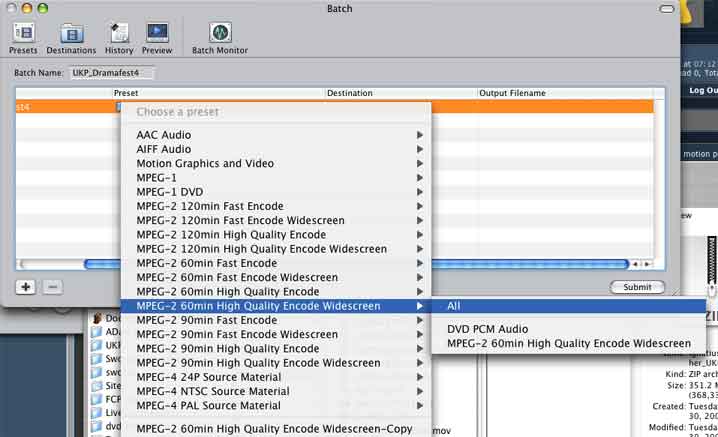
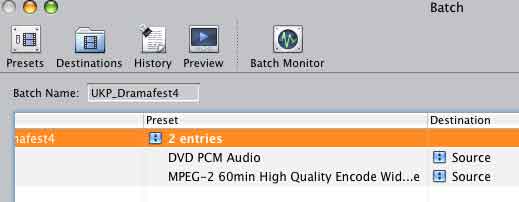
CompressorSettings1.jpg

CompressorSettings2.jpg


Then I uploaded both the m2v and aiff files in the zip as per the parameters. Pretty simple, hope it helps.
 
ignatius said:
I do need to fine tune a bit of CC, it gets dark in the compression, so I've got to make a version to accommodate that. .

That is weird. Ours gets lighter when we compress. I wonder if Windows makes it lighter and Mac OS makes it darker. Strange. Thanks for your help again.
 
UKP has been officially entered. The upload (a zip file at 359 megs) took about 2.2 hours to complete, but completed without a hitch.
 
jontuttle said:
That is weird. Ours gets lighter when we compress. I wonder if Windows makes it lighter and Mac OS makes it darker. Strange. Thanks for your help again.

That usually happens to images I export for the web via Photoshop, the lesser jpeg compression somehow lightening the overall image. Well, you can probably dial in that Alpha Gain filter (which is a gamma curve, I think) to accomodate your export results. I did a bunch of tests on a one minute clip to extrapolate the size and quality. I actually had to do some pre-export CC on either end of my flick because the imagery is darker there than in the main middle section, so a blanket gamma correction only served to brighten the middle too much. And people think film-making is a piece of cake.
 
jontuttle said:
That is weird. Ours gets lighter when we compress. I wonder if Windows makes it lighter and Mac OS makes it darker. Strange. Thanks for your help again.
I had the same results working on a project in AE7 yesterday. The background was completely black in the comp and when I encoded it to h264 through QT Pro the background was a dark gray. Problem with that is that you can really go "blacker" on an already black background.

Is the Alpha Gain filter in QT Pro? Or is that a FCP deal?
 
Bayne said:
I had the same results working on a project in AE7 yesterday. The background was completely black in the comp and when I encoded it to h264 through QT Pro the background was a dark gray. Problem with that is that you can really go "blacker" on an already black background.

Is the Alpha Gain filter in QT Pro? Or is that a FCP deal?

We had to re-export it from Premiere Pro with 10% less brightness and 20% more contrast to get it looking right. We played with the Alpha Gain for hours and it seemed to make no difference. We tried the brightness and contrast settings in QT Pro and it seemed to work, but it would cause this strange random green flickering. So we had to do it at the source.
 
Bayne said:
Is the Alpha Gain filter in QT Pro? Or is that a FCP deal?

The Alpha Gain is under Filters in the Quicktime Pro Export Options window. There's Settings :: Filters :: Size, and it's the first one under Filters. Decreasing the Alpha Gain by decimal points brightens the picture and increasing the value darkens it.
 
ignatius said:
Yeah, dude, check about five posts up this page.
icon10.gif

HAH....as I said in an earlier post. this is why I am CREW.....I need to take direction, not give direction.
 
I've been watching the flick at standard or smaller resolution during the entire editing phase (I don't have a widescreen monitor to output to for editing, and I didn't like the stretched view on my 4:3 monitor), so last night I full-screened it in Quicktime and I have say it was great fun! The flick is a lot cooler to look at big on screen, even soft, rather than small, it kinda showed the "cinema" of it.
 
Congratulations on getting your movie posted. I'm looking forward to seeing it.

This is going to be a busy weekend with the DVXUser Dramafest viewing and the SuperBowl. Not sure which is more entertaining... Dramafest... SuperBowl... Dramafest... Super...?
 
looks real pretty sir. and a very pretty poster too.

god, this is gonna be a good run of pictures here.

--evan
 
abraham said:
looks real pretty sir. and a very pretty poster too.

god, this is gonna be a good run of pictures here.

--evan

Thanks, Evan, I hope it lives up to its hype, haha. I agree, the selection looks enormous this time 'round!
 
Hey IF, haven't been over to your thread in a while.... just want to say good luck to you. You have me very excited to see yor film.
 
Theodore J Arabian said:
Hey IF, haven't been over to your thread in a while.... just want to say good luck to you. You have me very excited to see yor film.

Excellent, Ted, thank you and right back at ya. You KNOW I'm excited to see TTN (I'm about a hundred and fifty pages into your thread)!
 
HAHAHA!!! Have you come across "the shirt" yet? That was quite the topic of conversation and photoshop display!
 
Back
Top