HVX200 Goes Upside Down On

Robert Eder

New member
hello,

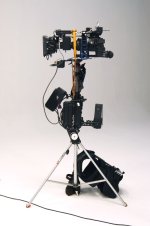
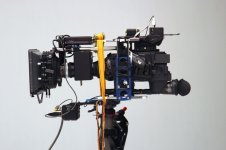
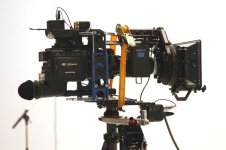
recently i had to use the micro35 adapter on steadicam. i thought some of you might be interested in this.

because my private rig, which is a baerbel, was on service i had to borrow an old 3a steadicam rig which had a unflippable monitor. according to this issue i decided to flip the whole system by using the suhi server (the baerbel lomode bracket) which worked pretty fine for me. it was quite easy to balance this system. the only problems we had were some strange vibrations but we could fix them by adding a load securing strap.

i think the hvx is a really nice tool, but i am not the biggest fan of the micro35. in my opinion the xl2/xlh1 ps mini35 setup is the best 35mm adapter rig in the non pro class. but thats only an opinion :2vrolijk_08:

i will let you know when the video is finished.

greetings, robert

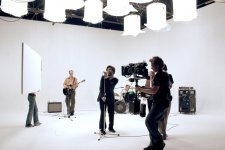
some photos for you:
 

Attachments

  • micro35 rig1.jpg
    micro35 rig1.jpg
    102.1 KB · Views: 0
  • micro35 rig2.jpg
    micro35 rig2.jpg
    89.1 KB · Views: 0
  • micro35 rig3.jpg
    micro35 rig3.jpg
    95.5 KB · Views: 0
  • micro35 rig4.jpg
    micro35 rig4.jpg
    144.7 KB · Views: 0
lol wow....thats one way of solving the image flip situation. or you coulda just rented a Varizoom monitor and turned it upside down.
 
Were you swapping out lenses or sticking to one focal length? And if you were swapping, how difficult/time consuming was it?
 
getken said:
Were you swapping out lenses or sticking to one focal length? And if you were swapping, how difficult/time consuming was it?


Hi
i'm Alex, the Dop/Director.

We weren't swapping lenses extensively, we only did 2 shots with steadicam and m2 adapter.
That one lens change wasn't really time consuming, but the m2 system itself is.
There are lots of spots in it where dust and hair may settle, and if you ever accidentally lift the camera on it's handle it almost certainly drifts off center on the groundglass, which results in vignetting and unsharp borders.
Quite annoying in my opinion.
Plus the distance marks on still photography lenses aren't really to be trusted,
so measuring the lenses via siemens star and making new marks beforehand is necessary.
As Robert already stated, the XL-H1 and p+s technik combination is superior in my opinion too (disregarding the hdv vs. p2 discussion, thats another story).
the bajonett mounted mini35 with pl lenses is simply a way more rugged design,
nothings gonna jiggle there, you can lift the system on the camera's handle without displacing the systems elements.

That being said, i must add that for it's price, the m2 system is not a bad one.

Robert, danke nochmal für deine Zeit und spitzen Arbeit!
 
Good review, however the M2 can easily be hard mounted to the HVX, or, actually, any camera you might prefer, using a spacer tube and a downconvert ring... I keep the Achromatic lens, the ring/spacer tube and the M2 attached together permanently. All I have to do when I use the M2 is screw the whole thing to the camera lens.
 
Alex: Are you saying to quality to which you wanted would have been better to use the XLH1, OR were you talking about the functionality of the M2 with the XHL1 would have been better suited for the shoot.?
 
alex, thanks for the comments, but! "we >>>"only" did 2 shots with steadicam and m2 adapter." please would you mention that on of the takes was nearly 90sec. ;) *g*

i think the quality would have been better with a xlh1 / pstechnik setup. i think lots of users will kill me now but i think the hvx with its 100mbit compression is not that good as it seems. the images are definately not as sharp as with a h1 and even a sony fx1 is sharper (feel free to kill me for this statement ;) ) but it is true. also i had to reshoot one whole day, because there was so much noise in the p2 material that it was not usable. (hvx and m2) the material from the sony was better. (lowkey light situation) now the pedestal of the hvx200 was reset from 0 to -3 which seems to help (i have not used it since then)

the pstechnik adapter is way better in built quality than the m2, the focus marks can be used and all lenses are sharp at infinity. i often had the problem that for example a 50mm canon fd lens (f1.2) was not sharp on the m2 because of the m2´s poor built quality. in my opinion it is better to rent a mini35 than consider buying a m2. but thats MY opinion :)

greetings,

Robert
 
Robert Eder said:
alex, thanks for the comments, but! "we >>>"only" did 2 shots with steadicam and m2 adapter." please would you mention that on of the takes was nearly 90sec. ;) *g*

sorry for that... :)
 
hvx-200 Goes Upside Down On

hvx-200 Goes Upside Down On

Hi,
I've been following the DVXuser forums for quite some time now, but this is my first post. My friend and colleague Tom Kochem, a mechanical engineering alumni of Olin College recently finished producing "Yellow Lights", an independent feature-length student film that was shot with DVX100 http://www.yellowlightsmovie.com/ . It has an all original score, and it was shot for under $2000 with borrowed equipment.

We are currently in the process of producing a micro budget independent feature (~$30k), which is being funded by ourselves. We both work fulltime as engineers (I'm a computer engineer, he's a mechanical engineer, but we both have a passion for film).

We will be shooting with an HVX200, M2 adapter, and Nikkor lens combo. Much of the capital equipment has already been purchased and we have established an LLC for our production company.

We will be purchasing an Adobe editing suite with DV Rack HD 2 for editing DVCPRO HD. Since we will be shooting to P2 cards, rather than using the on-the-fly capture/monitor features of DV Rack, does anyone here know if the 180 degree rotation can be performed upon converting the MXF DVCPRO HD to be edited natively in Premiere? I'm aware that it can do it on-the-fly if using DV Rack as a monitor.

If not, Tom will be designing a rig to mount the entire camera assembly including the M2 adapter upside down, because we have determined that converting our 35+ hours of footage will be time prohibitive in Premiere. We would rather just mount the entire assembly upside down. Would anyone be interested in one of these rigs? It would be ergonomically pleasing (these are the types of products he designs for a living), include a standard tripod mount, and a mount for a field monitor. We will actually be shooting with two monitor in the field, a standard definition CRT strictly for color, brightness, and contrast monitoring, and a Marshall LCD for focusing the HD footage.

-Bob
 
DV Rack 2.0 HD can flip the DISPLAY of the video captured live, but it still records upside-down. This is because DV Rack does not manipulate the data coming from the camera in any way, it just dumps it to disk in the container format of your choice.

You should be able to flip the video in Premiere once the MXF has been converted to an AVI.
 
rbermani said:
Hi,
I've been following the DVXuser forums for quite some time now, but this is my first post. My friend and colleague Tom Kochem, a mechanical engineering alumni of Olin College recently finished producing "Yellow Lights", an independent feature-length student film that was shot with DVX100 http://www.yellowlightsmovie.com/ . It has an all original score, and it was shot for under $2000 with borrowed equipment.

We are currently in the process of producing a micro budget independent feature (~$30k), which is being funded by ourselves. We both work fulltime as engineers (I'm a computer engineer, he's a mechanical engineer, but we both have a passion for film).

We will be shooting with an HVX200, M2 adapter, and Nikkor lens combo. Much of the capital equipment has already been purchased and we have established an LLC for our production company.

We will be purchasing an Adobe editing suite with DV Rack HD 2 for editing DVCPRO HD. Since we will be shooting to P2 cards, rather than using the on-the-fly capture/monitor features of DV Rack, does anyone here know if the 180 degree rotation can be performed upon converting the MXF DVCPRO HD to be edited natively in Premiere? I'm aware that it can do it on-the-fly if using DV Rack as a monitor.

If not, Tom will be designing a rig to mount the entire camera assembly including the M2 adapter upside down, because we have determined that converting our 35+ hours of footage will be time prohibitive in Premiere. We would rather just mount the entire assembly upside down. Would anyone be interested in one of these rigs? It would be ergonomically pleasing (these are the types of products he designs for a living), include a standard tripod mount, and a mount for a field monitor. We will actually be shooting with two monitor in the field, a standard definition CRT strictly for color, brightness, and contrast monitoring, and a Marshall LCD for focusing the HD footage.

-Bob


I'd be interested in that rig, let me know if it's going to happen, also what price do you think?
 
THoff said:
DV Rack 2.0 HD can flip the DISPLAY of the video captured live, but it still records upside-down. This is because DV Rack does not manipulate the data coming from the camera in any way, it just dumps it to disk in the container format of your choice.

You should be able to flip the video in Premiere once the MXF has been converted to an AVI.
Good to know, thanks for the info. We think converting 35 hours of footage through Premiere could take too much time. Are we wrong in assuming that? Regarding the cost of the rig, not sure since it hasn't been designed yet. Of course, building the prototype will cost more than the unit cost if manufacturing it in volume.
 
Flipping the video will take less time than shooting it. You should be able to do that overnight, a day at the most. You'll spend more time designing, building and debugging the rig. Just MHO...
 
Back
Top