Advice, 6-channel affordable Video Mixers

andybiz_2005

Well-known member
Hi All,

I may be looking to invest in an affordable video mixer/switcher unit that can broadcast live video footage to widescreens & supports up to 6 cameras.

My budget is from $1000 - $1500

I also want to get it brand new. Do you know of any brand & model of mixers/switchers that can fit within my budget? Thank you in advance.

Andrew
 
Whew, that's a tough order. 6 inputs for under $1500.

Lets ask a few questions:
Whatr are you shooting?
What type of signals do you plan to switch?
What cameras are you using?
Is cuts-only switching enough, or do you want to do more (fades, whipes, etc?)
Do you want keying/titling possibileties.
Is Tally important for you?
Must you have inputs? can you do with less? - Or do you perhaps need more for other soueces (like a deck?)
Is a "Program" output enough, or do you need a "Preview" for monitoring too.
Do you need too loop the signals through the switcher/mixer to monitors?
Does it have to be brand new?

Write up a list of features that you: 1) NEED. 2) Want. And we can help you out better.

Also dont' forget all the other gear you generally need for a multicamera shoot: Monitors, Decks?, Communication, Graphics?

- Mikko
 
Lets ask a few questions:
Whatr are you shooting? I'll be shooting large corporate seminars/functions in ballrooms
What type of signals do you plan to switch? Switch from 1 cam to another, & another, etc.
What cameras are you using? Mostly DVX100As, or Sony PD170
Is cuts-only switching enough, or do you want to do more (fades, whipes, etc?) Possibly some basic transitions like cross dissolves, fades, wipes. Nothing too overly fancy.
Do you want keying/titling possibileties. I don't think titling is that necessary.
Is Tally important for you? Erm, not sure what you mean here. Could you ellaborate?
Must you have inputs? can you do with less? - Or do you perhaps need more for other soueces (like a deck?) The minimum number of channels I can consider is 4.
Is a "Program" output enough, or do you need a "Preview" for monitoring too. I would think a "Preview" for monitoring would be absolutely essential.
Do you need too loop the signals through the switcher/mixer to monitors? Yes.
Does it have to be brand new? Perhaps 2nd-hand at the very least.

Thank you Mikko. Hope there's suffiicient info. The other alternative would be to rent it. Would this be a much more viable option?
 
By signal types I meant Composite, S-video, etc? With the cameras you are using it's going to be Composite (Don't use s-video, it sucks for multicamera stuff.)

Tally (lights) are the red lights on the camera that light up when they are selected from the switcher. Very usefull for the camera opearators to know who is "on the air" at any given time, critical if the communitation system isn't 100% reliable.
(top right)
camera.jpg


I wouldn't go too cheap with a coporate gig, you might shoot yourself in the foot.
There are loads of dirt cheap (and in my oppinion prety worthless) video mixers out there with 4 inputs from all sorts of manufacturers. Look on e-bay for "Video mixer" Names like: Panasonic MX-20 and MX-50 and Videonics MXpro, MX4, MX1 are all prety comon and dirt cheap. - You could even afford to gange 2 together to get 7 inputs. Most of these lower end units don't offere tally and only offfer basic 2-channel syncronization which can inhib switchign freedom a little. But they do do the job. I prefere the panasonics, the Videonics mixers have the gawd awfull switchign delay. Trasistions run about half a seccond after you begin them.

There is one video mixer avbaiable that I know of with 5 inputs: The Panasonic AW-SW350.
aw-sw350.jpg

it's prety rare as it hasn't been marketed prety hard, and it prety pricy too. However it rocks. It's a simple mixer withotu many effects, but it has the basic transistions. It has a 5-channel frame syncronizer, so that you can just plug your cameras in and it works - no problems with syncronization. It has a Down Stream Key channel for graphics if you want. And it has full Tally Outputs.
If you can afford it, it's a GREAT option. I recomended one of thsee for out schools tudio a few years ago and it has yet to have any problems.

The next size up is normally 8 inputs. Again the first option is from Panasonic, the MX-70:
mx70-mixingf264.jpg

A much more advanced mixer, inclduing audio mixing (which isnt' really a video mixer feature, but coudl be usefull). More effects liek Chroma key, etc. It has 8 inputs, and again full tally. However it only has a 2 channel frame sync whcih can be a little restricting. Also a good, but again pricy, option.


Then there are the hoards of old, bigger, video mixers on e-bay. Unfortunatly most will require your cameras to be syncronized (genlocked) to swithc cleanly. This can be accomplished with extraenal frame syncronizers / TBCs, but that's more geare to get and pay for.

Though this one might do the job: http://cgi.ebay.com/Panasonic-WJ-4600C-Special-Effects-Video-Switcher-Mixer_W0QQitemZ190050506318QQihZ009QQcategoryZ21166QQrdZ1QQcmdZViewItem - At that price it's almost worth riskign needing ot spend a little on Framesyncs if the internal one is no good. Looks like a precursor to the SW350.


Wheter you buy or rent is a financial descision, but those are the basic options available.

- Mikko
 
I would think a "Preview" for monitoring would be absolutely essential.
"No Preview" in a vision mixer wouldn't mean you don't see anything, you would still see the program (=final output) as your "preview". The preview (or PVW, also called "preset" or PST) on a vision mixer is the level where you pre-select your camera/source and then, if you press "cut" or "auto" or use the mixing lever this preview/preset signal is cut/mixed with the current program signal. So a mixer with preview/preset actually gives you two "previews". One is PGM (the signal currently broadcast) and one PVW/PST (the signal being switched to PGM when you cut or mix).


vmixer.jpg


Note that Philips calls PGM "background" (because it is the background for the key-level) and the preview/preset "background preset"
... sorry the DD10 is a little out of your price range , but it was the best picture I could find...

What cameras are you using? Mostly DVX100As, or Sony PD170
[...]
Is Tally important for you? Erm, not sure what you mean here. Could you ellaborate?
MiniDV cams can't be connected through a CCU/MCU, so I think there's no way you can operate their tally with the mixer. But as long as the operators can see the PGM somewhere it doesn't hurt, I think.
 
Last edited:
FBAS said:
MiniDV cams can't be connected through a CCU/MCU, so I think there's no way you can operate their tally with the mixer. But as long as the operators can see the PGM somewhere it doesn't hurt, I think.
Yup. true studio cameras have a lot of features very different from your regular MiniDV camera. For tally lights on a DV camera, you will need an evternal Tally light system. Se get out a soldering iorn, some cable and some red LEDs.. Or use something like the Camplex (www.camplex.com) PRO-X1 system which has built in tally lights to attach to your camera.


And yeah, there's defiantly a lot to video mixers - even the very simple ones like the MX4 up above should have 6 monitors attached. (Actually, I believe 7 with the MX4)

Using the term "preview" for all monitors is very very confusing. Just call them "monitors" or "viewing monitors" if you must. Reserve the name "Preview" for the actual Preview monitor.

Typical monitoring setup for a shoot with 4 cameras and a video mixer.
- PGM ("Program") also called "TX" (Transmission) in the UK. This is what is going out to air or being recorded. It's what the viewers see. It includes anything mixed through the Program row and all graphics (even ones added after ("down stream" of) the "program" row)
- PVW/PST ("Preview/Preset"). Linked to the "Preset" bus of a switcher, but has many uses. This is the monitor used to preview most things before they go on air. In simple mixing you will see the next camera or source on this monitor. It can often also be used to test-run a transition to see how it looks before it is run on the air. Other info can also be added to this monitor such as framing guides, timer displays, setup information, etc.
- "Camera" monitors fall under the general group of "Source Monitors". These are monitors that show the raw image from one image source. Often they are smaller than the PGM and PVW monitors. For example with a monitor for each camera a Director can see all the cameras side by side and make decisions on where to cut next without having to cycle through all cameras one at a time on Preview. A 4-camera shoot should have 4 camera monitors, bringing the total to 6. If you are clever you can reduce this number by using a "quad splitter" which puts 2 pictures on one monitor (like a security camera system). This can reduce you need for actual monitors, but you still will need all 6 images somehow.


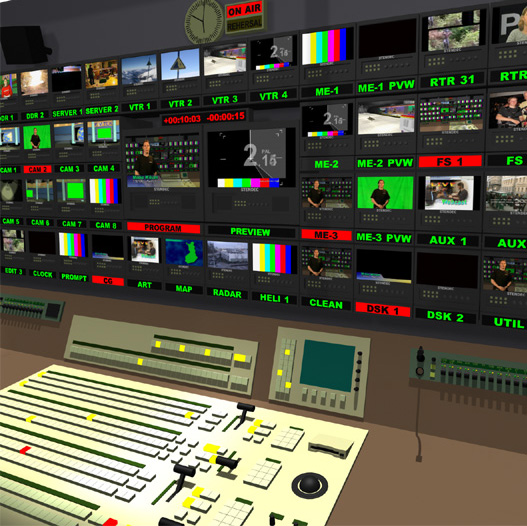
In larger set ups there are more monitors:

3Dmonitorwall1.jpg

In this control room we can instantly, clearly, see the Program monitor in the center, with the Preview monitor alongside. At a glance we can see that there is a person on the air with a graphic in front of them. We can also see that there is something with a count-down (probably a tape) cued up on Preview. So it's safe to assume that the person on camera is about to introduce the tape, which will roll for 2 seconds and then be cut onto the air.

Around the sides we can see all the Source monitors, where we can see all the sources that are available to be mixed onto the air. The camera feeds can be seen to the left.

Some source monitors are also output monitors too! As you can see, the video mixer at the bottom of the shot is rather large and complicated (leaves the DD10 in the dust). The video mixer in question has lots of layers off effects that can be mixed together in "Mix/Effect" groups that can then be combined into the final image. These "M/E" groups also have their own mini 'program' and 'preview' feeds with their own monitors that can be seen to the right of the main Preview monitor. It's like having multiple video mixers plugged into the inputs of a main video mixer!

In this set up there are also feeds from other places available; You can see feeds from Video Tape Recorders ([VTR] at the top, there's a couple of video Servers on the left. Graphics channels along the bottom with everything from titles to a weather map. There's also a graphics Frame Store [FS-1] on the right.

To the lower right we can see what makes up the final stages of the program image: The "[Clean]" feed is the output of the "Program" (or "background") bus. After that often a couple of "Down Stream Keyers" [DSK] are used to add elements like titles on top to create the final Program feed.


This particular control room is rather conveniently labeled very clearly. Not only can we see what is on each monitor but we can also see if it's on the air by the red label.
You can also see that the lights on the video mixer buttons are also color coded to show tally too.

Let's trace back what is making the "Program" image...
The "Program" is of course on the air, so it's label is red (a tally light, just like on a camera)
First we can see that a title is on from [DSK-1], the source for which is the "[CG]" computer. So both their labels are red.
Then we can see that Mix/Effects group 3 [ME-3] is on the air. Looking at it's preview monitor we see that there's actually a green-screen shot going on.
The sources for the Green-screen shot can be identified as Camera 2 [CAM 2] where we can see the actor in front of a green screen.
We can also see that graphics Frame Store #1 [FS-1] is providing the background for the green-screen processed in ME-3.
We can also see that the tape that is going to go on the air next will probably come through ME-2, which might have some clever effects or transitions ready to go too. They could even use ME-1 as a source in ME-2, which is a source for the Program!

That's pretty much how your local TV news control room looks. If you know what to look for in the program, you can start to pick apart all the elements that go together to make it. And you can start to see why so many monitors and so complex video mixers are used.


6 inputs and a Preview monitor you where asking for? No problem... :)


- Mikko
 
Back
Top