Teleprompter

Any picks of your setup Rone? Im really interested in getting that DV11, i dont run windows, but can if i need to on the Macbook Pro to operate the thing.

I am going to be doin alot of instructional stuff as well as 30 minute Infomercial soon, this would be a great asset. Im just curious. If not , no biggie, thanks!
 
Hmm, it looks like those 1Prompeter ones use VGA only monitors. Not good if you need to hook up multiple ones. A good promter should have a Composite video input - it's easy to cable one or a bunch together.

Also, if you have a Jog/Shuttle controller (like the Contour Shuttle Pro) you can normally use that to control the prompter too. Very handy!

- Mikko
 
I've got a Prompter People DV-11, also. Works GREAT, and it's SUPER easy to use. I found some software to run it from a MacBook. I might end up selling it...just needed it for one gig last week, if you're interested.
 
I'm actually looking to build my own Teleprompter -- does anyone have experience with software that will run on a PC? Nothing with Product Activation, please... :)

If I can't find anything decent, and there's interest, I may look into writing a Teleprompter app for Linux.
 
Twisted:
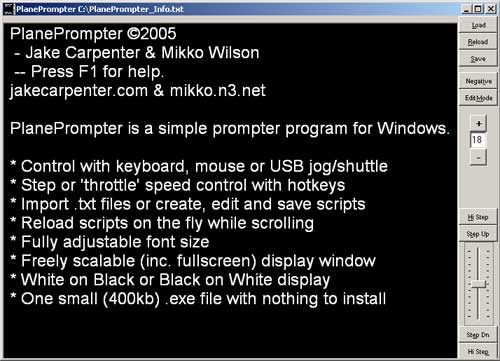
http://www.mikkowilson.com/files/PlanePromter.exe (Right click and download). Just a raw exe ready to run, nothing to install or activate.

Custom made by a friend per my design. A simple prompter program for the PC. Scrolls text, allows you to change font size, import .txt files and edit directly in the interface. Can be controlled by Keyboard, Mouse or USB Jog/Shuttle.

PlanePromter-Screenshot.jpg


It's a free download, though $10 paypal donations to our "feed the hungry programmers" (mikkowilson@hotmail.com) fund are much appriciated if you like and end up using it.
Or better yet, donate $10 to www.isara.com! :)

- Mikko
 
I've worked as a presenter using prompters for some of the work. Some thoughts:
- the most important element is the operator: good ones follow your style, stay awake, can change the script as needed without fuss.
- if you plan to shoot out of doors, get the below the lens types as these are easier to read in bright light - but it takes an experienced presenter to keep eyeline to the lens in tight shots
- if you plan on long shots, you need a big, contrasty screen - what matters is contrast for easy reading: some LCD panels won't know a black if it hit them in the face - their blacks are more like a mid-grey.
Enjoy!
Tom
 
Very nice Mikko. I will keep you apprised of my project, and will gladly donate to your fund once I'm finished.

Incidentally, I think I've found my first obstacle... does anyone know of a way to horizontally flip the contents of your screen? Perhaps through a video driver or the like? Without doing so, my teleprompter won't do much good...

To that end -- Mikko, I'm sure you could readily sell your program for much more than $10 should you impliment a feature to flip the text.

More updates later...
 
Lincoln,
Yeah, flipping the image is an issue. The above program was made as a practice program while learning VB. There's some better programs out there for free now too, and really, it's not to make money (that's why it's free to download) but just so that I could have a slick little program that was designed for my ShuttlePro2. And I figured if I've got a good thing, why not share it.
I've been practicing VB myself with all sorts of little utility programs, some of which I may release if they get to that stage.

As to flipping the image for a mirroring prompter. This is something that is normally done at the prompter - the video signal is normally a regular (non flipped) video signal so that it is also available to other monitors in a studio & control room during a shoot (on bigger productions) without being displayed backwards.

And in deed it is pretty easy to flip the image in many monitors now..
* Best: Buy a proper Teleprompter, well worth the money if you need it a lot and of proper quality.
* Best DIY: Most LCD video monitors have some sort of flipping functions, especially the 7" ones that all over the place now. Lilliput, etc.. Go look on E-bay, you can get a pair for $100 and they work fine up to about 15 feet.
* Old school: It is relatively easy to convert a CRT monitor to flip the image. Basically it involves flipping the horizontal coil wires so that the electron beam scans backwards. *NOTE* THIS IS DANGEROUS! Only ever open up a CRT monitor if you know what you are doing, and entirely at your own risk. There's potential for massive electric shock and explosions if things go wrong. Just get an LCD monitor and don't open a CRT!
* Quick & easy: Screw the flipping thing! It's over rated for most uses. Really. A monitor placed directly above [preferable] or below the lens works just fine for prompting and eliminates the hassle of mirroring the image.

- Mikko
 
Used my prompter people DV11 on the HVX for the first time in a professional capacity, the CEO who was reading it thought it was great.

The DV11 is a great piece of kit but I would recommend you update to the full software as you can't actually edit text on the free lite version - which I didn't know. You can edit in word and then export to RTF but this is slow.

I am also going to get the battery pack to power the monitor.

I will try and get some pictures of the set-up.
 
Back
Top