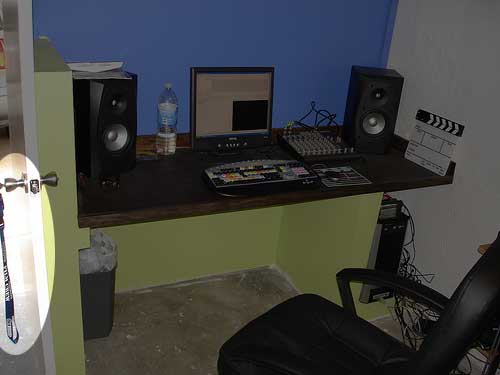
Garage to Studio transformation

yea my case has a 120mm exhaust fan in the back and a cpu intake and a 80 mm fan in front of the hdd...

The case i got the whole front is wire mesh. so should be good for air flow.

The opening is twice the size of the PC and im only putting the PC in there...

As for the power, i added the pc cubby after i wired it all up so im just going to have to run a cable... not a big deal...

Im planing on having a 17" LCD (when i can afford it i want bigger) and a 13" TV, sterio for souond.

guskersthecat said:
All PC's have the air intake in the bottom front of the computer cover, and exit at the top rear (power supply). As long as you make sure both are clear, and you have a cold air intake, and hot air exit, you'll be fine. If your tower has a separate side intake for CPU clearing, that will have to be clear too.

Keep in mind that MTB ratings, particulary with hard drives, are directly correlated to operating temperature. Cool is good!

I'm in the same boat on the core2 issues. My 2.8 P4 isn't going to cut it with HD.
 
Just a friendly suggestion here. Consider simply putting the computer in a completely separate room. May not be an option now, but it works really well. Don't have to worry about cooling problems OR noise :)
 
The issue is not just cooling the computer, it's keeping the room cool. My G5 makes a significant and uncomfortable hot wind... and when the room is sealed up for sound, it's like having an oven in there...
 
ullanta said:
The issue is not just cooling the computer, it's keeping the room cool. My G5 makes a significant and uncomfortable hot wind... and when the room is sealed up for sound, it's like having an oven in there...

Yea i worked sitting infront of the Exaust of a Dual CPU g5 for 3 hours, That was not fun.
 
" and when the room is sealed up for sound, it's like having an oven in there..."


Oh yes, but you've got to love the power. I've ran a full 3D(maya) 2k logo animated clip at the highest and best settings on my dual G5 for about 9 hours, well that's before I bought the extra 6 gigs of ram. Now it's probably a fraction of that time, but yes it does get hot!!

I recommend getting an external AC unit for render time, not while recording sound, it's kind of loud. You can find a much more sound efficient unit, but it will cost you $$. I believe this is the upgraded version of mine, but the unit gets very cold and it's great for your computer.

http://cgi.ebay.com/NEW-SNO-10000-B...5QQihZ007QQcategoryZ20711QQrdZ1QQcmdZViewItem


Studio is looking really good, can't wait to see the final picture!
 
The A/C is good, but an exhaust fan - with the computer ducted sorta like a clothes dryer - is more effective.

For A/C in, it's good to put the unit far away outside, and sent into the room through a complex maze of sound-absorbant baffles...
 
265325871_4d191f7bd3.jpg


265325883_7de81d1efb.jpg


265325863_0a28257ebd.jpg
 
Back
Top