Import P2 in FCP not working??

SurJones

Veteran
I having some issues, Never ran into this....

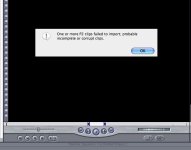
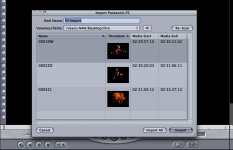
I shot a couple things and d-loaded and then imported into FCP, and error.. I hit import all and then hit okay and I get the error. By the way no clips imports, the second I hit the imoprt all button, I get the error. I thought things went fine so I reformated the P2. HELP!


Here is what it looks like.
 

Attachments
  • Picture 1.jpg
    Picture 1.jpg
    147.8 KB · Views: 0
  • Picture 2.jpg
    Picture 2.jpg
    105.8 KB · Views: 0
Last edited:
Ran into this on when importing from FS-100. Could not locate any problematic clips and think in this case that it had to do with several "1394 Disconnect" messages I got in the HVX when trying to record too quickly after stopping prior clip.

Ned Soltz
 
do you have a copy of the CONTENTS and LASTCLIP.TXT saved on your HD or your computer?

Open your your contents directory, then video and check your file sizes..

Also, let us know about your system specs, and your HD SPACE/TYPE and what changes you have made since everything has worked..

- - Justin
 
I'm currently trouble-shooting this same problem, without any luck... There don't seem to be any reliable answers anywhere!!!!!

SOMEONE HELP US!!!!!
 
All files and LASTCLIP.TXT intact...

Contents, Video directory: .MXF files between 50-150 Mb each.

I'm running MacBookPro 2.0Ghz
2G Ram
Final Cut 5.1.1

All specs qualify... I feel poopy.
 
Ya, I copied over to a folder, from the P2 via FW to G5. I did not move or change anything.

Is there a way I can view the MXF? Is there an MXF player. You know like quicktime player?
 
To view the MXF files, you need HDLOG. The entry-level version is $299 and is a P2 reader. Check out the product line at www.imagineproducts.com

Thus far, Panasonic has not ported the P2 viewer to Mac. There is buzz that we may see more native MXF features in future versions of FCP but I am in no way privy to any Apple information (if I were, I wouldn't even speculate in public... I take NDA's very seriously).

As far as an answer to the error message, I have not really seen a problem so I'm not going to worry about unless there is a problem.

Ned
 
I had the same problem for days... It wasnt the footage files or the drive that was causing the problem. i knew this because I was able to load the footage from my drive into two other FCP systems.
I was able to resolve the problem by doing a Clean Install of my OSX and all other software... However, the good news is that the footage imports fine now.
 
Let me suggest that anyone having this problem apply the 10.4.6 combo updater and for future updates, utilize the combo updater. I just posted this in another thread but I am beginning to be suspicious about update methodologies having heard that several users' problems were solved after a reinstall. Using the combo updaters rather than the delta updaters ensure a complete update of your OS.

Ned Soltz
 
I am not sure which updates your are talking about? I update using the apple Icon, and Software updates. Also I want to add that I did a clean install on this and have not done the updates..... MAYBE WE ARE ONTO SOMETHING..... Doing a clean install in 30mins, and then updating fully, I will tell you want the prognosis is.
 
Clean install definitely tells me this is an update issue. So, here's the trick. When Apple announces an update (and according to the rumor sites, 10.4.7 is on the way), be the second kid on your block to update, not the first. Then do not update from Apple menu-> Software updates (certainly, NEVER turn automatic updates ON). Go to Apple's web site and download the larger 10.4.x Combo updater. This includes all updates from 10.4 onward. Sometimes with multiple updates, it is possible a file did not get replaced or something just happened. By using the combo updater, you are certain that you have picked up every single file change since the OS was released.

Ned
 
Try creating a clean new project (with proper settings), then import P2... that fixed it for me.
 
Try the HDLog demo at www.ImagineProducts.com . Since it doesn't require the "lastclip.txt" to open and view MXF video it may help you. However, I'm wondering if perhaps your XML data (inside the P2 volume) is missing or damaged. This data IS required for HDLog to open P2 files.

Also required is the DVCPro HD codec typically installed with FCP. And of course, OSX10.4 and QT7 or greater.

Please try the demo and let us know at support@imagineproducts
 
I am having this same issue. Used the normal 10.4.6 update and issue was not resolved. Downloading the combo updater as nsoltz has recommended, but not sure if a clean sweep is also a ness. step, if i should of done that first.

How exactly is a clean sweep done?? And do I need to backup project files/capture scratch or are they not affected by clean installs of the osx??

I should say also that, I just had FCP 5.0 and was importing all my p2s perfectly, then i got discs for the Final Cut Studio and just installed all of them today, and when i tried to import new p2s, I got the error message, also previous p2 folders i've already imported sucsessfully also produce the same error message, so i know it can't be the files.
 
Back
Top