
I was just matching the GH3 LCD screen to the copied video files on my computer monitor and I realized that there was a big difference in terms of light and shadow details. VLC player / Media player show the video files darker than how the GH3 LCD screen shows them. Just to make sure, I imported the video file in Premiere (cs6) and suddenly the video matched the look of the LCD screen of the GH3.
When I export the file from Premiere and play it with VLC player / Media player, it looks the same as in Premiere / GH3. So far, so good. My conclusion is that VLC player / Media Player show the original .mov files from the GH3 darker than they actually are. Can I do something about this? Or why is this?
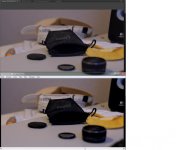
I added a picture screenshot of the difference. Top one is Premiere, down is VLC player.
When I export the file from Premiere and play it with VLC player / Media player, it looks the same as in Premiere / GH3. So far, so good. My conclusion is that VLC player / Media Player show the original .mov files from the GH3 darker than they actually are. Can I do something about this? Or why is this?
I added a picture screenshot of the difference. Top one is Premiere, down is VLC player.
