
...Please make sure that it is turned on and is not being used by another application or user.
Hi all,
I've found a similar error in one of the threads but the solution provided did not help. The situation is the following:
I capture with Windows Media Encoder using firewire. (I need the files as WMV). However, today I used Sony Vegas to capture in DV as I needed to do some editing. The above error message appeared so I fired VirtualDubMod and captured there.
Now ALL applicaitons (Vegas, VirtualDubMod and Windows Media Encoder) do not work. a 'Cirrus Logic USB-DVR2' option appeared in Windows Media Encoder but I ignore it and select my device which is a Sony DV device (DSR-25).
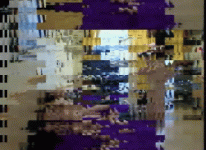
The Video I get is like big blocks, please see attached picture.
Deleting the [HKEY_CLASSES_ROOT\CLSID\{860BB310-5D01-11d0-BD3B-00A0C911CE86}] key did not help.
Any help would be greatly appreciated as this is quite urgent.
Thanks
Hi all,
I've found a similar error in one of the threads but the solution provided did not help. The situation is the following:
I capture with Windows Media Encoder using firewire. (I need the files as WMV). However, today I used Sony Vegas to capture in DV as I needed to do some editing. The above error message appeared so I fired VirtualDubMod and captured there.
Now ALL applicaitons (Vegas, VirtualDubMod and Windows Media Encoder) do not work. a 'Cirrus Logic USB-DVR2' option appeared in Windows Media Encoder but I ignore it and select my device which is a Sony DV device (DSR-25).
The Video I get is like big blocks, please see attached picture.
Deleting the [HKEY_CLASSES_ROOT\CLSID\{860BB310-5D01-11d0-BD3B-00A0C911CE86}] key did not help.
Any help would be greatly appreciated as this is quite urgent.
Thanks