Technicolor Look

Dmitry Kichenko

Well-known member
Hi all.

I just thought I'd start a topic on simulating the look of Technicolor (2- and 3-strip) as it's quite a interesting look. Not that I think I'd use it for a film but knowing you can is great :).

I'm going to play with Shake tonight in hopes to squeeze the look out. There is an article on completing the effect in Flame over at FXGuide, but so far I weren't quite succesful at duplicating the tree in Shake.

One of the keys to emulating is, as can be noticed, to offset the colour channels slightly. Unfortunately, on a subpixel level of the offset the image, of course, becomes slightly blurred. So far it looks like a whole 1 pixel of offset is a bit too much for our purposes.

I'll post my experiments later tonight.
 
I've played around in Shake, and did reconstruct the Flame Technicolor tree. However, the results are far from what I consider to be the Technicolor look.

Here is my first attempt to emulate the two strip process. A bit of a history recap first.

Back in the 1920s and 30s, the 2-strip Technicolor camera involved a beam splitter, and 2 filters, red and blue-green, which would expose the two corresponding strips of film. Later a dye was applied, with the choice of colour being ultimately up to the person making the creative decision. Of course, the red strip would always be left alone, and dyed with Cyan to preserve the natural skin colours.

The closest look resembling the actual action the camera was photographing would be, therefore, with red reds and something in between green and blue for the blues and greens. That's the look I went for. I borrowed a frame from a clip of the Mini35+HD100 shoot over at HDVInfo.net *DVXUser-s shout "Boo!"*

COMPARISON.

That look was derived using strictly Shake's colour correctors, blurring the frame, mixing it with the original, and offsetting the colour channels slightly for the image to appear to be composed of 2 pieces of film. I reduced saturation of the whole picture to almost zero, then boosted the red hue where the skin tones are, and applied a green-blue hue over everything else. The reference was an example from the Technicolor History page. The actual grab is probably not the best one to work with, but it's ok

The FXGuide method, on the other hand, uses a digital approach to the actual Technicolor process, and involves "dying" the RGB channels of the image with their complimentary colours, but all it gains is a desaturated image with the clamped whites, which is not the Technicolor look we all love :).

My next goal is to try to get the look of the image to resemble the actual dye. If you look closely, after the dye is applied, the look of the film changes slightly towards the way how the black and white photographs look after they have been coloured by hand. For instance, such as in the intro shot for the "Cheers" sitcom, with the coloured pictures of New York bars and taverns from the late 1800s.

Feedback appreciated, as always.
 
Last edited:
Magic Bullet Suite has an adjustable preset for the Technicolor 3-strip process look, but I have no idea how accurate it is.
 
There was an old copy of Cinefex about the Aviator and how they developed a 3-strip look for the film. I can't remember how they did it, but I remember reading that Rob Legato recreated the look in After Effects.

I'll have to read it and post any good info.
 
Alright, would be interesting to read about the FX in Aviator :).

As to Magic Bullet, all it does is pretty much desaturate the image, just like in case of the Flame method on FXGuide. For me, that's not what associates with the Technicolor look.

EDIT: I found a vague article on the colour in Aviator that, nevertheless, states that they tried to match the look-up tables of the Technicolor film with the footage they have. I'd love to find out more on how they did it.
Here is a fanfare from Adobe on it but the stills look nothing like Technicolor to me.
 
Last edited:
Dmitry Kichenko said:
Alright, would be interesting to read about the FX in Aviator :).

As to Magic Bullet, all it does is pretty much desaturate the image, just like in case of the Flame method on FXGuide. For me, that's not what associates with the Technicolor look.

EDIT: I found a vague article on the colour in Aviator that, nevertheless, states that they tried to match the look-up tables of the Technicolor film with the footage they have. I'd love to find out more on how they did it.
Here is a fanfare from Adobe on it but the stills look nothing like Technicolor to me.

Yeah, this is pretty much the method he outlined in Cinefex. Maybe you can post some example pics of what you're looking for and that can help up narrow down the "look"?
 
There are a few more factors involved in the Technicolor look.

First, the dyes used in two- and three-strip process changed a number of times during the evolution of technicolor. So, a general Technicolor look will be hard to codify. It would be most useful to simply choose a single Technicolor film and attempt to emulate it.

Second, there is much to be said about how production design contributed to the look. Gone With the Wind was Technicolor, but so was The Godfather, and that film is hardly known for its flashy colors. Costume and sets are a huge part of the look.

I have tried to Magic Bullet "3-Strip Process" effect. That setting alone creates an unusual and unusable image, so it needs to be combined with a Post Contrast, and possibly Post Gamma, adjustment at which point it doesn't look desaturated, just different. It's not bad, but your COMPARISON image looks pretty good, too.
 
Alright. Good point. The look I was going for is something among the lines of the examples on the Technicolor history page, such as this one in particular:
ben-hur2color.jpg

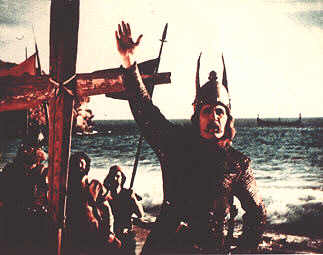
Another good example is the Vikings film which my comparison approximates.
viking.jpg

It, however, has an unusual amount of contrast for Technicolor, so I presume it was a scan from a magazine, and magazines often change the look of the images they print.

As to 3-strip, this is the Technicolor look I adore and aim for:
technicolor-gardenofallah2.jpg

(ah, Marlene :)).
And of course, no Technicolor discussion goes by without mentioning Wizard of Oz:
technicolor-wizardofoz1.jpg


Other examples can be found here.
The images often tend to have a green tint, and very gray blacks, mostly likely due to the very heavy amounts of lighting required to expose all 3 strips of film
 
there is a company in California that owns all the remaining inventory of the Technocolor original dyes used in making of this film. They are COAST CHEMICAL INDUSTRIES in Garden Grove, California
 
Back
Top