

reflex
Well-known member
Im having some trouble. I want to take a video clips maybe something orginally like this...
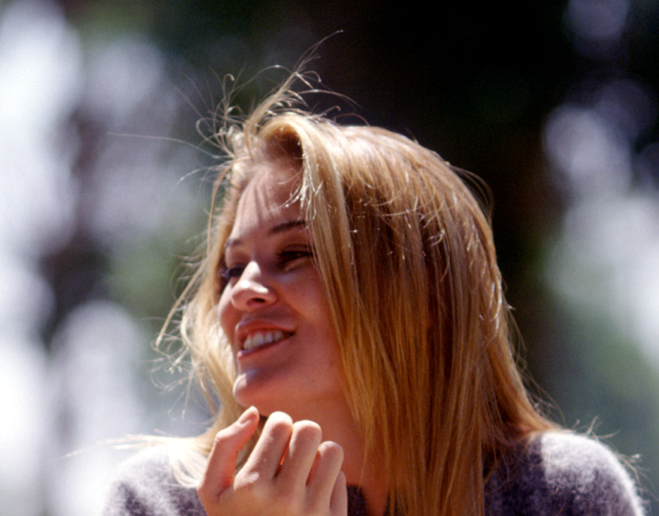
and then in AE i would like to get something like this for compositing...
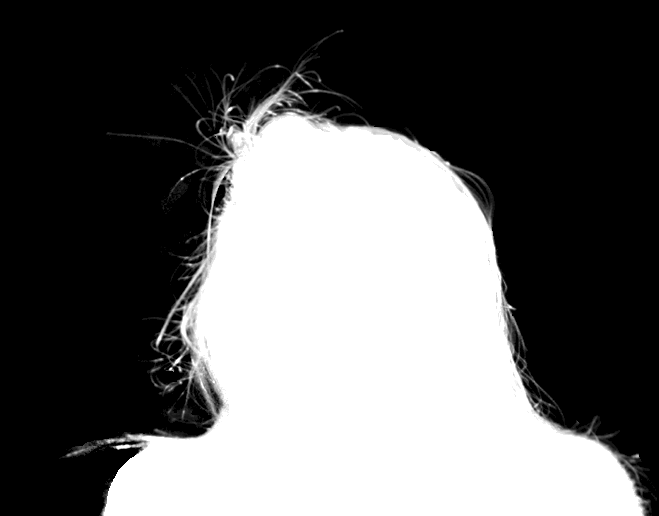
Is there a step by step to getting that end result? Basically I want to be able to effect certain things in the video with out having to make a mask with teh pen tool and animate it. Plus it is impossible to even mask the hair out and everything.
In the Others, ( movie with nicole kidman ) on the extra DVD they were showing some compositing stuff. and they where showing all the layers. They were using mattes like this on parts of the video to be able to effectively add effects to certain things. I.E. mist and fog to the back ground and a little bit to some people in the middle place between the front most character and the background and then none on the front character.
So basically the matte would have teh character close to the camera in white, then some people behind her were grayish ( so that the mist sort of covered them ) and then the background was black so that the mist was really heavy back there....
Anyone know where I should start or what i should do?
and then in AE i would like to get something like this for compositing...
Is there a step by step to getting that end result? Basically I want to be able to effect certain things in the video with out having to make a mask with teh pen tool and animate it. Plus it is impossible to even mask the hair out and everything.
In the Others, ( movie with nicole kidman ) on the extra DVD they were showing some compositing stuff. and they where showing all the layers. They were using mattes like this on parts of the video to be able to effectively add effects to certain things. I.E. mist and fog to the back ground and a little bit to some people in the middle place between the front most character and the background and then none on the front character.
So basically the matte would have teh character close to the camera in white, then some people behind her were grayish ( so that the mist sort of covered them ) and then the background was black so that the mist was really heavy back there....
Anyone know where I should start or what i should do?


