cannot line up tracks to be in sync less than 1 frame?

craigodvx

Member
Hi, need some help desperately...

I'm doing a project, I do 3 takes of the same audio but different shots (view).

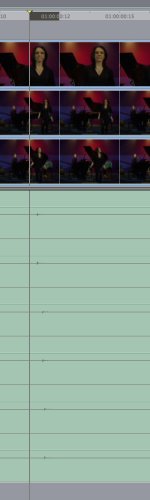
I then capture from my DVX100B (24PA) to FCP and use the correct settings (advance pulldown happens on capture), but when I come to put each take in my arrange window the spikes I made in the audio file at the start of each take cannot be lined up, you can see in the image I've attached.

I can move each track by 1 frame but I need to be moving less than 1 frame to make them exact, as you can imagine I cannot crossfade between the various tracks like this as I need the "live" vocal from each take.

What's gone wrong? :crybaby:

Thanks
Craig
 

Attachments

  • Picture 2.jpg
    Picture 2.jpg
    140.7 KB · Views: 0
Thanks CaptM,

Glad you did a video tutorial for it.

I moved them and I cannot see anything weird going on with the video close up with the vocal, it seems to still be in sync.

I still don't understand how it happens, I've got quite a lot of promo material to get through in the next couple of weeks & this was the first video, so I guess I'll have to do this for every take I do.

Is there no way to sub-frame edit the audio (as you shown) but the video moves too?
or is it not usually needed for a sub-frame edit?

Thanks again for the speedy answer.

C.
 
If you are not able to sync the audio exactly, remember the golden rule:
It's ok for the audio to be a frame or two behind the action (the audience will never notice), but if it is even 1 frame ahead, it will look (and sound) wrong.
 
It's ok for the audio to be a frame or two behind the action (the audience will never notice), but if it is even 1 frame ahead, it will look (and sound) wrong.

Thanks for the help...

So looking at the 3 audio tracks on my image, what I should do is move the top 2 tracks inline with the bottom audio track?

If I put the bottom 2 inline with the 1st audio track (top) then these 2 audio tracks would be ahead of their corresponding video... is this correct?

C.
 
Thanks CaptM,


Is there no way to sub-frame edit the audio (as you shown) but the video moves too?
or is it not usually needed for a sub-frame edit?


C.

Think of it this way... each frame is a 'picture snapped one 1/24th of a second. There are no existing photos between those 24 per second. There would be NOTHING to nudge to.

Audio is different... it is sampled at 48,000 times a second. In FCP you can shift it 1/100th of a frame. 1/2400th of a second vs 1/24th of a second. You see?

CaptM
 
So looking at the 3 audio tracks on my image, what I should do is move the top 2 tracks inline with the bottom audio track?


C.

Correct. Unless, as noted, you are able to do sub frame editing on the audio. In the days of Moviolas and Kems, we would often throw the entire mag track (sound track) back a frame to ensure the appearance of sync. In those days, we only had accuracy down to a single frame (none of this subframe gravy!). Yea, I'm an old guy.
 
Last edited:
Back
Top