
Navigation
Install the app
How to install the app on iOS
Follow along with the video below to see how to install our site as a web app on your home screen.
Note: This feature may not be available in some browsers.
More options
You are using an out of date browser. It may not display this or other websites correctly.
You should upgrade or use an alternative browser.
You should upgrade or use an alternative browser.
My project is rendering out at a choppy speed..what's up?
- Thread starter FilmBoy77
- Start date
j1clark@ucsd.edu
Veteran
i have a short quicktime movie i edited and put some effects in AE, it was shot at 24pn, but when i render it out it plays choppy....what am i missing?
quality and audio are perfect.
What is the machine you are on, what is the frame size you are using, and what is the 'bit rate' you have selected for your output.
Depending on the computer, and the bitrate/frame size, the CPU may not be able to keep up with the processing to spit the images onto the screen fast enough...
j1clark@ucsd.edu
Veteran
i'm on an intel mac using leopard, the .mov file is only 640x360, looks like the bit rate is at 8 on the composition and the resolution is set to auto
my last mac was almost 2GHZ slower and spit out these files just fine
what do you think it might be?
Bit rate??? Do you mean 'frame rate' of 8 frames per second???
The bit rate I refered to was in the render output options, and with a codec that one can tailor the compression to a given 'play back' bit rate, say 6 Mbits/s for Standard Definition (or nearly so, such as your case of 640x360...), or 20 Mbits/s for HD. This is for 'play back' only, as such low rates would affect quality if this was just an intermediary clip for some future processing. I've had some problems playing back when I use the Animation, no loss, full resolution, (even SD), output on some laptops... there the actual data rate may be up to 100 Mbits's and there for may actually exceed the disk drive's (depending on age and type) maximum data rate. I've not kept up on current disk drives, but still I think the actual max data rate on a drive is somewhere between 100-250 Mbits/s, and that can depend on rotation speeds, or 'raid' arrays, to get higher performance. This particular spec is often buried, and one has to look for the 'sustained' data rate, not some 'instantaneous' or 'disk drive 'cached' sector (very limited...)' rate.
Also, unless that's a typo, a frame rate of 8 frames per/sec is really low, especially if you are using 24p.
If your intent was to produce a 'slow mo' effect, that's not exactly how to do it, and further, enabling frame blending would smooth out some jumpyness.
Bit rate??? Do you mean 'frame rate' of 8 frames per second???
The bit rate I refered to was in the render output options, and with a codec that one can tailor the compression to a given 'play back' bit rate, say 6 Mbits/s for Standard Definition (or nearly so, such as your case of 640x360...), or 20 Mbits/s for HD. This is for 'play back' only, as such low rates would affect quality if this was just an intermediary clip for some future processing. I've had some problems playing back when I use the Animation, no loss, full resolution, (even SD), output on some laptops... there the actual data rate may be up to 100 Mbits's and there for may actually exceed the disk drive's (depending on age and type) maximum data rate. I've not kept up on current disk drives, but still I think the actual max data rate on a drive is somewhere between 100-250 Mbits/s, and that can depend on rotation speeds, or 'raid' arrays, to get higher performance. This particular spec is often buried, and one has to look for the 'sustained' data rate, not some 'instantaneous' or 'disk drive 'cached' sector (very limited...)' rate.
Also, unless that's a typo, a frame rate of 8 frames per/sec is really low, especially if you are using 24p.
If your intent was to produce a 'slow mo' effect, that's not exactly how to do it, and further, enabling frame blending would smooth out some jumpyness.
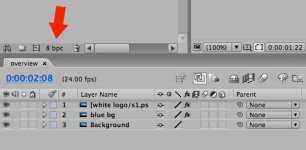
oh i thought you meant the bit rate where you can set the project to either 8, 16 or 32 which is located right above the timeline (see attachment)
where would i find the bitrate you're talking about? in the render que? if so, under which option?
here's an example of how my footage is rendering out: http://www.dirtymartinithemovie.com/video/dirty_intro_choppy.mov
Attachments
Last edited: