Question about Intensity Pro Card

Jim Brennan

VHS Member Old Skool
I had read somewhere that the Intensity Pro card may not support playback from a 24fps timeline. Can anyone verify or de-bunk this?

Also, I has also read that some folks had trouble with support for 720P P2 footage, although once the footage is on the Mac, I can't imagine why that would make a difference.

Thanks, I am looking at a used one today and want to make sure it fits my needs.
 
Okay, it seems to be true about the IP not supporting 24P playback, so since I will be monitoring RED footage via whatever card I get, it seems like the IP is a bad choice for me.

But I like the fact that it has analog I/O. I still have clients that bring me VHS or BETA SP to convert. Is there a card that does that, has 24P Compatibility, and (not likely) the convenience of HDMI monitoring for me to use my 720P HDTV as a low-cost monitoring solution?
 
Jim, I just installed one on my new Mac Pro, and the first thing I did was fire up my FCP project for my latest short film (still in post). I shot 720/24pN, editing in a 23.98 timeline (not using Raylight though - everything was brought into FCP using Log and Transfer). It played back perfectly to my HDTV via HDMI.

I think that covers everything :)
 
Another question is whether the card will downres a 1080P prores file for monitoring on a 720P HDTV....

That's usually how I edit Red footage.
 
The 24p issue with the IP card is only with capture via HDMI. If you shoot with an HV20 or HV30, you have to capture 24p material via firewire (but 1080i material can be captured uncompressed via HDMI). For monitoring your 23.98 timeline out to your HDTV, it's no problem.

If you can send me a few seconds of 1080p pro-res, I'll test it for you tonight. I have my IP card hooked up to a 720p Vizio. Email me: herbalmedia (at) gmail. I am 99% certain it will be fine, but best to double check.
 
Thanks, I will do that. Capture isn't a problem because I just get the files right off the HDD. Might still be hope for this cad yet :grin: thanks.
 
Will, even a 2 second file is 45 megs, so too big to e-mail. I tried to upload it to my site for you to download, but when I tried to download it, it gets all wiggy.

If you have another suggestion to get it to you, I'd be happy to try it.

Thanks again.
 
Hey Jim,

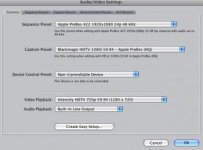
I'm using the settings in the screen capture attached below... It plays back your 1080p footage, but it appears to be cropped just slightly and there is some slight image degradation when it down-rezzes (sp?) to 720. I'm seeing jagged lines. It's not terrible, but not as high quality as you might need. The good news is that it plays back though, so might be worth the $350 (or less, if you get that used one) for all the other features.
 

Attachments

  • Picture 1.jpg
    Picture 1.jpg
    15.2 KB · Views: 0
No problem. I am interested to learn more about this card and its capabilities. I'm only editing DVCPro-HD right now, but hopefully bigger, better formats await...
 
DVCPro-HD is a kick-ass format.

I guess I should have realized this wouldn't be a problem. AFter all, I currently monitor SD through my firewire, into a camera, then out to a CRT that is most likely not 24P capable. So, I should have known that FCP had a pulldown fix.

Someone asked about this on REDuser as well and the response about the IP card being able to support broadcast only framerates was:
That doesn't really make any difference, because in Final Cut, 3:2 pulldown is added for real time previews, and in Color, well, there isn't any real time play anyway.
 
Got the card, set it up and all is good...except I can't figure out how to adjust my preferences for the card. It shows that you can set them for the one composite input or output to handle the whole load (in other words, just the single cable of consumer decks and TVs, not the 3-color cables of higher end stuff), in the manual. But I can't figure out how to actually change the settings. Right now all my analog output is in B and W. I looked in the apps and it has the disc speed clock and the On-air app, but no way to change the preferences on the card that I can see. Any suggestions?
 
Back
Top