
Navigation
Install the app
How to install the app on iOS
Follow along with the video below to see how to install our site as a web app on your home screen.
Note: This feature may not be available in some browsers.
More options
You are using an out of date browser. It may not display this or other websites correctly.
You should upgrade or use an alternative browser.
You should upgrade or use an alternative browser.
'film' grading, A1 + Letus Extreme
- Thread starter PaPa
- Start date


The technique that Jonathan and I have been using to correct skintone via Curve only works in certain situations and results a greenish cast that's somewhat unpleasant. I've been practicing with the secondary color correction tools in Premiere (the 3 Ways Color Corrector) and I've had a fair bit of success in isolating the skin tone for specialized correction. It's turned out to be a surprisingly easy to use tool but very powerful.
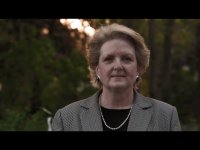
I've gone back and CC one of Jonathan's stills. The result is good in my opinion but it can be better with practice. The original still is on the left. As you can see, a good bit of the magenta/pinkish cast have been removed from the original. The trick is to target only those areas and desaturate them so they blend in with the normal skintone.

I've gone back and CC one of Jonathan's stills. The result is good in my opinion but it can be better with practice. The original still is on the left. As you can see, a good bit of the magenta/pinkish cast have been removed from the original. The trick is to target only those areas and desaturate them so they blend in with the normal skintone.
Last edited:

PaPa
Major Contributor
The technique that Jonathan and I have been using to correct skintone via Curve only works in certain situations and results a greenish cast that's somewhat unpleasant. I've been practicing with the secondary color correction tools in Premiere (the 3 Ways Color Corrector) and I've had a fair bit of success in isolating the skin tone for specialized correction. It's turned out to be a surprisingly easy to use tool but very powerful.
I've gone back and CC one of Jonathan's stills. The result is good in my opinion but it can be better with practice. The original still is on the left. As you can see, a good bit of the magenta/pinkish cast have been removed from the original. The trick is to target only those areas and desaturate them so they blend in with the normal skintone.
I wish i understood how to use the secondary color correction. I have read about it and it still does not make much sense to me. Those bars don't seem to do much when i play around with them so i don't know what effects what exactly. I too am using pp cs3
Jonathan, it's actually very simple to use. When I have a bit more time I'll post a grab of my settings. But the tool you want to use is the Three-way Color Corrector.
1)Apply the corrector, set your output to Mask instead of Composite. This shows you a matte of the area to be affected, initially it should be all white, indicating that the entire frame is selected.
2) Go to the Secondary Color Correction portion, there are 3 droppers, including one with a + and one with a - sign. Click on the leftmost dropper (the one without any sign) and select the portion of the image you wish to correct. Now you note that instead of an all white image you're getting smaller white outlines.
3)The principle is that you want to use the (+) dropper to select color tones that you want and the (-) dropper to subtract color tones that don't need correction. Keep using the (+) and (-) dropper until you arrive at a matte that covers your skintone area. You can also define this matte by Luma, Hue or Saturation values. Once you have come up with a matte that covers the area you want, switch the output back to Composite.
4) Now the affected area is split into Shadows, Highlight and Midtone areas, all of which can be adjusted individually. The controls for that is similar to those found in the Fast Color Correction tool and is pretty self-explanatory. The difficult part is figuring out which part of the mask the program considers Shadows, Highlight or Midtone and adjusting that.
1)Apply the corrector, set your output to Mask instead of Composite. This shows you a matte of the area to be affected, initially it should be all white, indicating that the entire frame is selected.
2) Go to the Secondary Color Correction portion, there are 3 droppers, including one with a + and one with a - sign. Click on the leftmost dropper (the one without any sign) and select the portion of the image you wish to correct. Now you note that instead of an all white image you're getting smaller white outlines.
3)The principle is that you want to use the (+) dropper to select color tones that you want and the (-) dropper to subtract color tones that don't need correction. Keep using the (+) and (-) dropper until you arrive at a matte that covers your skintone area. You can also define this matte by Luma, Hue or Saturation values. Once you have come up with a matte that covers the area you want, switch the output back to Composite.
4) Now the affected area is split into Shadows, Highlight and Midtone areas, all of which can be adjusted individually. The controls for that is similar to those found in the Fast Color Correction tool and is pretty self-explanatory. The difficult part is figuring out which part of the mask the program considers Shadows, Highlight or Midtone and adjusting that.

jls4
Veteran
Wow! what a great thread! Thanks for starting it and posting all of your findings. I noticed something myself the other day.
My wife was getting on me because she said the images that I had recently shot for a commercial didn't look "filmic" enough and looked more amature. d#mn - right? So I spent some time on the web - almost 6 hours yesterday and came away with a few tips. Hope these can help you guys.
There is so much to making the color look right that it's almost impossible to write it all down. But I think you'll have figured out a good piece of it already.
Two things I noticed: when shooting close the iris down to at least 5.6 on both the DOF and Camera. This seems to keep darker gray areas from reaching the camera as dark gray. Instead they come in closer to black. So your blacks are better. But you'll need more lights.
Next in post, easier to do in photoshop as a test. Start with a clean image - no push in any direction simply 5600K if outside or 3200K if inside. Take those images make sure the whites are correct. Then set your curve, slightly crushing the blacks maybe by 3 or 5. After the curve go to Variations. Pump the midtones lightly with red (I took the amount bar to 2 instead of Photoshop starting in the middle [what I would consider 3] and clicked the Red twice.) Then I selected the Darks and went to Blue and clicked it 4 times.
And I almost fell out my chair because it looked so much better than what I had before. (at least to me) I don't know if this has anything to do with the way light is picked up. Remember you have infra-red and ultraviolet. So I didn't know if the dark areas tend to not get enough blue and the mids tend not to get enough red because of the way light reacts.
I got the tip by "listening between the lines" of a tutorial on how to use Magic Bullet's Colorista. The guy said at the end - "Oh and let me bump up my red mids and take these dark areas to blue - make them look a little more filmic" So I tried ti in Photoshop and my best and worst critic - my wife - was pleased.
So don't know if any of what I said is right - but it looks good to me and I'll be at least thinking about it from now on.
My wife was getting on me because she said the images that I had recently shot for a commercial didn't look "filmic" enough and looked more amature. d#mn - right? So I spent some time on the web - almost 6 hours yesterday and came away with a few tips. Hope these can help you guys.
There is so much to making the color look right that it's almost impossible to write it all down. But I think you'll have figured out a good piece of it already.
Two things I noticed: when shooting close the iris down to at least 5.6 on both the DOF and Camera. This seems to keep darker gray areas from reaching the camera as dark gray. Instead they come in closer to black. So your blacks are better. But you'll need more lights.
Next in post, easier to do in photoshop as a test. Start with a clean image - no push in any direction simply 5600K if outside or 3200K if inside. Take those images make sure the whites are correct. Then set your curve, slightly crushing the blacks maybe by 3 or 5. After the curve go to Variations. Pump the midtones lightly with red (I took the amount bar to 2 instead of Photoshop starting in the middle [what I would consider 3] and clicked the Red twice.) Then I selected the Darks and went to Blue and clicked it 4 times.
And I almost fell out my chair because it looked so much better than what I had before. (at least to me) I don't know if this has anything to do with the way light is picked up. Remember you have infra-red and ultraviolet. So I didn't know if the dark areas tend to not get enough blue and the mids tend not to get enough red because of the way light reacts.
I got the tip by "listening between the lines" of a tutorial on how to use Magic Bullet's Colorista. The guy said at the end - "Oh and let me bump up my red mids and take these dark areas to blue - make them look a little more filmic" So I tried ti in Photoshop and my best and worst critic - my wife - was pleased.
So don't know if any of what I said is right - but it looks good to me and I'll be at least thinking about it from now on.

Norbert
Well-known member
I used your images to try the oh so modern blue-tint-with-preserved-skin-tones look. There is nothing special about the skin tones themselves, but I think they get that extra punch from the surrounding blue tint.
Oh, and nice light by the way. Was it natural for these shots too?

Oh, and nice light by the way.
Was it natural for these shots too?
Stu from prolost/orphanage fame shows you how to do some secondary corrections to correct skintones while doing extreme grading. http://prolost.blogspot.com/2008/03/save-our-skins.html
Norbert
Well-known member
If you have Photoshop CS3, you can do it. That's what I used. All that is needed is two hue/sat adjustment layers, one for bumping up the red saturation to +80 and one set on colorize with a blue tint (and an opacity of about 65-70% to let the skin tones shine through).
PaPa
Major Contributor
the problem is that i try using the secondary color correction, with the level bars, the huge, luminance, saturation, etc.. and no matter how i drag the arrows, it doesn't affect the image one bit.
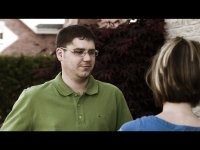
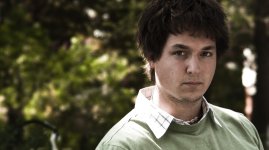
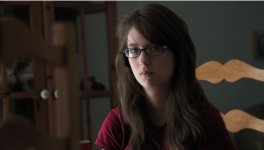
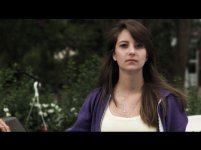
Here are some stills from todays shoot. It's for a video assignment in school "Cinema and Architecture"
Shot with the canon XH A1, Letus Extreme, Nikon Primes, Vision02 preset.
Color corrected in post, curve adjustment and then brought the blues up in the shadows and crushed the blue's in the highs (more yellow )


Here are some stills from todays shoot. It's for a video assignment in school "Cinema and Architecture"
Shot with the canon XH A1, Letus Extreme, Nikon Primes, Vision02 preset.
Color corrected in post, curve adjustment and then brought the blues up in the shadows and crushed the blue's in the highs (more yellow )


Levels and curves are very different. You can do much more with curves than you can possibly do with levels.
maybe, if you didn't know how to use levels. they both do the same thing. just with a different interface.
Norbert
Well-known member
Can you choose which part of the tonal range you want to affect with levels only?maybe, if you didn't know how to use levels. they both do the same thing. just with a different interface.
Can you choose which part of the tonal range you want to affect with levels only?
you can affect shadows, mids, highs, in seperate rgb. you can also affect white point, black point. Basically everything you can do in curves but with a histogram so you can check for any blown bits. i really only use it for color matching clips though. for grading i prefer to do it in after effects with colorista.
PaPa
Major Contributor
I'm afraid that is not exactly correct bimdas.
"When you move the center triangle
, what you are doing is identical to
clicking on the very center in the Curves command and moving it up or
down. The Curves command allows oyu to do far more, however. It allows
you, for example, to increase or decrease contrast, to lighten only the
shadows without affecting the hilights, to lighten only the midtones
without affecting the hilights or shadows, to increase contrast only in
hilights, and so on, and so on. None of these can be done with Levels."
Levels work linearly, curves work, as, well, as it says, curves. Very different workflow, very different results. You can achieve anything with curves that you can achieve with levels, but what you can achieve with curves is nothing that you can achieve with just using levels.
"When you move the center triangle
, what you are doing is identical to
clicking on the very center in the Curves command and moving it up or
down. The Curves command allows oyu to do far more, however. It allows
you, for example, to increase or decrease contrast, to lighten only the
shadows without affecting the hilights, to lighten only the midtones
without affecting the hilights or shadows, to increase contrast only in
hilights, and so on, and so on. None of these can be done with Levels."
Levels work linearly, curves work, as, well, as it says, curves. Very different workflow, very different results. You can achieve anything with curves that you can achieve with levels, but what you can achieve with curves is nothing that you can achieve with just using levels.