How to get Firebox & Premiere Pro working together?

Mavoz

Well-known member
Hi, I'm working on a documentary at the moment and am attempting to record my keyboard + voice within the Adobe Premiere Pro 2 timeline directly. (Want to be able to directly match my playing and voice to the 'mood' of the vision.)

Problem is I can't get my Presonus Firebox and Premiere Pro 2.0 to allow me to record audio from it....

Cubase LE works perfectly..but I'd love to utilise Premiere instead.


Any clues?


Steps tried:

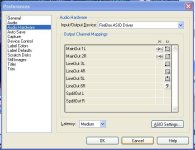
1.) Gone to preferences-Audio setup and chosen audio hardware PreSonus ASIo driver Firebox
2.) I can now playback audio from the timeline through the firebox's headphones jack..ie. Premiere is talking to firebox as an external solution.
3.) I have gone to audio mixer and clicked on track and enabled track for recording. Track is Stereo and keyboard is connected in Stereo.
4.) I have tried choosing the different inputs on the Audio track...I can see all the Firebox inputs listed there. Absolutely none of these allow any sound to come through.

Am I missing some magic 'let sound work' button?


Can anyone figure out what I am missing? Any suggestions of what to try? Is Premiere capable of capturing sound in this fashion or do I have to use Cubase LE to record instead?

Thanks!
 
Hi, I'm working on a documentary at the moment and am attempting to record my keyboard + voice within the Adobe Premiere Pro 2 timeline directly. (Want to be able to directly match my playing and voice to the 'mood' of the vision.)

Problem is I can't get my Presonus Firebox and Premiere Pro 2.0 to allow me to record audio from it....

Cubase LE works perfectly..but I'd love to utilise Premiere instead.


Any clues?


Steps tried:

1.) Gone to preferences-Audio setup and chosen audio hardware PreSonus ASIo driver Firebox
2.) I can now playback audio from the timeline through the firebox's headphones jack..ie. Premiere is talking to firebox as an external solution.
3.) I have gone to audio mixer and clicked on track and enabled track for recording. Track is Stereo and keyboard is connected in Stereo.
4.) I have tried choosing the different inputs on the Audio track...I can see all the Firebox inputs listed there. Absolutely none of these allow any sound to come through.

Am I missing some magic 'let sound work' button?


Can anyone figure out what I am missing? Any suggestions of what to try? Is Premiere capable of capturing sound in this fashion or do I have to use Cubase LE to record instead?

Thanks!
Not a problem to do it in Premiere. You have probably turned on 'record enable' as you should but forgot to actually hit 'record' so all you get is the playback track. On the mixer panel, lower left along the bottom is a bright red button. Click it, then hit the transport arrow for play. 3 steps ... enable record on the destination track, turn on record for the system, play.

See the topic "To Record A Voice-Over" in the Premiere Pro help.
 
Hi Steve,

Firstly..thank you for taking the time to reply...it is greatly appreciated...

ok...I'm getting closer now..just one final hurdle...I can't actually here anything whilst recording...only after recording!

I had to press enable record and choose record button on the mixer..but also choose option "Meter inputs only"

When I press record I can now record and see the levels flying up and down...but no sound comes out anywhere...

I can however still record...and then do hear the recording on playback afterwards....

If I turn off the option "meter inputs only"...then I no longer can see the levels moving either.....

Any clues?
 
Play with the firebox mixer, that might solve the issue. Headphones go into the firebox, instead of the computer.
 
Hi Steve,

Firstly..thank you for taking the time to reply...it is greatly appreciated...

ok...I'm getting closer now..just one final hurdle...I can't actually here anything whilst recording...only after recording!

I had to press enable record and choose record button on the mixer..but also choose option "Meter inputs only"

When I press record I can now record and see the levels flying up and down...but no sound comes out anywhere...

I can however still record...and then do hear the recording on playback afterwards....

If I turn off the option "meter inputs only"...then I no longer can see the levels moving either.....

Any clues?

Can't help you much there as we have different setups and I don't know about the I/O routing in the Firebox. I have an Echo AudioFire interface. I can confirm that with it Premiere allows you to playback one audio track and monitor it while simultaneously recording to a second audio track. The master output meter showed both the music playing in the background and my voice unless I turn on "Meter Inputs Only" in which case it only shows my voice on the meter (but I hear both). In the audio preferences page did you set the "mute input during timeline recording" checkbox on? That silences monitoring the recording input to prevent feedback in the speakers.
 
Can't help you much there as we have different setups and I don't know about the I/O routing in the Firebox. I have an Echo AudioFire interface. I can confirm that with it Premiere allows you to playback one audio track and monitor it while simultaneously recording to a second audio track. The master output meter showed both the music playing in the background and my voice unless I turn on "Meter Inputs Only" in which case it only shows my voice on the meter (but I hear both). In the audio preferences page did you set the "mute input during timeline recording" checkbox on? That silences monitoring the recording input to prevent feedback in the speakers.

Thanks again Steve...I think I've kind of got it going with your help!

I ended up going into the Software Firebox Mixer control and changing the Mixer Output to say Main instead of Bypass...don't totally understand what I'm doing here though...but it does get it to work!

Certainly recording/monitoring and adjusting levels with Cubase LE is less complicated than Premiere...plug in mic...set track to record...adjust slider...and bob is your uncle!

Premiere seems to need the wind blowing in the right direction...one holding their tongue on the right angle in their mouth..and about 45 different settings all aligned in harmony!!

Anyway thanks again for your help..it does indeed work and offers potential for some good keyboard backing tracks! Much appreciated.
 
Glad it's working for ya. I think my interface could be simpler than yours to setup for tracking like you want to do. Full duplex, 8 analog and 2 digital inputs, 8 analog and 2 digital outputs. Each output pair can take its signal from playback from the computer with any, all, or none of the inputs. I don't send any of the inputs directly to any outputs normally so all the inputs go to the computer and all the outputs get playback from the computer only. no direct monitoring in the interface itself. All I had to do was connect my mic panned equally to Inputs 1/2 and put my headphones on Output 7/8. I placed my playback audio on Premiere's Audio Track 1 and routed its output to the Master bus. I set Audio Track 2 to take its signal from Input 1/2 and send its output to the Master. I set the Master to send its signal to Output 7/8. Arm Audio 2 for recording, hit play, and you're in business - Audio 1 plays, Audio 2 records, and you hear a mix of both in your cans. ( I actually use a Mackie 1642 to handle all the I/O patching, record level setting, etc with the interface. If I wanted to, I could have bounced the playback through the board and mixed it with the mic before recording the mix onto the new track.)
 
Getting Premiere TimeLine audio through Firebox

Getting Premiere TimeLine audio through Firebox

I just got my FireBox working but not hearing timeline audio through the FireBox. I see you have that working.

I did do EDIT | PREFERENCES | AUDIO HARDWARE and select FireBox ASIO Driver but it's still coming out of my cheap speakers.

On that page it shows Output Channel Mappings and I think that's right.

I just noticed when I close Premiere and it gives me the "save project' beep that comes through the FireBox, but that is more of a Windows System sound which are all working that way.

So I'll ask a version of your question: Am I missing some magic 'let sound work' button?!

Thanks,

Barry Friedman

Matrox x.100
Premiere Pro 1.5
FireBox by PreSonus
Windows XP
Hi, I'm working on a documentary at the moment and am attempting to record my keyboard + voice within the Adobe Premiere Pro 2 timeline directly. (Want to be able to directly match my playing and voice to the 'mood' of the vision.)

Problem is I can't get my Presonus Firebox and Premiere Pro 2.0 to allow me to record audio from it....

Cubase LE works perfectly..but I'd love to utilise Premiere instead.


Any clues?


Steps tried:

1.) Gone to preferences-Audio setup and chosen audio hardware PreSonus ASIo driver Firebox
2.) I can now playback audio from the timeline through the firebox's headphones jack..ie. Premiere is talking to firebox as an external solution.
3.) I have gone to audio mixer and clicked on track and enabled track for recording. Track is Stereo and keyboard is connected in Stereo.
4.) I have tried choosing the different inputs on the Audio track...I can see all the Firebox inputs listed there. Absolutely none of these allow any sound to come through.

Am I missing some magic 'let sound work' button?


Can anyone figure out what I am missing? Any suggestions of what to try? Is Premiere capable of capturing sound in this fashion or do I have to use Cubase LE to record instead?

Thanks!
 

Attachments

  • Premiere_Audio.jpg
    Premiere_Audio.jpg
    39.2 KB · Views: 0
OK... next time I make a change like that, it doesn't work, and I put up a post before RESTARTING PREMIERE, can someone kick me?

So the moral of the story is it works fine, just restart Premiere after making the setting!

Barry
 
Check the audio mixer settings!

Check the audio mixer settings!

Hey! I found something else.
My problem was that I had sound on the left only after setting to ASIO FIREBOX.

Turns out that the Audio Mixer pans all the way left when creating a new track. Simply recenter it, and make sure the dB level is not at -100, like mine was.

Works like a charm now.

Hurray!:dankk2:
 
Back
Top