How to get clean shadows footage with the DVX

davide

Well-known member
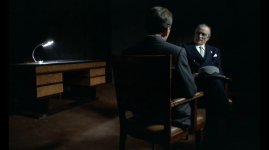
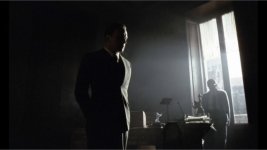
I'm embarking on a project where I'll be playing a lot with light and shadow ala the radio station scene in The Conformist. I was wondering what is the best way to get relatively noise-free shadows on the DVX. Would it be to underexpose the areas I want to be shadows by one or two stops and then crush them in post? Or would it be better to underexpose them one or two stops then crush the blacks in camera with the master pedal adjustment?

Is the master pedal changing the raw image data? If so would that make it better than adjusting contrast in post?

thanks in advance
davide
 

Attachments

  • conformist.jpg
    conformist.jpg
    57.4 KB · Views: 0
  • screenshot_04.jpg
    screenshot_04.jpg
    184 KB · Views: 0
My suggestion is a bit controversial... But I'll throw this out anyways because it IS working with my DVX100 Andromeda.

If your shooting under tungsten, put 90ccM and 80A in front of your lens, white balance manually, then then shoot with those filters on.

In a nut shell, this forces the red and blue channel gain down to the level of the green channel, and then optically white balances the camera.

I haven't done extensive testing with this using DV though... but like I said, I'm just throwing it out there.

As for underexposing, thats a bad idea. As for crushing in camera, its highly debatable.

Shoot some tests.
 
Hope I'm not hijacking this thread... but ...

cardmaverick, I've got a shoot coming up where the director wants as much shadow play as possible (mafioso meetings in dark rooms), yet still retain detail. My thinking was smoke some of the scenes to provide volumetric light, and use no fill-lights (all harsh lights, lower wattage, but only one or two key lights to isolate these scenes). I usually use either the Viper LUT or full 16bit DR LUT to capture with - using your method above, would there be enough light to capture the scene, or would I have to light it normally as if film, use a proc-amp and adjust the contrast to pull the talent out? The scenes davide included are close to what the director wants to achieve - and I finally get a chance to use the Andromeda.
 
You might want to repost this question in the lighting section. I'm in the planning stages of a shott that may be done this way as well, so I'll be checking in.

My best guess right now would be to shoot it slightly overexposed, but with plenty of contrast in the highlights, then crush blacks in post and probably desaturate a bit.
 
Thanks Ted. I'm not sure how to re-direct this post to lighting, unless you mean repost it also in lighting (won't someone complain?). I'm not even sure if it goes there, as the question is directed more towards Andromeda, LUTs and filters that cardmaverick suggested. I really didn't want to hijack this thread (I'm also interested in the non-Andromeda suggestions as well).

However, there is no active place to post Andromeda specific questions or solutions.

As far as the shoot...

I'm torn between crushing the blacks in post (pretty much as you described in your post), or going for detail in the shadows - but overall I'd want it as noise-free as possible. cardmaverick has achieved that in several screen-grabs I'd seen of his - amazing really. I think he used a linear LUT for capture and has developed a comprehensive method of getting there. I'm pretty sure he uses a lot of light, but not certain if he's shot a similar scene as I intend to while still using all that light using the Andromeda and his recommendation above.

Apologies if this is an "out there" question, and for talking about cardmaverick as if he's not here (seriously - sometimes I think I just need more sleep).
 
Hi John - sorry if I was a little unclear - I meant to suggest that davide ask again in the Lighting forum, not you.

Sadly, I know little to nothing about Andromeda except that it's a DVX100 HD workflow product (right?), and am scratching my head trying to remember what an LUT is.

Always willing to be educated though : )

BTW your sig reminds me of another quote: "Never try to teach a pig to sing. You will waste your time and annoy the pig."
 
John,

I do not recommend any of the original Reel Stream LUTs with Full DR 1.6 being the exception.

I strongly recommend you use my "nuzzaco_contrast_0" LUT for best results.

Render out as "soft" which is basically unsharpened, and use the "none" LUT. Do your sharpening in a better program like AE, this way you have better control over keeping signal noise from being accentuated.

My tungsten filtering setup is a bit heavy on light loss, but if you want shadowy scenes like the above, its not very hard to create that even if you don't have a high sensitivity. I recommend HMI, you need less filters, and you still get very clean footage.

Andromeda is a big luxury because you have a full 9.5 stops, so I say be bold and let the contrast be there when you shoot, you can brighten up if you need to.
 
(grins...) both quote's work, in a strange sort of way.

Ted - thanks. I see davide already posted the question in lighting.

A LUT (Look Up Table) is a graphical representation of the darkest color value to the lightest color value, in the Andromeda's case, for each channel (RGB). At least, this is my understanding. The Andromeda system allows you to load a LUT into the camera's modifications memory in the camera, another one for the monitor to view it's output (this would be to correct the image, as it'll appear milky in straight capture), and another LUT to render the captured footage with. Again, this is my understanding of it. Although I'm pretty heavy in electronics, I haven't reverse-engineered it to know for certain.
 
Chris - I agree. That one and the Viper LUT are the only ones that seem to provide acceptable results (of course, I'm not nearly as knowledgeable in using it as you are). If I remember right (sorry - been having a lack of sleep lately due to my day job - brain isn't working as fast as it should). You worked on a modified linear-LUT, is this that? I've been using the "sharpening" slider all the way to the right (full sharpen), and have seen artifacts - but haven't been certain it was due to the Scuplter-HD's sharpening algorithm or the way I was lighting or capturing. Actually haven't tried "soft". The "none" LUT is what I've been rendering with (and using as a monitor LUT).

Currently, I have FCP2 and Shake (UNIX guy - don't own Windows), however I've been using no color correction but have been using a combination of a proc-amp adjustment and a contrast adjustment to dial in the captured images. Doing it that way produces somewhat too-colorful images, and I usually have to dial down the saturation. It also seems to produce an even grain-like noise in darker/shadowy areas though (approaching the level of mosquito noise), which I'm trying to eliminate. I haven't been using any sharpening in external programs yet - assuming it'd harden the edges while leaving non-edges soft.

I'll try your way and see what happens.

I've downloaded your "nuzzaco_contrast_0" LUT and tried it (this was, several months back if I remember right - sorry - day job is making me kinda tired), and it wouldn't load properly, showed a really color-distorted image. I'd assumed I screwed up somewhere along the line but didn't re-try it (it was probably my download).

HMI - hadn't thought of using that amount of light. 2K? Higher?

I'm still a bit nervous about using Andromeda for a client, although it really excites me when I see the capture. I really want to show it off, but I'm also leary of wasting production time. That will probably go away I'm sure, when I get images a tad closer to what you seem able to pull off.
 
The reason why your image looks "color-distorted" with my LUT is because you probably are not using the monitor LUT. Every monitor out there applies a gamma curve that expects footage with an inverse of what it applies. Linear, or "short linear" LUTs like mine do not adjust the gamma curve, thus the image gets "crushed" by the monitor and looks really dark. All the data is there.

Another note, be sure you are in 10 bit mode. My LUTs are made for 10 bit.
 
That would explain the color distortion I was getting. Using 12Lin to 16Log and none for the monitor LUT. I need to go back and re-read your investigative posts until I understand them fully. I'd love to see the schematics of the modification - might be able to build an attachment I have in mind, though I might not be able to sell it.

Another forum member and yourself had been describing several work-flow methods that extended into post production (each differed quite a bit). Yours included lighting requirements. The entire chain (lighting, setup, capture, capture-processing, storage, editing, effects, color correction, final post) is somewhat more critical than working with DV, especially if you're trying to reduce or eliminate noise in each channel. Your method of reducing noise in the red and blue channels to be gain-matched with the green made the most sense to me, and from what you've shown, it's also the cleanest.

It's also the most problematic and work-intensive to deal with (it's like working with film frames - and the heat from the lights is problematic - wish the Lumen was still being made...). Keeping the director excited about what it will look like when finished is at times, daunting - time for me to do tests so he can better see where it's going. I need to post some grabs as well. Guess a trailer is in order. So far, he likes what he sees, even if I'm getting a low-level film-like grain - but being the kind of guy I am, I want to go further, as I think we can get pretty iconic shots where it may be difficult to believe they came from a lowly DVX.

Which version of Sculpter-HD are you using? I've got 1.1.0, but Juan has never responded to any emails I've sent and I don't know if he'll be allowed to update (unless I've got the last update).

In one of the posts above, you mentioned a 90ccM filter - was that the series of three magenta filters you experimented with around June last year (I think - making it four filters in front of the lens - I've only got two 4x4s I can add to the mattebox I have right now, and that's coming off of a Letus EX, although I'm thinking about cutting resin and making my own filters. I almost have to shoot wide open to see the set - f1.8/f2.0.)?
 
But Andromeda records raw image data right? I'm wondering if I'm going to be shooting with the DVX100 which burns in white balance and sharpening that I should be doing more in camera. Kind of like shooting RAW vs. JPEG on a DSLR. When I shoot on a DSLR I just make sure that the exposure and focus is right and leave the rest till later because I can. When shooting JPEG I try to make sure I get all the colors I want right when I take the picture since I have much less data to push and pull around in post.

I was wondering if I should work the same way with the DVX.

davide
 
davide, the only problem I see with doing more in camera, is that it can't be undone. You've already altered what the data looks like before it can be processed after capture, and if the information isn't there, there's nothing to work with. Others may and do disagree, and in the end it's an artistic-freedom thing. The pictures you'd posted from "The Conformist" were very noise free in the shadows - and shot on film (don't know what film stock they used). I suspect lighting and lens choices in this case makes all the difference (including smoking the set in some shots).
 
Thanks John. Is there a method of shooting with the DVX that will give me the most room to work with in post? I'm going to be shooting tests tonight and I'm wondering what different methods I should test out.

davide
 
davide, I am by no means one of the experts here - but I'll do the best I can.

The bottom line for me is to expose to the right (this gets more information in the capture so there's more information to process in post).

I'd light the set with more light than you may be used to, use ND filters, try to get a slightly over-exposed shot but don't blowout the highlights if possible (if is starts to blow out, close the iris a click or two or add an ND filter - but then you may have to adjust the placement or wattage of your lights - its kind of a moving target), set the fstop to around 5.6 - maybe a tad more open) focus as tightly as possible, and adjust the contrast in editing.

There will be heat, and probably noise problems you'll have to solve along the way (you're sound crew will not like you... some lights and fans are noisy - unless you're using CFLs, you'll have a pretty hot set). The shots will look too bright on the LCD - but as long as there's no blowouts in the highlights, you'll have as much information in the capture as you can get to crush the shadows and still retain detail and lesson the noise that the camera's sensors and in-camera processing circuitry and algorithms produce (you'll see mosquito noise in the shadows - this is what you're trying to reduce). It's kind of a balancing act between too much gain in some channels, (leaving you with noise), and with how the camera processes what light you're letting in. Use your zebras.

I don't know what you're using for lights, temperature, wattage, placement, distance the lights are from the principal, etc. nor what you're editing with. I'm also assuming you're not using a 35mm adapter or filters (more light loss). It's a long chain, and each element adds to the composition - in post, it's sometimes in a positive way (more information captured), and sometimes in a negative way (less information captured).

There are incredible people on this board who have a wealth of knowledge, and better yet, have a wealth of experience to draw on. Not all of them will agree with each other on what's the best way. It took me a while to understand why. Thats because with so many variables to work with, there is more than one way to achieve similar results - and as well, there is more than one way to not achieve those results. Experiment as much as you can (what you learn from that - that's your tool chest).

hope that helps
 
Thanks for the advice, John. It makes a lot of sense. I've read that CMOS sensors record the most information in the brightest areas that are just under being overexposed. The DVX's 3ccds work the same way?

Would your advice for shooting the scene to get the look in those grabs be this then: make sure that everything is properly exposed and just keep an eye on the ratios of brightness between the areas I want to eventually be crushed and the ones I want to stay well lit.
 
Something like that. Yes. I haven't worked out yet how many stops below the highlights the shadows should be, where I still want to retain detail. I, like yourself am still learning a lot. Getting that number is useful, and can help speed up the set up and capture time on set - then again, if actors and the camera itself is moving, doing test shots of the whole track as they and you are rehearsing is pretty important - might find area's that need lighting adjustments, and find some areas in a moving scene where you can't really do anything with. This, of course is for interior setups - where light is more controllable. I haven't tried to tackle the exterior problems yet.
 
Back
Top