
Navigation
Install the app
How to install the app on iOS
Follow along with the video below to see how to install our site as a web app on your home screen.
Note: This feature may not be available in some browsers.
More options
You are using an out of date browser. It may not display this or other websites correctly.
You should upgrade or use an alternative browser.
You should upgrade or use an alternative browser.
Modeling a building/sky scrapper in C4D?
- Thread starter triplej96
- Start date

Gord.T
Still "Senior Member"
Maybe model the ground floor first.
The upper levels are usually just rows & layers of windows.
For that maybe model one area around a window with the ledge ect. Clone that several times until you have one floor. Then clone each floor and stack them up. You could hand clone them or use a matrix or mograph.
Later you could go back & put a couple lights in some random windows.
//Can you show a photo of a building you had in mind?
The upper levels are usually just rows & layers of windows.
For that maybe model one area around a window with the ledge ect. Clone that several times until you have one floor. Then clone each floor and stack them up. You could hand clone them or use a matrix or mograph.
Later you could go back & put a couple lights in some random windows.
//Can you show a photo of a building you had in mind?
Last edited:

triplej96
Veteran
Maybe model the ground floor first.
The upper levels are usually just rows & layers of windows.
For that maybe model one area around a window with the ledge ect. Clone that several times until you have one floor. Then clone each floor and stack them up. You could hand clone them or use a matrix or mograph.
Later you could go back & put a couple lights in some random windows.
//Can you show a photo of a building you had in mind?
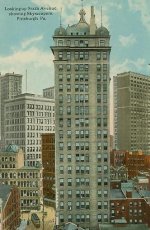
Something simillar to this minus all the extra parts on top of building.
Thanks Raptor.
Attachments
oneinfiniteloop
Veteran
Depending on how you intend to use the model, you can cheat a lot of it with bump maps and textures with minimal model. Obviously the closer you get to the building the more detail you need.
Modeling to scale will help with realism, and break it down into parts. It's mostly in the textures though, that will really sell it.
Modeling to scale will help with realism, and break it down into parts. It's mostly in the textures though, that will really sell it.
Gord.T
Still "Senior Member"
Here are several tutorials on creating buildings & city blocks to get started.
Those techniques can be expanded upon as you need more detail.
Included are instruction pdfs and project file downnloads.
How to Create City Blocks
Camera Animation through a City
Close up Detailed Building for Camera Close-up
Creating Detailed Buildings for City Scene
source & more C4D tutorials...
http://www.maxoncomputer.com/tutorial_search.asp
Those techniques can be expanded upon as you need more detail.
Included are instruction pdfs and project file downnloads.
How to Create City Blocks
Camera Animation through a City
Close up Detailed Building for Camera Close-up
Creating Detailed Buildings for City Scene
source & more C4D tutorials...
http://www.maxoncomputer.com/tutorial_search.asp
triplej96
Veteran
Here are several tutorials on creating buildings & city blocks to get started.
Those techniques can be expanded upon as you need more detail.
Included are instruction pdfs and project file downnloads.
How to Create City Blocks
Camera Animation through a City
Close up Detailed Building for Camera Close-up
Creating Detailed Buildings for City Scene
source & more C4D tutorials...
http://www.maxoncomputer.com/tutorial_search.asp
Thanks Raptor just what I was looking for. I'm very excited to get started. I sware 3d model/animation is so fun and addicting not to mention I can't wait to integrate it with AE.
thanks much!
Josh
Gord.T
Still "Senior Member"
No problemo.
Here's a very simple one I just did in about 1/2 hour using your photograph.
I used the photo as a texture on a cube.
Then used the Mograph cloner with a Random Effector to vary the heights.
Then used a paint program to adjust the color.
If I used a detailed model, or several and did some compositing, well you get the idea. I'll have to try another one.
//If you have mograph and would like this scene file, left me know and I'll upload it somewhere.
But I think those tutorials will be fine.

Here's a very simple one I just did in about 1/2 hour using your photograph.
I used the photo as a texture on a cube.
Then used the Mograph cloner with a Random Effector to vary the heights.
Then used a paint program to adjust the color.
If I used a detailed model, or several and did some compositing, well you get the idea. I'll have to try another one.
//If you have mograph and would like this scene file, left me know and I'll upload it somewhere.
But I think those tutorials will be fine.
triplej96
Veteran
No problemo.
Here's a very simple one I just did in about 1/2 hour using your photograph.
I used the photo as a texture on a cube.
Then used the Mograph cloner with a Random Effector to vary the heights.
Then used a paint program to adjust the color.
If I used a detailed model, or several and did some compositing, well you get the idea. I'll have to try another one.
//If you have mograph and would like this scene file, left me know and I'll upload it somewhere.
But I think those tutorials will be fine.
Seriously wow Raptor very nice for that short of time and very close to what I want! Wish I did have mograph I just have XL Bundle. So I guess the scene file wouldn't work for me since I don't have Mograph. I would love to take a look at C4D.obj file of the building if you had one. Your work along with Anhars and few others have really inspired me to get into 3d.
I'll be starting my project tonight. Also thanks for that maxon link I didn't know it existed.
great work.
Last edited:
triplej96
Veteran
I sent a PM.
Those tutes are a little old so some things in C4D have been changed since then.
Yeah I noticed some of the things were outdated. I was mostly intrested in just seeing how you applied the picture as a texture what methods you used. I think it looks great.
josh@joshjohnsonfilms.com
thanks again

twocik23
Veteran
triplej96
Veteran
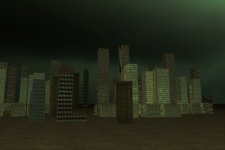
My first attempt.....It isn't great or very realistic by any means yet but it does make me fool good to at least complete something and animate it. This is my first C4d Render so take it easy lol. Thanks to Raptor for all the links and help.
Attachments
Last edited:
triplej96
Veteran
Not bad for your first attempt, I'd play with your lighting and settings a little bit more. Now you've got me wanting to try....
Thanks for the tips I plan to. This stuff is freaking addicting.
Gord.T
Still "Senior Member"
Looks like you did everything right. Umm, here's one I did just to give an idea of how to take it a bit further. Yours is right so far so dont take this wrong.
It's just adding to what youve done already.
I used a single B&W window as an alpha and placed that on a cube. Then scaled the texture to make the windows cutouts like in the tutorial.
For the relection in the glass I inserted another cube 'inside the building' with a plain white color. Reflection channel set to 100%. I also had too give relection to the building material, weird. To light the reflections I used
a light placed 'inside & middle' of the buildings with shadowing turned off. That allows the reflections of all buildings to see the light. It gets worse but thats all I'm saying for now. But that mght help.
I can send a semi-block portion of the scene C4D file to you to play with if you want.
You'll note that the first image has a little too much transparnecy.

The image below had the grain & blooming added in photoshop.
Cars/road area added in post with alphas as seperate renders.
Getting that reflection look is a bit more complicated though.
Still needs a little work in making it look more random but I learned what I wanted to.

It's just adding to what youve done already.
I used a single B&W window as an alpha and placed that on a cube. Then scaled the texture to make the windows cutouts like in the tutorial.
For the relection in the glass I inserted another cube 'inside the building' with a plain white color. Reflection channel set to 100%. I also had too give relection to the building material, weird. To light the reflections I used
a light placed 'inside & middle' of the buildings with shadowing turned off. That allows the reflections of all buildings to see the light. It gets worse but thats all I'm saying for now.
But that mght help.I can send a semi-block portion of the scene C4D file to you to play with if you want.
You'll note that the first image has a little too much transparnecy.
The image below had the grain & blooming added in photoshop.
Cars/road area added in post with alphas as seperate renders.
Getting that reflection look is a bit more complicated though.
Still needs a little work in making it look more random but I learned what I wanted to.