FCP QT Video Has Jagged (Interlaced?) Lines! Need this to work for festivals!

JoshuaK

Member
(Err, need this to work for festival applications!)

I am having trouble exporting (via Compressor) a clean version of my short film. I've tried a number of things but it always ends up with jagged horizontal (interlaced?) lines in areas where there is motion in the frame.

Here's background info:

Shot on super-16mm. Telecined at Fotokem, where they delivered back on HDCAM and DVCAM (which I'm using for the edit). I think they laid it out at 29.97fps even though it was shot at 24fps.

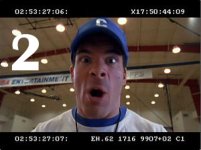
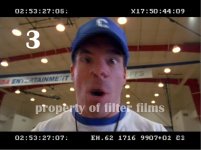
The reason I think this is in IMAGE #1:

DVCAM timecode in UPPER left runs at 24fps.
DVCAM timecode in LOWER left runs at 30fps (or 29.97).

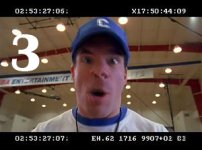
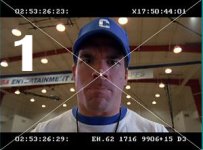
It looks fine in FCP in a 29.97 timeline as shown in IMAGE #2 (though when my editor originally put it into a 24fps timeline, it had this same line-blurring interlace-like problem).

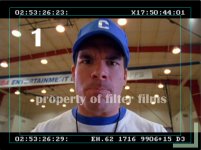
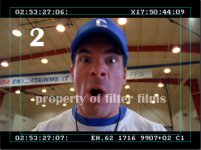
When exported as a QT movie (to get feedback from a colleague), movie now has this line-blurring issue usually when there's any kind of movement as shown in IMAGE #3.

Settings for Compressor were h.264 LAN (bit rate dropped down to 1000), with framerate at 29.97 and keyframes every 15 frames (upped from every 150). Frame re-ordering is checked.

Subsequent export tests also left same problem. Trying switching lower/upper fields. Also tried exporting at 24fps in Compressor. Also tried placing it back in a 24fps timeline (which showed jagged horizontal lines even in FCP sequence) and then exporting via Compressor.

I need to be able to send out a clean copy for festivals! I would like to know what I'm doing wrong with export settings.

Thanks fellas,

Joshua
 

Attachments

  • tcsample.jpg
    tcsample.jpg
    85.6 KB · Views: 0
  • fcpsample.jpg
    fcpsample.jpg
    80.5 KB · Views: 0
  • qtsample copy.jpg
    qtsample copy.jpg
    81.4 KB · Views: 0
DVCam is going to be at 29.97, HDCam is going to be at 24 (well hopefully), so if you're editing with the DVCam then you should be editing at 29.97.

If you're seeing interlacing lines/problems on a computer monitor, then don't worry about it. Computer monitors aren't meant to be used for QC and really don't handle that stuff properly. Do all of your QC on a proper (broadcast) monitor.

What are you trying to send to festivals exactly? A DVD or a tape? If you're wanting to send a really nice clean DVD, then I'd do a match back to the HDCam (which should be at 24) and then down convert from that to SD 24p and make a 24p DVD that way. HD to SD down convert DVDs look great from ones I've done and seen. Also, if you author it out at 24p, you save space and can then increase your data rate.

cheers.
 
The Three Sample Photos - Larger Size

The Three Sample Photos - Larger Size

As requested, here are the sample files.
 

Attachments

  • tcsample-1-copy.jpg
    tcsample-1-copy.jpg
    189.6 KB · Views: 0
  • fcpsample-1-copy.jpg
    fcpsample-1-copy.jpg
    182.4 KB · Views: 0
  • qtsample-1-copy.jpg
    qtsample-1-copy.jpg
    139.1 KB · Views: 0
Last edited:
VaricamLife:

Thanks for the good tips. Unfortunately, for at least the first festival deadlines, I cannot go back to HDCAM since the short isn't 100% locked yet. I also am out of the country working on it so I don't have access to a broadcast monitor.

I plan to burn it straight to DVD off my MacBook, probably through iDVD in Kiosk Mode or a very very simple menu.

Are you saying that even though I am seeing these jagged lines in the QT movie on my laptop monitor, that the very same QT movie will appear fine on a broadcast monitor? Or at the very least, when I burn it to DVD it will appear fine? Or is the jagged line an issue that it was temporarily converted to 29.97 (for DVCAM) and that I'm stuck until I go back to HDCAM?


-J
 
That's pulldown. Sounds like a complex workflow that unfortunately took a wrong turn from native 24p to 29.97 thus adding interlaced frames. Not much you can do at this point without going back to the step that introduced pulldown into the mix.

Noah
 
actually for FILM transfers this is Normal Noah .
Tele 24fps to 29.98 is the norm, this is from the 3:2 pulldown used to get 24fps onto 29.97 .
Joshua when you online the master they wont be there.
Film workflow for 24fps is alot different from DVX100 24fps workflow.
 
Hey Filmbot,

Thanks for alleviating my concerns a bit. But tell me if I'm hearing you right: the jagged edges that appear in the sample clips are going to be there until I go back to 24 and have nothing to do with viewing it on the Macbook monitor, right?

-j
 
Joshua,

You might want to Google up on Interlacing vs Progressive scanning and pulldown. 24 is progressive. DVCam 29.97 is interlaced.

Yes it does have to do with viewing it on your MacBook monitor. Computer monitors are useless for quality control. They are fine for doing the story edit, but that's it. They don't play back interlaced footage well. Even though its the exact same footage, taking it to a broadcast monitor (good) or a tv (tolerable) will give you a better idea of things. They will at least playback the interlacing properly for you.

cheers.
 
actually for FILM transfers this is Normal Noah .
Tele 24fps to 29.98 is the norm, this is from the 3:2 pulldown used to get 24fps onto 29.97 .
Joshua when you online the master they wont be there.
Film workflow for 24fps is alot different from DVX100 24fps workflow.

Yes of course it is normal for a film to tape telecine to add pulldown- 23.98 cannot exist on most tape formats. However it is also normal to remove the pulldown *before* you start editing so that you can cut at true 23.98 in anticipation of an eventual filmout

You do this in CinemaTools right after you bring in the captured telecine tapes. If you don't the pulldown will be baked into the edit and cannot be removed from a tape out of the whole cut because the cadence changes on every shot.

Joshua- you'll need to go back to your original captures at least and remove the 3:2 pulldown to conform the edit to 23.98 if it's not already. Then you copy the cut into a 23.98 timeline and relink the media to the 23.98 conformed media. Here's a primer on how this is done:

http://www.kenstone.net/fcp_homepage/film_digital_video_cinema_tools.html

Now of course if you are going into an online session with some form of 24p master- such as your HDCAM and the cut you've made with the DVCAM has window burn from the 24p tapes you should be ok. They will assemble using the tape as a guideline. But the version you have in DVCAM will continue to exhibit pulldown until you take it out as described above.

-Noah
 
Noah,

You gave me a mild case of heartburn until I read the end of your e-mail. The goal is to go back to the HDCAM master when picture is locked. As the samples show, there is window burn for both the 24fps and the 29.97 so we'll get back on to the right track then.

In the meantime, it sounds like I'll live with the pulldown and from VaricamLife, it sounds like the interlaced/jaggedness won't look AS bad when it's burned to DVD and viewed on a TV screen (which is hopefully where the festival programmers will view it).

Thanks fellas and thanks for the links.
 
Okay guys, you won't believe it but I found a Compressor setting that seems to eliminate the interlaced/jagged line issue.

It appears that outputting at 720x540 as opposed to 640x480 did the trick. (Even 720x486 works but it stretched the picture.)

Here's the new problem: When I do 720x540 in 10bit or 8bit uncompressed, I get a sharper image but a less vivid , less color-corrected-looking image than when I output at 720x540 with h264 where the image is more vivid but there's a slight blurriness to it. (This of course is still all on the macbook screen but I don't have any other choice right now. And anyway, it's all relative since I'm talking about in comparison to h264.)

I don't want to lose the vividness or the sharpness. Any ideas why 8/10bit loses it? (I figure h264 is less sharp b/c it's a compression codec and runs at a lower bit rate.)
 
Last edited:
Back
Top