Colorista - Color Correcting - Stills & Footage

John Scott 3

Well-known member
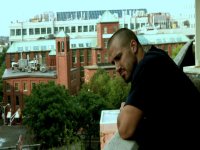
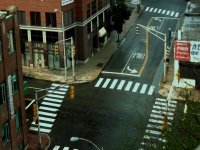
I was out yesterday shooting some more test footage and trying to capture the look I want for an upcoming film. I used the Canon A1 and Letus Flip Enhanced with Nikon lenses. I color corrected all of this test footage with Colorista (thanks to whomever posted something about that program, it rocks). Please check it out and let me know what you think. My two favorite shots are the guy leaning over the edge, and the overhead shot of the city.

Movie:
http://www.zeroaperture.com/Cambridge_Test_1.mov

Stills:
http://www.zeroaperture.com/Cambridge_Street.jpg
http://www.zeroaperture.com/John_Cambridge.jpg

By the way, this color correcting software really works wonders. Please comment on the color correcting too.

~John

Side note - I downloaded stills from both Saving Private Ryan and Children of Men and I managed to produce my own footage that looked uncannily similar to both of those movies. I'll post if anyone wants to see.
 
Colorista was a step up from the built in NLE options. Im on mac with FCS2, which includes Color. This is stand alone software that really does blow the NLE built in color correctors (including colorista) out of the water. Ill do a sample still for you - pics up soon.
 
OK so heres a lowlight shot. Bit dark, lots of mixed light. This was fast (would need more time spent for perfection) and not the final choices I may make, but just a look at the possibilities.

This shot has a primary grading and 8 layers of secondary to make the final image. Each secondary layer can jave motion tracking applied. And this doesnt even touch on the color fx options with node trees, plus built in preset. In addition any Primary or Secondary, or created color fx can be saved and simply applied to your next shot on the timeline.

Original
ungraded.jpg


Graded
graded.jpg


I matched the exterior light with interior. Gave the interior lights in view a bit more orangey feel. Illuminated the walkway, so it looked a bit more ethereal. Some slight light cast alterations. I think you get the picture.

This las shot I made everything that was masked in my secondaries pink so you can clearly see what was changed.

pink.jpg
 
Last edited:
I would love to see them. I'm thinking of getting Colorista for Premiere Pro 1.5

Let me know what you think.

Thanks,

Mike

I don't think that the footage that I'm using lends itself to be color corrected to those specifications. The whites are too white in the first picture there. So when I drop the whites, I can't escape the picture getting darker and I can't increase exposure because of harsh grain, which ruins it. The second picture doesn't look bad, but in every picture that the Dammit Janet posted, there's an overcast (it looks). My footage was a sunny day. Had I shot my footage with the intention to color correct to Children of Men color specifications, I might be able to pull something off. But with my limited talent and this late at night, this is as good as it gets for today. Haha. What do you think?
 

Attachments

  • Children1.jpg
    Children1.jpg
    154.5 KB · Views: 0
  • Children2.jpg
    Children2.jpg
    227.3 KB · Views: 0
Your image was a bit soft and compressed to start with. Also had to alter the aspect ratio.

But heres a quick pass, using some masks. Quite a bit better IMO. If you really took the time on detail it it would even better again. Once again Grading was in Color.

screen.jpg
 
Last edited:
i think you exposure is your enemy here. Absolutely 0 sky detail so it looks painted. Even then you could probably swap it out and still save it. Especially easy in this shot where its unlikey there is going to be any motion occuring there.

com1.jpg


For reference

children2.jpg
 
Last edited:
NCJE,
Thanks, that was pretty good. I don't know how to mask the color correcting quite yet. I'm still a beginner. I can get the feel I want for the overall tone, but I can't hit certain areas of the image and leave the other areas unaffected.

On another note, I thought I would present this:
http://www.dvxuser.com/V6/showthread.php?t=105236
It's a link to something I shot and color corrected last night. A few of the shots are a little light on the focus, but read the little synopsis and you'll find out why.

Thanks for all the help, guys and girls.
 
Back
Top