USB OTG drive, USB ON THE GO

UK USB ON THE GO Drive....

UK USB ON THE GO Drive....

I have looked high and low for a USB on the go drive thats compatiable with my HVX AND is available in the UK!

Ive been everywhere and the most I get is blank stares.... so does anyone know of a dealer in the UK that does a USB on the Go hard drive thats compatiable with the HVX?
Cheers

Indy... in Rome, Italy
 
I use the "Conceptronic Photobox". but til now only for offload pictures. http://www.conceptronic.net/site/De...Cat=20&grp=2010&Prod_ID=993&Prod=CPHOTOBOX&st
Its a dutch Company (I think they have dealers in UK) and I ordered it via Internet. Its very easy to use and for pictures it works fine. The advantage for me is , that I have an additional external batterypack with sTANDARD AAA Betteries. My Idea for the HVX200 is:
For offloading I use the batterypack, if its empty its switching seemless to the internal Lio accu, I change the batteries and start again with the extrnal batteriepack. I hope, that I can avoid in ths way the main issue - the lasting of Batteries. So it will offload a few hours - until the internal Batterie is empty, so that you cant swap anymore. For pictures i can offload two 4GB SD Cards with one batterie-set(rechargebale).
You can built in a harddisc of your own choice and the envelope is only 50 € plus external batterie
I think about all this, because I am "standby" buying a HVX200, and I am looking for cheaper storage solutions. Its a pity that I couldnt try it out by myselve
Benn
 
Can anyone recommend a drive like these USB drives but with Firewire instead? and with rechargeable battery?
 
I looked for it, but couldnt find anything. The problem is, there is no firewire drive with rechargeable battery on the market. Afaik.
Benn
 
That sounds interesting. But which one could it be? That one for iPod? Because of the firewire connection? I hope you will tell us about your experience
Greetings Benn
 
Could be the amswer! But when I talk about "USB to go" the interface is able to "suck" the files from any device with the right connectors without needing a computer. Does "on the go" with firewire mean the same??
Or simple: Can I use it for to offload DIRECT from HVX200?
 
Using the firewire without a computer the hvx has to be in host mode. So the hvx control the transfer to the hard drive. Confusion probably comes from the brand of the firewire drive lalune wants to buy. You can do a forum search, its been discuss in detail and already exlained better then i can do it.

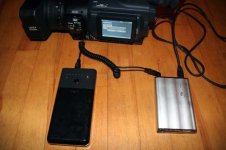
SO i did some tests with the tekkeon last night. It works pretty well. It takes less then 7 minutes to transfer a full 4 gig P2 card with data check. Half that time without data check.

So the pros of the tekkeon with 2.5 firewire combo is to be able to data check after the transfer. Also the battery seems to last forever. I'll try to count how many transfers. But its good for hours thats sure.

The cons. Its bigger the the usb to go battery powered drive. Its 2 pieces of hardware so you have one more connection for the power, that means one more possible cause of problems.
Also with the firewire option you are limited on disk space to 15 partitions. So for 4 gig p2 users thats a max of 60 gigs drive space using firewire.
 

Attachments

  • tekkeon.jpg
    tekkeon.jpg
    51 KB · Views: 0
Thanks for uploading the picture. I have a similar package with an USB OTG drive and a smaller battery, I put them togehter with two strong rubberbands.
Benn
 
Probably its a stupid question, but.....: Is it possible to power the HVX200 with the tekkeon?? Like with an other batterie-pack (Anton Bauer ELIPZ 10K Package) ?
Benn
 
Just tried it. Works. The connector is not heavy duty but it works. Ill test to see how much time it gives with a full battery. Could be usefull as an emergency backup.....
 
I just wanted to reply on this whole usb on the go drive idea. My buddy and I just got back from filming in 9 different states for 2 months filming backcountry snowboarding.

It is a very very risky way to load footage. He has a 100 gig USB on the go and I have a 60gig. It worked fine here and there but it is not reliable by any means. Right now I'm trying to open his 100gig and it won't recognize the HD because of a bad sector somewhere. So if anyone has software/workaround for that let me know (PC or MAC). And then on my 60gig I did a download to it and it only loaded half of the P2 clips. What I think happened is the battery on the USB drive was low when I was loading the clips to it. So ya there goes some footy that I "kinda" wanted.

All in all we are lucky we got most of the best shots that we needed. We tried most of the time to go straight to the laptop from the cameras which worked every single time.

anyways just wanted to post to anyone else out there that is trying this setup. Also both of our drives are the M-wave brand with the battery enclosure that was suggested on here.
 
A bad sector on the drive won't cause the drive not to be recognized.

If you are not experienced in data recovery, I would stop messing with the drive right now. If it was me, I'd take the drive out of the enclosure, connect it you my PC using a laptop drive adapter, make an image of the drive, and proceed from there.
 
How are you guys dealing with the 32GB partition limit? When I setup my USB OTG drive it told me that in order to use it in Host mode it had to be partitioned as FAT32 which has a 32GB limit for each partition. Does the drive know to copy data to the next available partition if it reaches 32GB on the first?

Thanks!
 
Don't format using Windows; Windows artificially limits you to 32GB. Download Swiss Knife, or get Partition Magic; either will let you format the full capacity of your drive.
 
Those things have always worked for me but Ive never had the batteries low on them. It is best to back up those guys on a laptop and/or multiple drives if in the field....
 
Back
Top