64min DVCPRO HD 720p 60p HELP

SurJones said:


That screenshot of your scopes definitely shows blown-out whites...you should really fix this before going to DVD. Pure white looks horrible on TVs. On the 'Waveform Monitor' do you see the cloud above the line that reads 'White'? You need to lower the highlights until it is completely under that line or you can apply a broadcast safe filter to the entire sequence (this is probably a better idea).
 
Just came to think of it, as this is to be delivered in SD and you have resolution issues, why not throw the hd clip into a SD (maybe even 4:3) DVCPRO 50 sequence, this way you can scale "up" the image with _more_ resolution than you'll get from a HD 16:9 to SD convert.

If it's a 720 timeline, that should be sorta exactly 2x the SD timeline, pixelwise, gives you some headroom (and autmation issues, I know)

Gunleik
 
pmpworks said:
I use the preset for 60min DVD best quality, not 90min. Also I believe if you are using 1080i 60i footage it will not look as good as 720p 24p because of the interlasing. I may be wrong here but I never shoot anything but 720p. If I need to I'll do it at 30p instead of 24p. Progressive video seems to look much better when going to DVD from HD.


The only 60min is a HD version??
 
Because of the quick motions, jumps etc. Also that what was recommended by Users here who have done Ballets before.
 
I see, probably best for low light too. Have you tried to play the DVD on different TV's? Same problems?
 
SurJones, if you want to, send me a small clip of your encoded dvd and I'll burn it and see what it looks like on my 51" widescreen.
 
Pretty much, Color Correcting really helped the blown out whites, BUT, still needs some work on Video Quality. I just want to know the best set up for compressor. I have done many variations, and some I dont even see a difference. I have done so many, They all just bleed togther :)

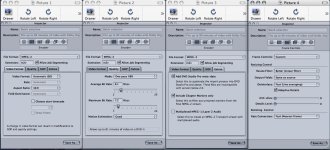
Here is what I put together from peoples suggestions.. Change anything? anyone thought about doing MPEG4?
 

Attachments

  • Picture 5.jpg
    Picture 5.jpg
    251.2 KB · Views: 0
Last edited:
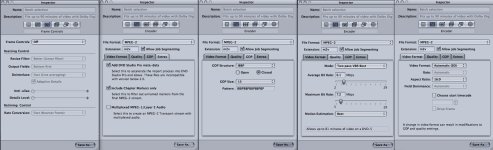
MP said It might be because I shot in 720p 60p that might be the reason why the DVD looks bad. Here is the compression I am doing over night. What do you think. I saw the Best 60min HD DVD setting and it had the Frame controls off. So I thought I would try.
 

Attachments

  • Picture 6.jpg
    Picture 6.jpg
    250.3 KB · Views: 0
Forget HD DVD/mpeg4. Won't play on any standard DVD player.

I think you're messing up with your field settings and think you should definitely set your resulting DVD to some sort of progressive, 30p is the most logical, and you should NOT de-interlace progressive footage, you just loose half your rez (yeah I know that's a "sorta" thing to say, but still...)

What you SHOULD (or rather could...) have done (it seems) was to shoot DVCPRO 50...

I still suggest that you salvage even more rez by dropping the 720 60p footage to a DVCPRO 50 timeline and zoom in and automate the motion a bit if you really need more rez. It's in the footage and you can get it out. I still stand by my PM -;)

Gunleik
 
gunleik, will any dvd player playback 30p as progressive video?, I thought progressive scan dvd players only played back 24p. I saw the footage and it's fine on a pc monitor, but on a tv thru a dvd player it's interlaced. It doesn't look terrible but you definatly loose resolution and detail. I suggested magic bullet the footage out to 24p.
pmp
 
The whole NTSC thing... -;)

Answer is: Dunno. 25p is working over 50i here in PAL and it sounds more logical than to go to 24p... Try (Or I can I have a NTSC/PAL switchable monitor)

I thnink the advanced format conversion in Compressor may handle this pretty well (but do small tests)

G
 
Gunleik; I am not screwing with the HD, just the notion to Keep the FrameControls off. Ecport time was like 4.5 hours for the compression:) The resulting footage looks just like the rest. I dont see a difference. Also how am I deinterlacing the image? I dont mind re-editing this. It is a simple edit. Shot in 60p made sense to edit in a 60p timetline...
 
C ur point!

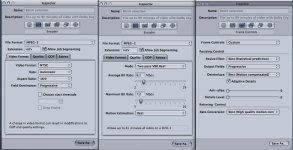
You shouldn't deinterlace it, but it says in your compressor settings that you do...

I noticed the de-interlace here

But what I suggest is to make small exports (5 sec) of the same segment onto a DVD

Set everything at "best"
Try:
24p
60i

Give one shot to compressor standard, and one to advanced format conversions
Set field dominance to "none" or "progressive"

Put the resulting 4 files on a dvd and burn (via dvdsp and then possibly toast if you like)

For this test I would also have included 5 secs of HD in DVCPRO SD p24 timeline with some reframing, just for the kicks of it - but that's just me -;)

That'd add another 2 files to your 30 sec DVD

Lay them out on one track with chapter markers

Compare on different sets.
Pick what makes you least unhappy.

BTW I don't see any easy 30p setups, so I guess your option to stay in p-land is to go 24 (or 23,98xxxx)

Gunleik
 
can you show photoshop circles around the things you see as deinterlacing in the compressor settings?

I also dont know how to convert to 24p? Do i just create a new sequence change the setting so 720p24p time line, Copy the contents in my 60p timeline and paste in the 24p timeline?

Here is the compressor settings I am thinking about doing tonight.
 

Attachments

  • Picture 4.jpg
    Picture 4.jpg
    149.3 KB · Views: 0
Last edited:
these looks good.

Just for the test:

To go to p 29.xxx or p24
In compressor choose: advanced format conversion
DV50 NTSC anamorphic

Click the settings tab for video like this

And choose either of these 1 or 2 settings

After finishing, send the resulting file through your compressor mpeg2 routine

Jusrt out of curiosity, though.

Gunleik
 
Back
Top