64min DVCPRO HD 720p 60p HELP

SurJones

Veteran
I am in a extremely messy situation. I cant what I am doing wrong. I shot a Ballet DVCPRO HD 720p 60p Direct capture into Final Cut. High Definition has such great quality in the RAW, and when I compress and Author the DVD, it sucks, no detail, and I loose 1/2 the lighting. I am new to the post production side, and beg for your help. If anyone who works with DVCPro HD and 1 hour to DVD I would greatly appreciate it. Also am I suppose to be using a special DVD?
 
How are you compressing for DVD? What is your workflow? What applications are you using?

I have great luck using Compressor and the DVD presets. BEST 90 min compression presets. 2-pass VBR.

Then I import into DVD Studio Pro.
 
I just shot a wedding 720p, and also used compressor at best 60 min, took my m2v and ac3 file into bootcamp on my mac and used encore to burn, looked perfect on 51 inch widescreen tv. Just remember if you shot in 1080i it's interlaced and will look bad on a computer monitor, but will play fine on a tv.
 
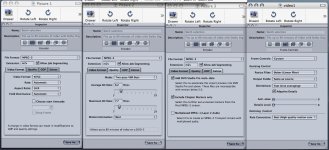
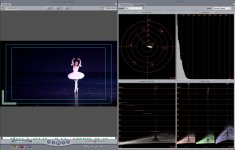
Here are my compression Settings. And also my Waveform. With brightest subject spot on the whole video. The images are not sharp. Looks blurry. My client went the HD way to see the detail, I need them to be able to see that detail.
 

Attachments

  • Picture 4.jpg
    Picture 4.jpg
    223.8 KB · Views: 0
  • Picture 5.jpg
    Picture 5.jpg
    230.6 KB · Views: 0
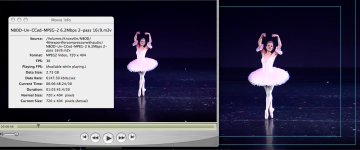
I actually check my FinalCut to Compressor Export against the frame of the editing timeline image, and they are almost identical. NOW, When I pop in the DVD, Differnt stary. Night an day on softness. Color and brigthenss is actaully brighter, and blurrier. Brigtheness is not night and day, I wish there was a way to take a snap shot of my DVD, but it says I can when DVD player is open. So to me, it seems as if DVDSP is doing something to it.
 

Attachments

  • Picture1.jpg
    Picture1.jpg
    147.5 KB · Views: 0
Do you have the option of burning in Toast? Many DVDSP users use this workflow, I've heard similar stories on other forums, might be worth a try. Either way, Toast is a worthwhile purchase.
 
I actually check my FinalCut to Compressor Export against the frame of the editing timeline image, and they are almost identical. NOW, When I pop in the DVD, Differnt stary. Night an day on softness. Color and brigthenss is actaully brighter, and blurrier. Brigtheness is not night and day, I wish there was a way to take a snap shot of my DVD, but it says I can when DVD player is open. So to me, it seems as if DVDSP is doing something to it.
Attached Images
jpg.gif
Picture1.jpg (147.5 KB, 0 views)

Your video size says 720 X 404, SD for DVD should be 720 X 480.
 
Toast can create a video DVD I believe yes, but lacking on menu options and the like. Haven't every actually tried it myself for that. Basically there's the 4 main tabs when you open it, Data, Audio, Video, and Copy. So its the Video tab you'd be interested in. At least that's w/ T7, not sure if older versions were the same or not.

cheers.
 
You misunderstood me - author your DVD in DVDSP, but burn it in Toast. When you're done, choose build & format in DVDSP, then burn the resulting VIDEO_TS and AUDIO_TS folders using Toast.

Search the DVDSP forum over on the cow for discussions on this.
 
SurJones said:
My client went the HD way to see the detail, I need them to be able to see that detail.

But how are you expecting to get HD detail in an SD format? I think your expectations may be a little high. You are going to lose a lot of resolution by burning a DVD. The only way you're going to preserve all of the detail is by going Blu-Ray or HD-DVD.

If there is something wrong, I would make sure that you are compressing at the highest data rate (that doesn't max out most players) and be sure you are compressing the audio to Dolby 2.0 (this gives you a little more headroom for the video data rate. Really, though, HD downrezzed will never look as sharp and detailed as the native video.
 
I use the preset for 60min DVD best quality, not 90min. Also I believe if you are using 1080i 60i footage it will not look as good as 720p 24p because of the interlasing. I may be wrong here but I never shoot anything but 720p. If I need to I'll do it at 30p instead of 24p. Progressive video seems to look much better when going to DVD from HD.
 
Oh, didn't see that, try a sample of your footage at the 60min, best dvd settings, and don't change any of the factory settings.
 
I believe the theoretical limit of DVD players is like 9.0. In reality though many won't play about the mid-8's. So I'd probably not wanna set my max bitrate higher then 8.2 or 8.3.

That being said, you're not gauranteed to get a direct correlation between higher bit rate and higher quality encode. It will bloat your file size of your MPEG-2 for sure, that's the only gaurantee. I've seen 6/7 max rates perform great in terms of quality.

If you want to preserve HD quality on a regular DVD then you need to burn a data file. Export out as H.264 or use Flip4Mac and go to the Windows HD thing WM9 is it called?. Then the person receiving the disc will have to play it back on a computer, but they will be able to see the details offered by HD.

Otherwise, like mentioned earlier, for over $1,000 and go the Blu-Ray or HD-DVD route. You'll preserve quality for sure, but you're so not getting bang for your buck down that road. Oh plus those two are in a format war right now, so you could end up picking the wrong one. Anyway.

cheers.
 
thanks so much, I appreciate all the help thus far. I will tell you how things turn out with some more testing.
 
May be off mark here, but

1.
you're shooting at 60p for 60i delivery

2.
Your whites are blown out and will not give you much detail on a TV set. Use the 3-way CC to take down the highlights to below 100, all above will most likely look totally blown without any detail on a regular TV.

3.
Maybe you could salvage more detail by going through a 60p to 24p step (I'm only theorizing here, though) as you'll end up with a p image which is possible to incorporate in a 60i stream.

Just my 2c

Gunleik
 
Back
Top