
Navigation
Install the app
How to install the app on iOS
Follow along with the video below to see how to install our site as a web app on your home screen.
Note: This feature may not be available in some browsers.
More options
You are using an out of date browser. It may not display this or other websites correctly.
You should upgrade or use an alternative browser.
You should upgrade or use an alternative browser.
Silicon Imaging SI-1920HDVR Camera
- Thread starter Fugitive
- Start date

Jason Rodriguez
Well-known member
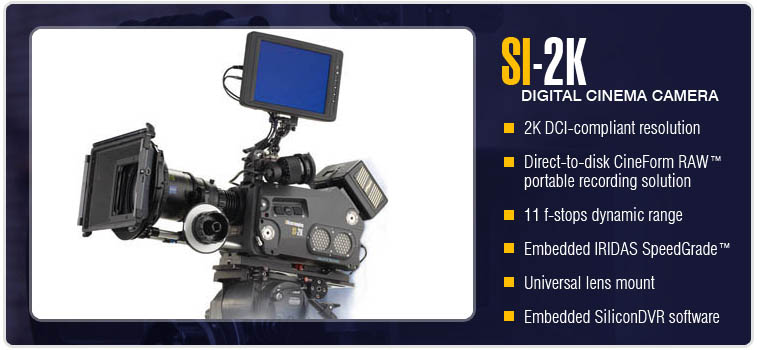
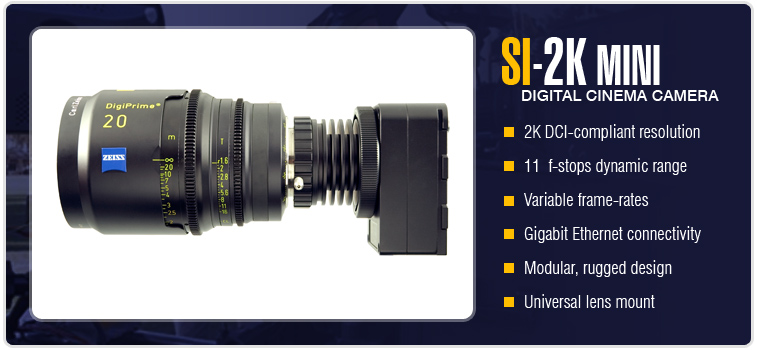
Yes, those pictures are the Mini camera and they are being recorded directly into a Dell Core Duo laptop (M65).
In regards to the IRIDAS color-management workflow with unlimited access to LUT's and color "looks", that will be enabled on both the Mini and the DVR. So these cameras are now complete "blank slates", allowing you to get anything you want out of the camera.
I know it sounds a bit fantastic to say "anything", but really, with 3D LUT technologies, you can gamut-map from any one color-space to another color-space. That means non-linear color-spaces (non-cube), like film, etc., can all be modeled with 3D LUT technology. The only real limitation will be the noise-floor of the camera, as that will limit the overall dynamic range. But with an overall dynamic range over 11 bits, or >68db, there's plenty of headroom to work in. So we're talking extreme flexibility to get the image you want, and not be stuck with what the default camera look is like so many other devices out there.
Also remember the color management is all non-destructive metadata, and it happens on the RAW data in a 32-bit floating point color-space, meaning over-white and under-black values are always preserved if your LUT is higher contrast and virtually "clips" any data.
In regards to the IRIDAS color-management workflow with unlimited access to LUT's and color "looks", that will be enabled on both the Mini and the DVR. So these cameras are now complete "blank slates", allowing you to get anything you want out of the camera.
I know it sounds a bit fantastic to say "anything", but really, with 3D LUT technologies, you can gamut-map from any one color-space to another color-space. That means non-linear color-spaces (non-cube), like film, etc., can all be modeled with 3D LUT technology. The only real limitation will be the noise-floor of the camera, as that will limit the overall dynamic range. But with an overall dynamic range over 11 bits, or >68db, there's plenty of headroom to work in. So we're talking extreme flexibility to get the image you want, and not be stuck with what the default camera look is like so many other devices out there.
Also remember the color management is all non-destructive metadata, and it happens on the RAW data in a 32-bit floating point color-space, meaning over-white and under-black values are always preserved if your LUT is higher contrast and virtually "clips" any data.

Jason Rodriguez
Well-known member
You bet it's tantalizing . . . if I were to say, "take an image, color-correct it in a 'photoshop-like' program, and that's how the camera will shoot native, and if you don't like it, it's all non-destructive so you can change you mind at any point in the post chain," well, I think that just describes the tip of the iceberg on the power that meta-data based 3D LUT technology can bring to the table.

yup.. thats how Raw and programs like Aperture work.
Ari Presler
Well-known member
SI-2K Color Management & Workflow
SI-2K Color Management & Workflow
Here is a detailed explanation
Complete End-to-End Color Management
The SI-2K and 2K MINI camera systems powered by SiliconDVR set themselves
apart from the pack through their comprehensive support and integration with IRIDAS's production and post-production color-mangement system.
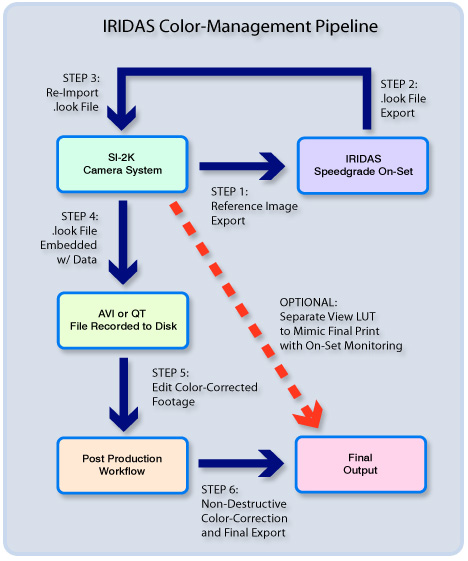
Reference images from the camera are imported into IRIDAS Speedgrade On-Set, a powerful, full-featured color-correction program with multiple stages of color-correction for the highlights, midtones, and shadows, along with the option of up to six separate secondary correctors. After the "look" that the D.P. or director deems is appropriate for the scene is created in Speedgrade On-Set, a .look file is exported from Speedgrade containing a comprehensive 3D LUT describing the color-corrections made. This LUT is then imported back into the camera system where not only a WYSIWYG preview of the "look" is created live using the host laptop or workstation's powerful GPU host processing system, but metadata for the .look file is applied to all subsequently recorded AVI's or Quicktime files on disk. With the "look" now embedded in the recorded AVI or Quicktime file, the editor can now edit with the color-correction in-context, rather than having to set-up a pre-arranged series of viewing environments, and be forced to edit with footage that does not reflect the creative desires of the D.P. or director. IRIDAS .look files are completely non-destructive metadata, so files can be full color-corrected and treated losslessly in post, and the 32-bit floating point internal processing engine of the CineForm RAW™ codec ensures that the complete dynamic range of the RAW data is available for creative manipulation at all times.
With the integration of an optional separate view LUT system in SiliconDVR, alternate .look files can be used as aids to visualize the look of the final film print in-context of the shoot with on-set monitoring systems. A D.P. can create a "look" that mimics the appearance of a certain film print stock on his or her monitor, while a separate, "flatter" color-corrected file is recorded to disk for further manipulation in post or the DI suite.
Interactive In-Camera Color Grading
Speedgrade On-Set's powerful suite of color-correction tools and 3D LUT export features allows for an unlimited number of "look" possibilities that can be previewed and applied to footage in-context of the SiliconDVR interface. Colorizing and designing the "look" of a scene or setting the style for a movie is no longer subject to a dizzying array of confusing submenus and un-intuitive control panels. Instead, the integration between SiliconDVR and Speedgrade On-Set allows for real-time, in-context color-correction of images from the SI-2K series cameras, and WYSIWYG performance between the two interfaces for complete accuracy and confidence in sculpting the look of your project. The era of looks being lost in translation between the set to post and editing is over. If you can imagine it, you can capture it.
Step 1. Prep Shot, Light and Grab Frame from Camera
Working with IRIDAS .look files, CineForm RAW™, and SiliconDVR is a simple 4-step process. In the first stage, the D.P. and director will set-up a scene and light it accordingly.

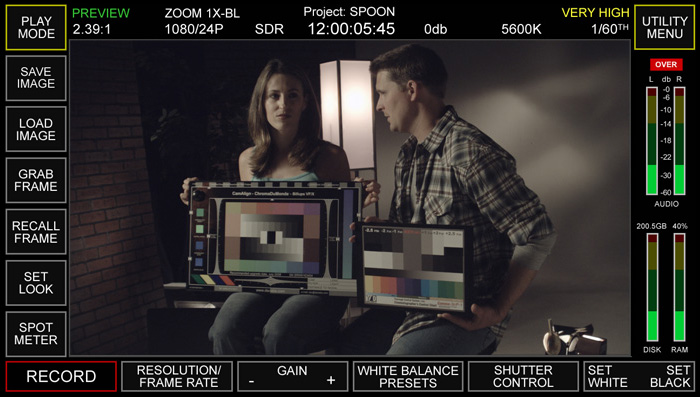
Step 2. Import Image into Speedgrade On-Set and create "look"
Once the scene is lit, the D.P. will save a DPX image in SiliconDVR and import this "reference" DPX into Speedgrade On-Set. Once inside the Speedgrade Interface, he or she can design and mold the image to fit their creative vision for the scene. Alternatively, pre-recorded images could be used to create looks ahead of the shoot or for the creation of "virtual film stocks" that the D.P. wishes to default the look of the camera to. This alternative approach would reduce the amount of time spent on-set in color-correction.
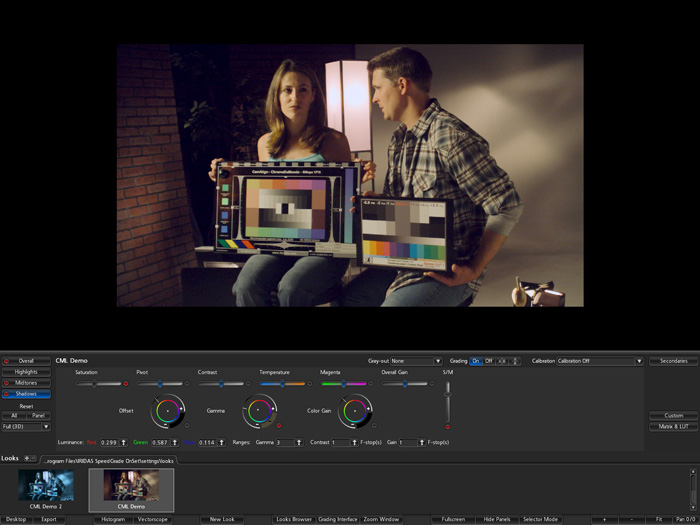
Step 3: Export .look file and Re-Import into Camera for In-Context Viewing
Once work in Speegrade On-Set is complete, the .look file is re-imported into the SiliconDVR interface for complete WYSIWYG integration and control. Alternately, separate view and record LUT's can be utilized for diagnostic or alternative visualizations, such as creating the characteristics of the final film-print using on-set monitoring resources. Up to three .look files can be pre-loaded for in-flight operation and easy LUT comparisons and preview. Below is an example of two different .look files applied to the SiliconDVR interface from the .look file browser in the Speedgrade interface above.
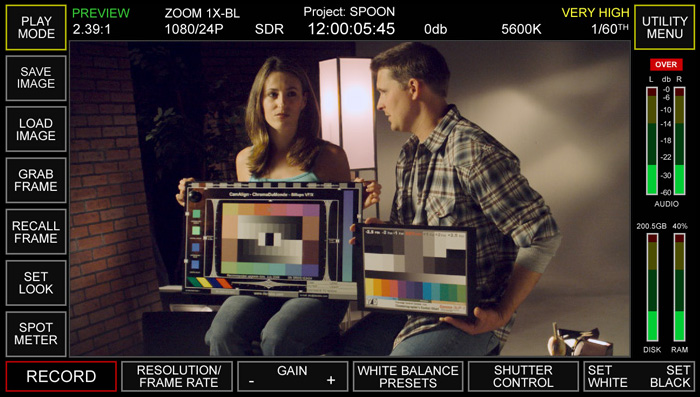
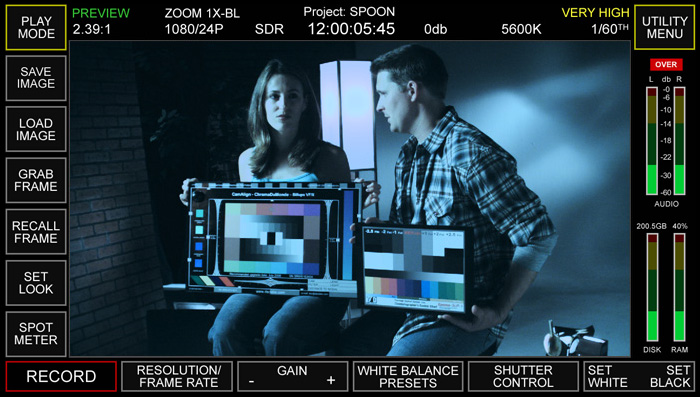
Step 4: Editing and Post with "Looks" Embedded with Recorded Files for complete WYSIWYG
During the recording process, metadata pointers are embedded in the recorded AVI or Quicktimes, connecting them with their associated .look files. When the recorded files are opening in the editing suite, the full color-information is available and embedded with the file, removing the barrier between the D.P.'s vision on-set and the post-production suite. Fully color-corrected dailies can also be created without the added time and expense of overnight telecine. Further down the line, rough-cuts can be viewed with the vision of the D.P. intact. Throughout the post-production chain, the D.P.'s vision remains intact, and should any color-correction be needed, the metadata-based approach of the IRIDAS color-management system allows for complete non-destructive editing of the RAW data, as well as the changing of the .look file associated with an AVI or Quicktime file should a complete re-visualization be necessary.
SI-2K Color Management & Workflow
Here is a detailed explanation
Complete End-to-End Color Management
The SI-2K and 2K MINI camera systems powered by SiliconDVR set themselves
apart from the pack through their comprehensive support and integration with IRIDAS's production and post-production color-mangement system.
Reference images from the camera are imported into IRIDAS Speedgrade On-Set, a powerful, full-featured color-correction program with multiple stages of color-correction for the highlights, midtones, and shadows, along with the option of up to six separate secondary correctors. After the "look" that the D.P. or director deems is appropriate for the scene is created in Speedgrade On-Set, a .look file is exported from Speedgrade containing a comprehensive 3D LUT describing the color-corrections made. This LUT is then imported back into the camera system where not only a WYSIWYG preview of the "look" is created live using the host laptop or workstation's powerful GPU host processing system, but metadata for the .look file is applied to all subsequently recorded AVI's or Quicktime files on disk. With the "look" now embedded in the recorded AVI or Quicktime file, the editor can now edit with the color-correction in-context, rather than having to set-up a pre-arranged series of viewing environments, and be forced to edit with footage that does not reflect the creative desires of the D.P. or director. IRIDAS .look files are completely non-destructive metadata, so files can be full color-corrected and treated losslessly in post, and the 32-bit floating point internal processing engine of the CineForm RAW™ codec ensures that the complete dynamic range of the RAW data is available for creative manipulation at all times.
With the integration of an optional separate view LUT system in SiliconDVR, alternate .look files can be used as aids to visualize the look of the final film print in-context of the shoot with on-set monitoring systems. A D.P. can create a "look" that mimics the appearance of a certain film print stock on his or her monitor, while a separate, "flatter" color-corrected file is recorded to disk for further manipulation in post or the DI suite.
Interactive In-Camera Color Grading
Speedgrade On-Set's powerful suite of color-correction tools and 3D LUT export features allows for an unlimited number of "look" possibilities that can be previewed and applied to footage in-context of the SiliconDVR interface. Colorizing and designing the "look" of a scene or setting the style for a movie is no longer subject to a dizzying array of confusing submenus and un-intuitive control panels. Instead, the integration between SiliconDVR and Speedgrade On-Set allows for real-time, in-context color-correction of images from the SI-2K series cameras, and WYSIWYG performance between the two interfaces for complete accuracy and confidence in sculpting the look of your project. The era of looks being lost in translation between the set to post and editing is over. If you can imagine it, you can capture it.
Step 1. Prep Shot, Light and Grab Frame from Camera
Working with IRIDAS .look files, CineForm RAW™, and SiliconDVR is a simple 4-step process. In the first stage, the D.P. and director will set-up a scene and light it accordingly.
Step 2. Import Image into Speedgrade On-Set and create "look"
Once the scene is lit, the D.P. will save a DPX image in SiliconDVR and import this "reference" DPX into Speedgrade On-Set. Once inside the Speedgrade Interface, he or she can design and mold the image to fit their creative vision for the scene. Alternatively, pre-recorded images could be used to create looks ahead of the shoot or for the creation of "virtual film stocks" that the D.P. wishes to default the look of the camera to. This alternative approach would reduce the amount of time spent on-set in color-correction.
Step 3: Export .look file and Re-Import into Camera for In-Context Viewing
Once work in Speegrade On-Set is complete, the .look file is re-imported into the SiliconDVR interface for complete WYSIWYG integration and control. Alternately, separate view and record LUT's can be utilized for diagnostic or alternative visualizations, such as creating the characteristics of the final film-print using on-set monitoring resources. Up to three .look files can be pre-loaded for in-flight operation and easy LUT comparisons and preview. Below is an example of two different .look files applied to the SiliconDVR interface from the .look file browser in the Speedgrade interface above.
Step 4: Editing and Post with "Looks" Embedded with Recorded Files for complete WYSIWYG
During the recording process, metadata pointers are embedded in the recorded AVI or Quicktimes, connecting them with their associated .look files. When the recorded files are opening in the editing suite, the full color-information is available and embedded with the file, removing the barrier between the D.P.'s vision on-set and the post-production suite. Fully color-corrected dailies can also be created without the added time and expense of overnight telecine. Further down the line, rough-cuts can be viewed with the vision of the D.P. intact. Throughout the post-production chain, the D.P.'s vision remains intact, and should any color-correction be needed, the metadata-based approach of the IRIDAS color-management system allows for complete non-destructive editing of the RAW data, as well as the changing of the .look file associated with an AVI or Quicktime file should a complete re-visualization be necessary.
Last edited:
Ari Presler
Well-known member
Ari Presler
Well-known member
2K Digital Cinema Camera Streamlines Movie and HD production
2K Digital Cinema Camera Streamlines Movie and HD production


Silicon Imaging and CineForm team to shoot, edit and encode HD and 2K using Intel® Core™ 2 Duo Processors
Hollywood, CA, November 1, 2006 –Silicon Imaging, with help from CineForm® and Intel Corporation, today unleashed a 2K Digital Cinema camera system set to revolutionize movie and HD production. The Silicon Imaging SI-2K will shoot footage directly to disk, at either 1920x1080P HD or 2048x1152 cinema resolutions running on motherboards integrated into the camera or on laptop computers powered by Intel® Core™ 2 Duo processors. Captured footage is instantly editable using CineForm’s Prospect 2K™ real-time visualization and colorization software. Afterwards finished projects can be directly encoded for theatrical distribution to digital cinemas or on-demand Internet download.
"The transition to digital cinematography started when George Lucas first shot 'Star Wars: Episode II' in HD," states Ari Presler, Silicon Imaging CEO. “Today, we have completely eliminated the need for film or tape and now offer the ability to shoot at even higher resolutions than HD, edit while each shot is taken, and have a production ready for distribution within weeks instead of months.”
The Silicon Imaging SI-2K is the first 2/3” digital cinema camera with 10-bit CineForm RAW™ and 12-bit uncompressed 2K direct-to-disk recording. It offers unprecedented image quality, over 10 f-stop dynamic range, a touch-screen interface and IT-friendly connectivity. It is also the first to deliver in-context 3D color-corrected “look” visualization and a complete raw post-production workflow.
Unlike modern HD cameras, which develop and compress colorized imagery inside the camera, the SI-2K streams images as uncompressed raw “digital negatives” over a standard gigabit Ethernet connection. An IntelCore 2 Duo processor-based computer embedded in the camera or tethered to a laptop up to 300 feet away, processes the digital negatives, where they are non-destructively developed and colorized for preview using the cinematographer's desired "look" for the scene.
The digital negatives and "look" metadata are simultaneously recorded to a 2.5” notebook hard drive using the CineForm RAW™ visually perfect codec. Up to 4-hours of continuous footage are captured on a single 160GB notebook drive; this is the equivalent of 14-reels of 35mm film which has an associated cost exceeding $25,000 for materials and processing.
“The Silicon Imaging camera is truly amazing” states Cinematographer Geoff Boyle. ”The SI-2K MINI is small enough to be placed directly in a scene for point-of-view shots, used on robotic arms for model photography or incorporate two side-by-side for stereo 3-D. We used it on ‘Mutant Chronicles’, a Sci-Fi feature with over 1500 visual effect shots. We shot flames and explosions using the 72fps slow motion mode and the recordings display smooth tonal gradations and natural colors. Finally, the director can immediately see full-resolution instant replays, without having to wait for film dailies or color correction."
CineForm’s Prospect 2K software, optionally bundled with the SI-2K, provides real-time, multi-stream editing of CineForm RAW files with look metadata using Adobe Production Studio, and supports both Windows AVI and Apple QuickTime formats. Further details on MacOS workflow including Final Cut Pro will be disclosed in the coming weeks.
“Together we are enabling a major paradigm shift in the entertainment industry for the way films are shot and edited," states David Taylor, CineForm CEO. “Our combined efforts allow CineForm RAW recording and Prospect 2K editing to retain the many benefits of shooting raw, including increased visual fidelity, while reducing costs during both production and post, and encouraging faster project completion.”
“With the power of multi-core ready applications and Intel Core 2 Duo processors, Silicon Imaging and CineForm have streamlined the digital high-resolution movie-making workflow,” said Elliot Garbus, general manager of the Developer Relations Division, Intel Corporation. “This solution promises cost and time saving benefits for cinematographers and directors by utilizing the power of multiple cores.”
The SI-2K DVR with an embedded Intel Core 2 Duo processor and hot-swap drive cartridge system plus the removable MINI camera head is $20,000 or bundled with Prospect-2K for $22,000; with estimated shipment in January. The SI-2K MINI is $12,500 and shipping in December.
2K Digital Cinema Camera Streamlines Movie and HD production
2K Digital Cinema Camera Streamlines Movie and HD production
Silicon Imaging and CineForm team to shoot, edit and encode HD and 2K using Intel® Core™ 2 Duo Processors
Hollywood, CA, November 1, 2006 –Silicon Imaging, with help from CineForm® and Intel Corporation, today unleashed a 2K Digital Cinema camera system set to revolutionize movie and HD production. The Silicon Imaging SI-2K will shoot footage directly to disk, at either 1920x1080P HD or 2048x1152 cinema resolutions running on motherboards integrated into the camera or on laptop computers powered by Intel® Core™ 2 Duo processors. Captured footage is instantly editable using CineForm’s Prospect 2K™ real-time visualization and colorization software. Afterwards finished projects can be directly encoded for theatrical distribution to digital cinemas or on-demand Internet download.
"The transition to digital cinematography started when George Lucas first shot 'Star Wars: Episode II' in HD," states Ari Presler, Silicon Imaging CEO. “Today, we have completely eliminated the need for film or tape and now offer the ability to shoot at even higher resolutions than HD, edit while each shot is taken, and have a production ready for distribution within weeks instead of months.”
The Silicon Imaging SI-2K is the first 2/3” digital cinema camera with 10-bit CineForm RAW™ and 12-bit uncompressed 2K direct-to-disk recording. It offers unprecedented image quality, over 10 f-stop dynamic range, a touch-screen interface and IT-friendly connectivity. It is also the first to deliver in-context 3D color-corrected “look” visualization and a complete raw post-production workflow.
Unlike modern HD cameras, which develop and compress colorized imagery inside the camera, the SI-2K streams images as uncompressed raw “digital negatives” over a standard gigabit Ethernet connection. An IntelCore 2 Duo processor-based computer embedded in the camera or tethered to a laptop up to 300 feet away, processes the digital negatives, where they are non-destructively developed and colorized for preview using the cinematographer's desired "look" for the scene.
The digital negatives and "look" metadata are simultaneously recorded to a 2.5” notebook hard drive using the CineForm RAW™ visually perfect codec. Up to 4-hours of continuous footage are captured on a single 160GB notebook drive; this is the equivalent of 14-reels of 35mm film which has an associated cost exceeding $25,000 for materials and processing.
“The Silicon Imaging camera is truly amazing” states Cinematographer Geoff Boyle. ”The SI-2K MINI is small enough to be placed directly in a scene for point-of-view shots, used on robotic arms for model photography or incorporate two side-by-side for stereo 3-D. We used it on ‘Mutant Chronicles’, a Sci-Fi feature with over 1500 visual effect shots. We shot flames and explosions using the 72fps slow motion mode and the recordings display smooth tonal gradations and natural colors. Finally, the director can immediately see full-resolution instant replays, without having to wait for film dailies or color correction."
CineForm’s Prospect 2K software, optionally bundled with the SI-2K, provides real-time, multi-stream editing of CineForm RAW files with look metadata using Adobe Production Studio, and supports both Windows AVI and Apple QuickTime formats. Further details on MacOS workflow including Final Cut Pro will be disclosed in the coming weeks.
“Together we are enabling a major paradigm shift in the entertainment industry for the way films are shot and edited," states David Taylor, CineForm CEO. “Our combined efforts allow CineForm RAW recording and Prospect 2K editing to retain the many benefits of shooting raw, including increased visual fidelity, while reducing costs during both production and post, and encouraging faster project completion.”
“With the power of multi-core ready applications and Intel Core 2 Duo processors, Silicon Imaging and CineForm have streamlined the digital high-resolution movie-making workflow,” said Elliot Garbus, general manager of the Developer Relations Division, Intel Corporation. “This solution promises cost and time saving benefits for cinematographers and directors by utilizing the power of multiple cores.”
The SI-2K DVR with an embedded Intel Core 2 Duo processor and hot-swap drive cartridge system plus the removable MINI camera head is $20,000 or bundled with Prospect-2K for $22,000; with estimated shipment in January. The SI-2K MINI is $12,500 and shipping in December.
Ari Presler
Well-known member
SI-2K and MINI
SI-2K and MINI
SI-2K and MINI
Ari Presler
Well-known member
SI-2K User Interface
SI-2K User Interface
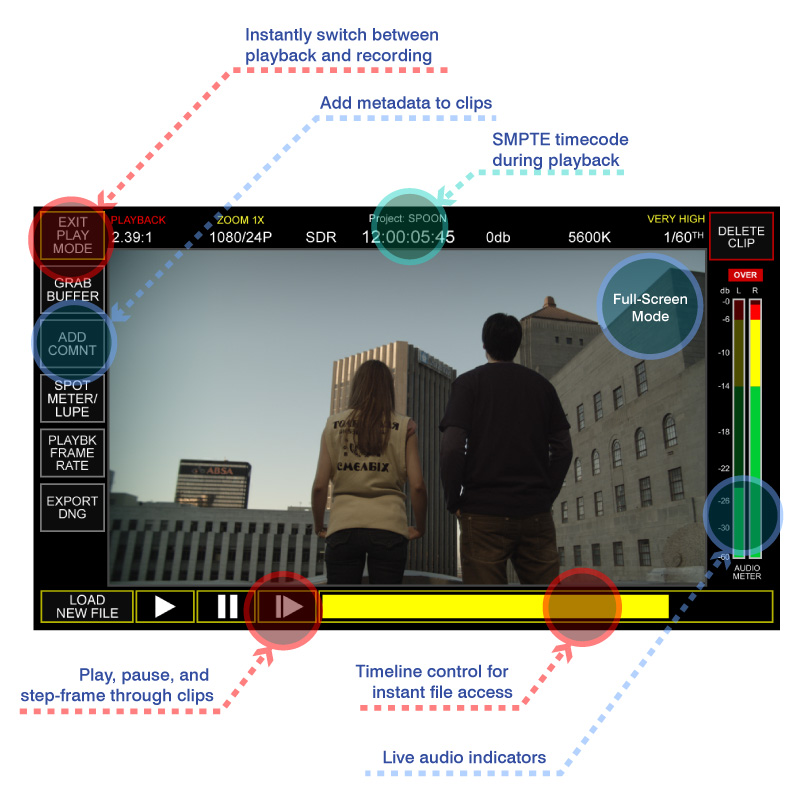
SI-2K User Interface

Landon D Parks
Active member
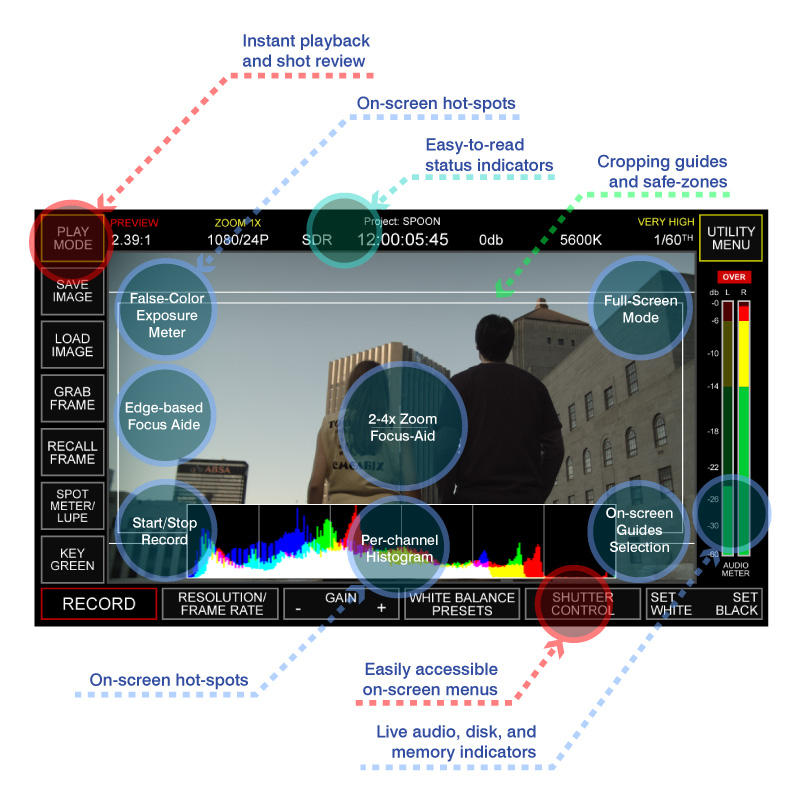
Be sure you guys include Frame markers for 1.33:1, 1.66:1, 1.78:1, 1.85:1 and 2.35:1... Also, it would be really neat if you could make it to where the area outside of the frame lines become a darker gray color. Kind of like how the film taps on the Arricam does... Not only does it look cool, but it also adds to the ability of framing (aka: you can still see the image outside of the frame guides, its just darker.)
This feature should be available on both the 7" LCD and all set monitors.
Implement this, and I'm definantly on the "future buyers" list.
This feature should be available on both the 7" LCD and all set monitors.
Implement this, and I'm definantly on the "future buyers" list.
Ari Presler
Well-known member
Landon,
The guides for 1.33:1, 1.78:1, 1.85:1 and 2.39:1 are in! We already had some discussions about the darker areas especially for the 2.39:1 mode.
We will put this on the list of "future features" for the "future buyers" ;-) !
The guides for 1.33:1, 1.78:1, 1.85:1 and 2.39:1 are in! We already had some discussions about the darker areas especially for the 2.39:1 mode.
We will put this on the list of "future features" for the "future buyers" ;-) !
i agree.. a shaded overlay definately helps in framing.. and would be very cool to have custom input for aspect ratios.
Ari Presler
Well-known member
What other permutations would you use?
Landon D Parks
Active member
Even though 1.66:1 is not used VERY much, it would still be nice to have for those people who like the super16 aspect ratio or for those that are for some reason (???) outputting it to Super16. It would be a very simply add, that might help those in that market.
Also, this is just my opinion, but you guys should make those frame guides available in SAFE area and full width. Kind of like this image here:

Also, this is just my opinion, but you guys should make those frame guides available in SAFE area and full width. Kind of like this image here:
Last edited:
Ari Presler
Well-known member
Shaded Guides - Frame Markers
Shaded Guides - Frame Markers
Jarred,
As you requested, we have added your shaded guides for 1.33:1, 1.78:1, 1.85:1 and 2.39:1.
Whats next?
Shaded Guides - Frame Markers
Jarred,
As you requested, we have added your shaded guides for 1.33:1, 1.78:1, 1.85:1 and 2.39:1.
Whats next?
ESTEBEVERDE
Veteran
Ari Presler said:Jarred,
As you requested, we have added your shaded guides for 1.33:1, 1.78:1, 1.85:1 and 2.39:1.
Whats next?
The next logical step would be to send me three evaluation units with primes! ;-)
Ari Presler
Well-known member
Silicon Imaging is Flipping Out!
Silicon Imaging is Flipping Out!
Once again...you asked for it you've got it:
The SI-2K can now flip your image in any of 4 orientations or Left, Right, Up and Down. It can be used with
Gound Glass Converters
Low-Mode SteadiCams
50/50 Prism and Mirror shots
What other features do you want?
:grin:
Silicon Imaging is Flipping Out!
Once again...you asked for it you've got it:
The SI-2K can now flip your image in any of 4 orientations or Left, Right, Up and Down. It can be used with
Gound Glass Converters
Low-Mode SteadiCams
50/50 Prism and Mirror shots
What other features do you want?
:grin:

MovieSwede
Well-known member
A Rocket booster???? 