Pantone Monitor Auto Calibrate for $79

Jarred Land

President/Founder
Staff member
Check this thing out.. just picked it up for 79 bucks and it kicks ass. I was trying to color match both of my Dell 24" monitors and it turned out to be a huge pain in the ass.. One was a full year and 3 revisions newer so i just couldnt do it with the lame color menus.

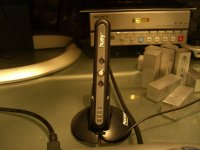
Nick pointed me to this thing that did the calibration for both monitors perfectly, and even better it sits on your desk and adjusts your monitors depending on ambient light source.. cool shiznit. I kinda was iffy since it was so cheap, but being a pantone product i gave it a go. So far so good.

http://www.amazon.com/gp/product/B.....


B000CR78C4.01._AA280_SCLZZZZZZZ_V56331893_.jpg


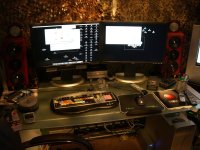
here is the size in relation to my setup.. its frickin small :
 

Attachments
  • h1.jpg
    h1.jpg
    110.1 KB · Views: 0
  • h2.jpg
    h2.jpg
    158.1 KB · Views: 0
Last edited:
John_Hudson said:
I used to date a girl that would have liked this.
mmm.. its a little small (4 inches).....


you walked right into that one.


ha ha haa ahaha ah sorry dude, couldnt resist.
 
how does it work ? does it just sit there between your screens, or do you have to plug your monitor in it ?
 
the colorvision is fine but the huey is a little bit better.. it does the calibrate as the colorvision thing but this huey goes beyond that by actively constantly monitoring ambient lighting and adjusting.

It hooks up via usb, and to calibrate it has little suction cups
 
Hey pretty cool....does it work for CRT also, or only LCD? I am having a heck of a time because my two CRTs are totally different from each other.

I know, I know...I need to replace them with two of those fancy Dell 24" suckers...but I just don't have that kinda dough...yet.
 
yes it does CRT.. if you watch that little video you can see step #2 you pic either Latop/TFT/LCD or CRT monitor.
 
no problem man.. it just made my life so frickin easy i thought i would share... its great having 2 monitors that actually look the same now.
 
I love the randomnes of pictures of people's setups... like a fake hamster under the editing desk


looks like you have a rodent problem there. might I recomend the NeCoRo robotic cat to deal with it? http://www.necoro.com/

mor10
 
yeah i guess i shoulda cleaned up a little for the photos lol... I guess now i know what keeps gnawing on my toes.
 
Jarred: you mention the two monitors of yours that didn't match; same problem here too; both are of same year (I think) but the software/firmware definitely is different, even if only slightly; I was never able to get them matched up very well though. I tried....I had some coffee....I tried some more....and gave up.

$75 seems like steal, really.
 
yeah i have the dell 24".. when i go into the hidden factory settings it shows #1 being a samsung version 1.8 and monitor #2 being version 2.2... .. they look the same on the outside but they never did match. now they do :)
 
hmmm I just got myself Monaco Optix XR Pro last week to color match my 2405s (same thing - different revisions, diferent OSD... newer one always seemed to be pink'ish) and yet I can still see some minor differences. I'll be tweaking 'em again. Optix does work great though, but it's more like $350.

now wth is that hidden factory settings menu? :huh:
 
xl70e3 said:
now wth is that hidden factory settings menu? :huh:

Someone posted how to access this menu just recently, I think it was about the time when Jarred ordered his monitor, but I can't find the thread for the life of me.

Jarred, what would say on the color accuracy of the Huey. I read a few reviews last night and people say great things about it (except accessing the control panel in OSX) and I was just curious how accurate it is for semi-color critical design work, i.e. motion graphics, etc...
 
It actually has different settings for motion graphics, print design etc. I have a pantone book and the colors look pretty good via Adobes pantone selector.
 
oneinfiniteloop said:
Someone posted how to access this menu just recently, I think it was about the time when Jarred ordered his monitor, but I can't find the thread for the life of me.


Id'e like to know how to access that menu as well.

I have 2 dell 19 ultras, I bought them at the same time, but #1 is very slightly warmer. I'de like to see if they are the same.

The color settings are all the same on them.
 
Back
Top